
1. Product Overview
The Baseus A06 is a compact Bluetooth 5.0 earphone designed for convenient communication and audio playback. It features a unique clip design for secure attachment to clothing and a vibration function for incoming call alerts. The earphone is equipped with an in-line microphone for clear calls and offers a stable wireless connection.
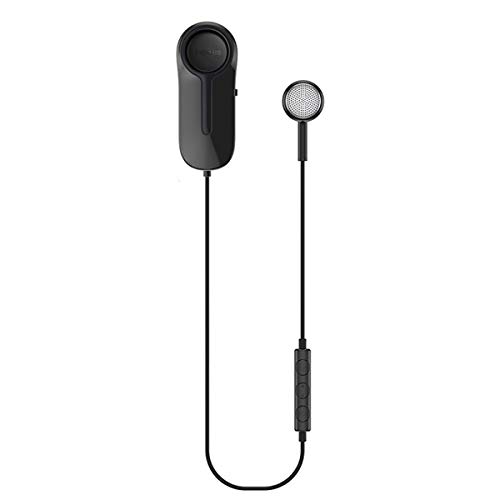
Image: Baseus A06 Bluetooth Earphone with clip and in-line controls.
2. Key Features
- Bluetooth 5.0 Technology: Provides a stable and efficient wireless connection.
- Vibration Alert: Notifies you of incoming calls with a subtle vibration.
- Integrated Clip Design: Allows for secure attachment to clothing, preventing loss and tangling.
- Magnetic Earphone Storage: The earphone can be magnetically stored within the clip when not in use, keeping it tidy.
- Built-in Microphone: Enables hands-free calling.
- IP54 Dust and Water Resistance: Offers protection against dust and splashing water.
- Long Battery Life: Up to 10 hours of music playback and 500 hours of standby time.
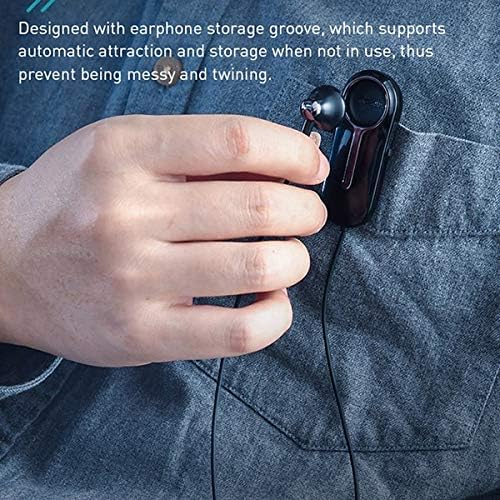
Image: Close-up of the Baseus A06 clip and earphone, illustrating the magnetic storage groove for tangle-free use.
3. Package Contents
Please check the package for the following items:
- Baseus A06 Bluetooth Earphone (1 unit)
- Micro USB Charging Cable (1 unit)
- User Manual (1 unit)
4. Setup Guide
4.1 Charging the Earphone
- Connect the Micro USB charging cable to the charging port on the earphone.
- Connect the other end of the cable to a USB power adapter (5V/1A recommended) or a computer's USB port.
- The indicator light will show the charging status. It typically turns red during charging and blue or off when fully charged.
- A full charge takes approximately 1.5 hours.
4.2 Bluetooth Pairing
- Ensure the earphone is fully charged.
- Press and hold the multi-function button on the in-line control until the indicator light flashes red and blue alternately, indicating pairing mode.
- On your mobile device, enable Bluetooth and search for available devices.
- Select "Baseus A06" from the list of found devices.
- Once connected, the indicator light will typically flash blue slowly or turn off. A voice prompt may confirm the connection.
- If prompted for a password, enter "0000".
Image: Representation of Bluetooth 5.0 technology, ensuring a stable and efficient wireless connection.
5. Operating Instructions
5.1 Power On/Off
- Power On: Press and hold the multi-function button for approximately 3 seconds until the indicator light flashes blue.
- Power Off: Press and hold the multi-function button for approximately 5 seconds until the indicator light flashes red and then turns off.
5.2 Call Management
- Answer/End Call: Short press the multi-function button.
- Reject Call: Press and hold the multi-function button for approximately 2 seconds.
- Redial Last Number: Double-press the multi-function button.
- Vibration Alert: The earphone will vibrate for incoming calls, even if the sound is muted on the device.

Image: A user wearing the Baseus A06 earphone, illustrating its practical use for hands-free communication.
5.3 Music Playback
- Play/Pause: Short press the multi-function button.
- Next Track: Press and hold the "+" (volume up) button.
- Previous Track: Press and hold the "-" (volume down) button.
5.4 Volume Control
- Volume Up: Short press the "+" button.
- Volume Down: Short press the "-" button.
6. Maintenance
- Cleaning: Use a soft, dry cloth to clean the earphone. Do not use harsh chemicals or abrasive materials.
- Storage: When not in use, store the earphone in a cool, dry place. Utilize the magnetic storage groove to prevent tangling.
- Water Resistance: The earphone has an IP54 rating, meaning it is protected against dust ingress and splashing water from any direction. Do not submerge the earphone in water or expose it to heavy rain.
- Battery Care: To prolong battery life, avoid fully discharging the earphone frequently. Charge it regularly, even if not in use for extended periods.

Image: The Baseus A06 earphone on a wet surface, demonstrating its IP54 dust and water resistance.
7. Troubleshooting
| Problem | Possible Cause | Solution |
|---|---|---|
| Earphone does not power on. | Low battery. | Charge the earphone for 1.5 hours. |
| Cannot pair with device. | Earphone not in pairing mode; Bluetooth off on device; too far from device. | Ensure earphone is in pairing mode (flashing red/blue). Turn on Bluetooth on your device. Move earphone closer to device (within 10m). |
| No sound during playback/calls. | Volume too low; earphone not connected; incorrect audio output selected. | Increase volume on both earphone and device. Reconnect the earphone. Check device's audio output settings. |
| Call quality is poor. | Weak signal; microphone obstructed. | Move closer to your connected device. Ensure the microphone is not covered. |
| Vibration alert not working. | Feature disabled (unlikely); earphone malfunction. | Ensure earphone is powered on and connected. If issue persists, contact support. |
8. Product Specifications
| Feature | Detail |
|---|---|
| Brand | Baseus |
| Model Number | A06 (NGA06-01) |
| Color | Black |
| Material | ABS + Thermoplastic Rubber (Plastic) |
| Connectivity Technology | Wireless (Bluetooth 5.0) |
| Communication Distance | Up to 10 meters |
| Frequency Response Range | 20 Hz - 20 kHz |
| Charging Interface | Micro USB |
| Charging Duration | Approx. 1.5 hours |
| Standby Time | Approx. 500 hours |
| Music Playback Duration | Approx. 10 hours |
| Battery Capacity | 120 mAh / 3.7 V |
| Input Power | 5 V / 110 mA |
| Power Consumption | 11 mA |
| Weight | 0.112 kg |
| Dimensions (L x W x H) | 17.5 cm x 9.0 cm x 3.0 cm |
| Dust and Water Resistance | IP54 |
| Included Components | Charging Cable |
| Control Method | Button (Touch) |
| Compatible Devices | Multiple Bluetooth-enabled devices |
9. Safety Information
- Do not disassemble, repair, or modify the device.
- Keep the device away from extreme temperatures, direct sunlight, and open flames.
- Avoid exposing the device to strong magnetic fields.
- Do not use the device at high volume for extended periods to prevent hearing damage.
- Dispose of the device and its battery responsibly according to local regulations.
10. Warranty and Support
This product is covered by a standard manufacturer's warranty. For specific warranty terms and conditions, please refer to the warranty card included in your package or contact your retailer.
For technical support, troubleshooting assistance, or inquiries regarding your Baseus A06 earphone, please contact Baseus customer service or your local distributor. Contact information can typically be found on the official Baseus website or on the product packaging.


