
Product Overview
This manual provides essential instructions for the installation, operation, and maintenance of the Blodgett 52301 900 Series Upgrade Kit. This kit is designed to enhance the performance and extend the lifespan of compatible Blodgett 900 Series commercial ovens. Please read all instructions carefully before proceeding with installation or use.
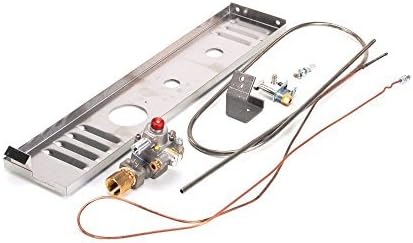
Image 1: Components of the Blodgett 52301 900 Series Upgrade Kit. This image displays the various parts included in the kit, such as a gas control valve with a red cap, a metal manifold, and several copper and metal tubes, indicating a comprehensive upgrade for gas-fired commercial oven systems.
Safety Information
WARNING: Improper installation, adjustment, alteration, service, or maintenance can cause property damage, injury, or death. Read the installation, operating, and maintenance instructions thoroughly before installing or servicing this equipment.
- Always disconnect power and gas supply before servicing.
- Installation and service must be performed by a qualified installer, service agency, or the gas supplier.
- Ensure all local codes and national standards are followed.
- Keep the area around the appliance clear and free from combustible materials.
Setup and Installation
The Blodgett 52301 900 Series Upgrade Kit is designed for integration into existing Blodgett 900 Series commercial ovens. Due to the nature of commercial gas appliance components, professional installation is highly recommended to ensure safety and proper functionality.
Pre-Installation Checks:
- Verify that the kit components match the requirements of your specific Blodgett 900 Series oven model.
- Ensure all necessary tools and safety equipment are available.
- Confirm that the gas supply is shut off and the appliance is disconnected from electrical power.
Installation Steps (General Guidance):
- Carefully remove existing components that are being replaced by the upgrade kit, following the oven's original service manual.
- Install the new manifold and gas control valve, ensuring all connections are secure and properly sealed according to gas fitting standards.
- Connect all associated tubes and wires, paying close attention to correct routing and secure fastening.
- After installation, perform a leak test on all gas connections using an approved leak detection solution.
- Restore gas and electrical supply and test the oven's operation according to the manufacturer's guidelines.
Refer to the specific installation instructions provided with the physical kit for detailed, step-by-step procedures.
Operating Instructions (Post-Upgrade)
Once the Blodgett 52301 900 Series Upgrade Kit is successfully installed, the operation of your Blodgett 900 Series oven should follow its standard operating procedures. The upgrade kit primarily replaces internal components to improve reliability and performance, not to alter the user interface or basic operational steps.
- Initial Startup: After installation, carefully follow the oven's original startup procedure. Observe for any unusual noises, smells, or operational anomalies.
- Temperature Control: The oven's temperature controls should function as before, with potentially improved accuracy or responsiveness due to new components.
- Safety Checks: Regularly perform routine safety checks as outlined in your oven's primary manual.
Maintenance
Regular maintenance is crucial for the longevity and efficient operation of your Blodgett 900 Series oven, especially after installing an upgrade kit. Always ensure the oven is cool and disconnected from power and gas before performing any maintenance.
- Routine Inspection: Periodically inspect all gas connections, wiring, and mechanical components for signs of wear, damage, or leaks.
- Cleaning: Keep the area around the gas control valve and burner assembly clean and free of debris.
- Professional Servicing: Schedule regular professional maintenance checks by a qualified technician to ensure all components, including those from the upgrade kit, are functioning correctly and safely.
Troubleshooting
This section provides general troubleshooting tips for issues that might arise after installing the Blodgett 52301 900 Series Upgrade Kit. For complex issues, always contact a qualified service technician.
Common Issues:
- Oven Not Igniting:
Check gas supply. Ensure all gas valves are open. Verify electrical power to the oven. Inspect igniter and pilot assembly for obstructions or damage. If the issue persists, the new gas valve or associated wiring may require professional inspection.
- Inconsistent Heating:
This could indicate issues with the temperature sensor or gas flow. Ensure the oven's thermostat is set correctly. A qualified technician should check the calibration of the gas control valve and temperature probes.
- Gas Odor:
IMMEDIATELY SHUT OFF GAS SUPPLY AND VENTILATE THE AREA. DO NOT OPERATE ANY ELECTRICAL SWITCHES. Contact your gas supplier and a qualified service technician immediately. This indicates a gas leak, which can be extremely dangerous.
Specifications
| Feature | Detail |
|---|---|
| Brand Name | Blodgett |
| Model Number | 52301 |
| Item Weight | 7.15 Pounds |
| Package Dimensions | 22.9 x 8 x 5.4 inches |
| Installation Type | Undercounter (referring to the oven this kit upgrades) |
| Defrost System | Automatic (referring to the oven this kit upgrades) |
| Form Factor | Compact (referring to the oven this kit upgrades) |
| Is Electric | Yes (referring to the oven this kit upgrades) |
Warranty and Support
For specific warranty information regarding the Blodgett 52301 900 Series Upgrade Kit, please refer to the documentation included with your purchase or contact Blodgett customer service directly. Warranty terms typically cover manufacturing defects for a specified period.
For technical support, parts inquiries, or to locate an authorized service provider, please visit the official Blodgett website or contact their customer support line. When contacting support, have your product model number (52301) and purchase details readily available.
Blodgett Official Website: www.blodgett.com