
Warm Audio WA-412
Warm Audio WA-412 4-Channel Microphone Pre-Amp with DI User Manual
Model: WA-412
Brand: Warm Audio
Introduction
The Warm Audio WA-412 is a 4-channel microphone preamplifier and direct injection (DI) unit designed to deliver classic American console preamp characteristics. This 1RU rack-mountable unit is known for its robust low-end and clear, open high-frequency response. It incorporates fully discrete, socketed 6-pin opamps and custom-wound Altran USA input and output transformers, contributing to its distinct sonic signature. The WA-412 is suitable for a wide range of studio applications, offering high headroom and low distortion.
Setup
Follow these steps to properly set up your Warm Audio WA-412 unit.
- Power Connection: Connect the provided AC power cord to the IEC inlet on the rear panel of the WA-412 and then to a suitable electrical outlet. Ensure the power switch on the rear panel is in the OFF position before connecting.
- Rack Mounting: The WA-412 is a 1RU unit. Securely mount it into a standard 19-inch equipment rack using appropriate rack screws.
- Microphone Input: Connect your microphones to the XLR Input connectors on the rear panel for each desired channel.
- Instrument (DI) Input: For direct instrument connection, plug your instrument (e.g., guitar, bass) into the 1/4" TRS DI Input on the front panel of the corresponding channel. Plugging into the front panel DI input automatically bypasses the rear XLR input for that channel.
- Output Connection: Connect the Balanced Outputs (XLR) on the rear panel to your audio interface, mixer, or other recording/mixing equipment.
- Power On: Once all connections are secure, flip the power switch on the rear panel to the ON position. The front panel power indicator will illuminate.

Figure 1: Front Panel Overview. This image displays the front panel of the Warm Audio WA-412, showing the four identical channels, each with its gain knob, output trim, tone switch, phantom power, polarity, and pad buttons, and the 1/4" DI input. The power switch is located on the far right.

Figure 2: Rear Panel Overview. This image shows the rear panel of the Warm Audio WA-412, featuring the IEC power inlet, power switch, and fuse holder on the left. Each of the four channels has an XLR input and a balanced XLR output.
Operating Instructions
The WA-412 offers intuitive controls for shaping your audio. Each of the four channels operates independently.
- Gain Knob: This large rotary knob controls the input gain for the microphone or DI signal. Adjust it to achieve the desired signal level without clipping.
- Output Trim: Located below the gain knob, the output trim allows for precise control over the output level. This feature is useful for driving the preamp into saturation for tonal coloration while maintaining a controlled output level to prevent clipping downstream equipment.
- Tone Switch: This button alters the input impedance of the transformer. Engaging the Tone switch (often indicated by an illuminated LED) typically provides a warmer, punchier sound characteristic of classic console preamps. Disengaging it offers a more open and neutral sound. Experiment with this setting to find the best match for your microphone and source.
- +48V Phantom Power: Press this button to supply +48V phantom power to condenser microphones connected via the XLR input. Ensure your microphone requires phantom power before engaging this feature. Do not engage phantom power when using ribbon microphones unless specifically designed to handle it, as it can cause damage.
- Polarity Switch: This button inverts the polarity (phase) of the audio signal. It is useful for correcting phase issues that can occur when recording with multiple microphones or when combining a DI signal with a miked amplifier.
- Pad (-20dB): Engage this button to attenuate the input signal by 20dB. Use the pad when recording very loud sources (e.g., drums, loud guitar amplifiers) to prevent the input stage of the preamp from overloading.
- DI Input (Front Panel): As mentioned in setup, plugging into this 1/4" TRS jack automatically selects the instrument input for that channel.
Important Note: The WA-412 utilizes fully discrete socketed opamps and custom transformers. These components are integral to the unit's sound. While opamps are socketed, replacement or modification should only be performed by qualified technicians to avoid damage and maintain optimal performance.
Maintenance
Proper maintenance ensures the longevity and optimal performance of your WA-412.
- Cleaning: Use a soft, dry cloth to clean the exterior of the unit. Avoid using liquid cleaners, solvents, or abrasive materials, as these can damage the finish or internal components.
- Ventilation: Ensure adequate airflow around the unit, especially if rack-mounted. Do not block ventilation openings.
- Environmental Conditions: Operate and store the unit in a dry environment, away from extreme temperatures, humidity, and direct sunlight.
- Internal Access: As indicated on the rear panel, DO NOT REMOVE COVER. NO USER SERVICEABLE PARTS INSIDE. REFER SERVICING TO QUALIFIED PERSONNEL. Opening the unit voids the warranty and exposes you to potential electrical hazards.
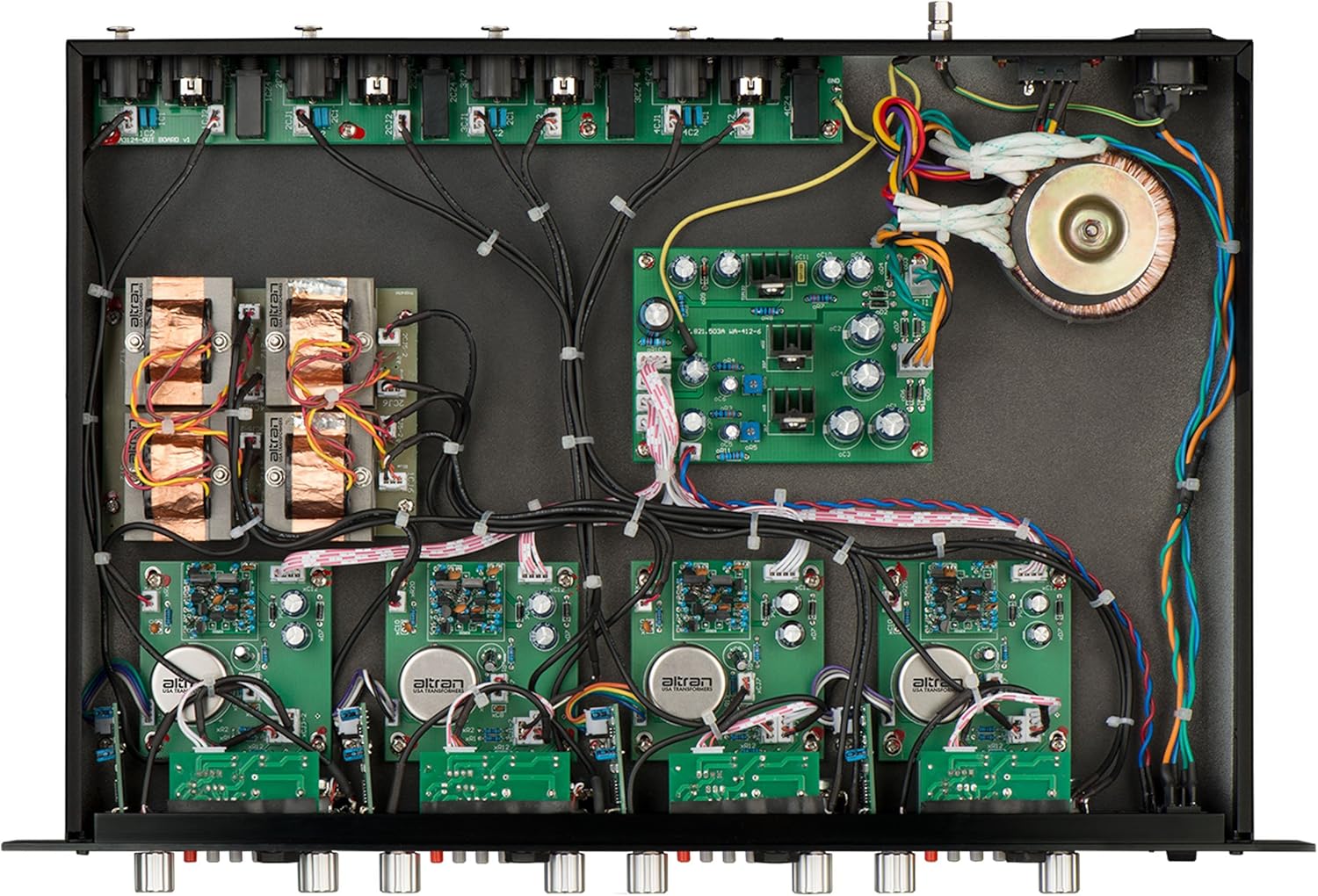
Figure 3: Internal Components. This image provides a view of the internal circuitry of the Warm Audio WA-412, highlighting the custom Altran transformers and discrete opamp circuit boards. This complex internal design underscores the importance of professional servicing.
Troubleshooting
If you encounter issues with your WA-412, consult the following common troubleshooting steps.
| Problem | Possible Cause | Solution |
|---|---|---|
| No power / Unit does not turn on |
|
|
| No audio output |
|
|
| Distorted or noisy audio |
|
|
Specifications
| Model Name | WA-412 |
| Number of Channels | 4 |
| Preamplifier Type | Discrete, 6-pin Opamp based |
| Transformers | Custom-wound Altran USA input and output transformers |
| Connectivity Technology | XLR |
| Connector Type | XLR, 1/4" TRS (DI) |
| Special Features | Output Trim, Tone Switch (input impedance), Discrete Opamps, Custom Transformers, +48V Phantom Power, Polarity Switch, -20dB Pad |
| Frequency Response | 20 Hz - 20 kHz |
| Signal-to-Noise Ratio | 72 dB |
| Power Source | Corded Electric (100-240V AC, 50/60Hz) |
| Item Weight | 13 Pounds (5.9 kg) |
| Product Dimensions (L x W x H) | 26.75 x 21 x 6 inches (67.9 x 53.3 x 15.2 cm) |
| Compatible Devices | Amplifier, Audio Interface, Mixer |
| UPC | 736724298873 |
Warranty Information
For detailed warranty information regarding your Warm Audio WA-412, please refer to the official Warm Audio website or the warranty card included with your product. Warranty terms and conditions may vary by region and purchase date. Please retain your proof of purchase for warranty claims.
Support
Should you require further assistance, technical support, or have questions not covered in this manual, please contact Warm Audio customer support.
- Official Website: Visit the Warm Audio Store for product information, FAQs, and support resources.
- Contact: Refer to the Warm Audio website for current contact methods, including phone numbers and email addresses for technical support.
Related documentsWA-412


Ask a question about this manual
Ask about setup, troubleshooting, compatibility, parts, safety, or missing instructions. Manuals+ will review the question and use this page’s manual context to help answer it.