
1. Introduction
This manual provides instructions for the Redi-Remote replacement remote control, designed for specific Avermedia units. This remote is a custom-built replacement and is not an original Avermedia product. It is engineered to perform all functions for the compatible Avermedia models without requiring any programming.
Compatible Avermedia Models:
- 0412A200AK3
- RM-KM
- RMK3
- TVBOX11
2. Product Overview
The Redi-Remote replacement remote control is designed for ease of use and direct compatibility. It features a durable construction and a comprehensive set of buttons to control your Avermedia unit.
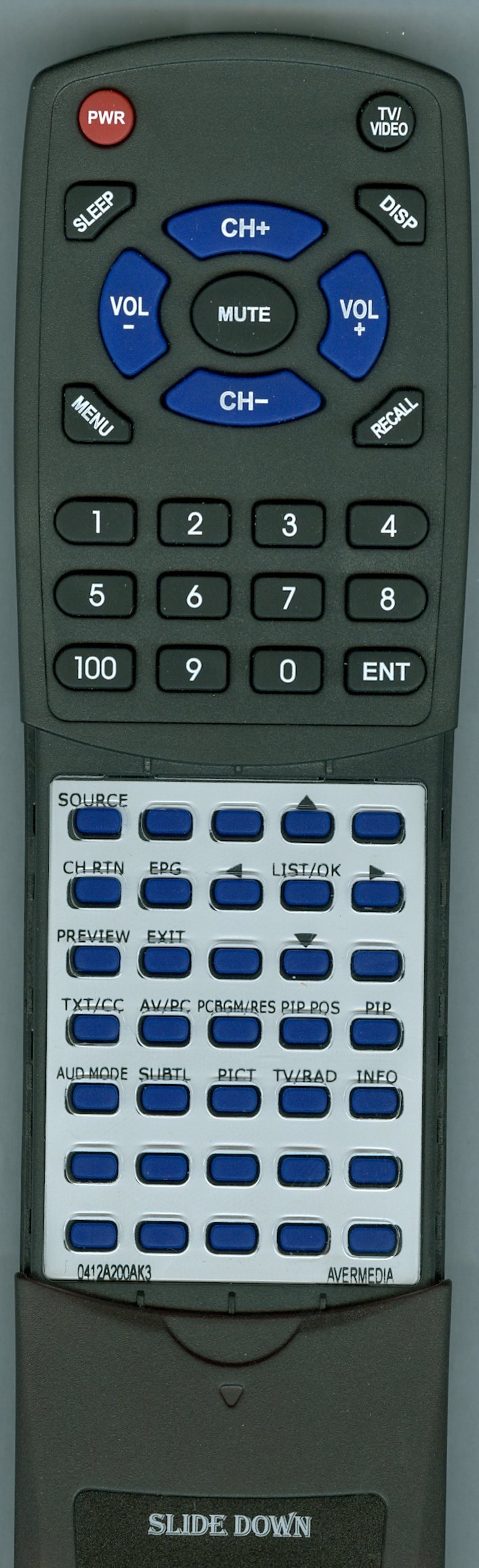
Figure 1: Front view of the Redi-Remote Replacement Remote Control. This image shows the layout of the primary buttons and the overall design of the remote.
Key Features:
- No Programming Required: Ready to use out of the box with compatible Avermedia units.
- Dedicated Functionality: Controls all functions for the specific unit it is designed for. It cannot be programmed to control auxiliary devices.
- Compact Design: Measures approximately 7.5 inches (19 cm) in length, 2.25 inches (5.7 cm) in width, and 0.75 inches (1.9 cm) in thickness.
- Sliding Cover: A cover over the lower half of the remote slides down to reveal additional buttons.
- Infrared Technology: Operates using infrared signals.
3. Setup
Setting up your Redi-Remote is straightforward as no programming is required. Simply install the batteries, and the remote will be ready for use.
3.1 Battery Installation
- Locate the battery compartment on the back of the remote control.
- Slide open the battery compartment cover.
- Insert 4 AAA alkaline batteries, ensuring the positive (+) and negative (-) terminals align correctly with the markings inside the compartment.
- Close the battery compartment cover securely.
Note: Ensure fresh alkaline batteries are used for optimal performance.
4. Operating Instructions
Once batteries are installed, your Redi-Remote is ready to operate your compatible Avermedia unit.
- Point the Remote: Aim the front of the remote control directly at your Avermedia unit. The maximum effective range is approximately 20 feet (6 meters).
- Press Buttons: Press the desired function button (e.g., Power, Volume, Channel, Menu) to control your device.
- Access Lower Buttons: If your remote has a sliding cover, gently slide it down to reveal additional control buttons for advanced functions.
Important: The remote uses infrared technology, so ensure there are no obstructions between the remote and the Avermedia unit's IR receiver.
5. Maintenance
Proper care will ensure the longevity and reliable performance of your remote control.
- Cleaning: Wipe the remote with a soft, dry cloth. Do not use liquid cleaners or abrasive materials.
- Battery Replacement: Replace all batteries at the same time. Do not mix old and new batteries, or different types of batteries.
- Storage: If the remote will not be used for an extended period, remove the batteries to prevent leakage and potential damage.
- Avoid Exposure: Keep the remote away from direct sunlight, heat sources, and moisture.
6. Troubleshooting
If you encounter issues with your Redi-Remote, please refer to the following common solutions:
- Remote Not Responding:
- Check if the batteries are inserted correctly with the correct polarity (+/-).
- Replace old batteries with new AAA alkaline batteries.
- Ensure there is a clear line of sight between the remote and the Avermedia unit. Remove any obstructions.
- Verify you are within the maximum operating range (approximately 20 feet).
- Specific Functions Not Working:
- Confirm that the remote is compatible with your specific Avermedia model (0412A200AK3, RM-KM, RMK3, TVBOX11).
- Ensure the sliding cover is positioned correctly to access the desired buttons.
- No Programming Required: Remember, this remote does not require programming. If you are attempting to program it, this is not necessary and may lead to confusion.
7. Specifications
| Brand | Redi-Remote |
| Model Number | RT0412A200AK3 |
| Compatible Devices | Avermedia 0412A200AK3, RM-KM, RMK3, TVBOX11 (HD Receiver) |
| Connectivity Technology | Infrared (IR) |
| Special Feature | No Programming Required |
| Maximum Range | 20 Feet (6 meters) |
| Number of Buttons | 58 |
| Batteries Required | 4 AAA Alkaline batteries |
| Dimensions (L x W x T) | Approx. 7.5" x 2.25" x 0.75" (19 cm x 5.7 cm x 1.9 cm) |
| Item Weight | 5 Ounces (141.7 grams) |
| UPC | 791090954914 |
8. Warranty Information
Specific warranty details for this Redi-Remote product are not provided in the available product information. Please refer to the seller or manufacturer's website for any applicable warranty terms and conditions.
9. Customer Support
For any concerns or questions regarding your Redi-Remote replacement remote control, please contact the seller directly. Contact information for customer support is not provided in the available product details.