
Luminous Cruze 3.5KVA Inverter with RC 18000 Battery
Luminous Cruze 3.5KVA Inverter & RC 18000 Battery System User Manual
Model: Cruze 3.5KVA Inverter, RC 18000 Battery
Introduction
This manual provides essential information for the safe and efficient operation, installation, and maintenance of your Luminous Cruze 3.5KVA Pure Sine Wave Inverter and RC 18000 Tall Tubular Battery system. Please read this manual thoroughly before installation and use to ensure optimal performance and longevity of your product.

Image: The Luminous Cruze 3.5KVA Inverter unit shown alongside four Luminous RC 18000 tall tubular batteries, illustrating the complete power backup system.
Product Overview and Features
The Luminous Cruze 3.5KVA Inverter is a pure sine wave inverter designed to provide reliable power backup. It is paired with Luminous RC 18000 tall tubular batteries, known for their robust construction and long backup performance.
Inverter Features:
- Pure Sine Wave Output: Ensures safety for sensitive appliances.
- Capacity: 3500 VA / 48V, with a maximum peak load of 2940 watts.
- Battery Support: Designed to support four 12V batteries.
- Intelligent 32-bit DSP Processor: For efficient power management.
- LCD Display: Provides real-time status and operational information.
- Protection: Integrated MCB for input main protection and auto over-load handling.
- Bypass Switch: Allows direct power supply from the grid in case of inverter fault.
- Quick Charging: Efficient battery charging capabilities.
- Battery Compatibility: Supports Flat Plate, Tubular, and SMF battery types.
Battery Features (RC 18000):
- Type: Tall tubular battery.
- Construction: Rugged design for durability.
- Rated Capacity: 150 Ah / 12V.
- Water Level Indicators: Six indicators for easy monitoring of electrolyte levels.
- Maintenance: Designed for minimum maintenance.
- Factory Charged: Ready to use upon installation.

Image: Visual representation of the Luminous inverter highlighting its intelligent features such as LCD display, 32-bit DSP processor, MCB protection, quick charging, pure sine wave output, and support for various battery types.

Image: A detailed view of the Luminous RedCharge 18000 battery, showcasing its key attributes like tubular plate design, factory-charged status, six water level indicators, and low maintenance requirement.
Setup and Installation
Proper installation is crucial for the safety and performance of your inverter and battery system. It is highly recommended that installation be performed by a qualified technician.
Safety Precautions:
- Ensure the installation area is well-ventilated and free from flammable materials.
- Keep the system away from direct sunlight, moisture, and extreme temperatures.
- Do not connect or disconnect batteries while the inverter is operating or connected to mains power.
- Wear appropriate personal protective equipment (PPE) such as insulated gloves and safety glasses during installation.
- Verify correct polarity when connecting batteries to avoid damage to the system.
Connecting the Batteries:
The Luminous Cruze 3.5KVA Inverter requires four 12V batteries for operation. Connect the batteries in series to achieve the required 48V DC input for the inverter. Use the provided battery link cables and ensure all connections are tight and secure.
- Position the four batteries in a suitable, well-ventilated area near the inverter.
- Connect the positive terminal of the first battery to the negative terminal of the second battery using a battery link cable.
- Repeat this process for the remaining batteries to form a series connection (positive to negative).
- Connect the remaining free negative terminal of the first battery to the negative terminal of the inverter's battery input.
- Connect the remaining free positive terminal of the last battery to the positive terminal of the inverter's battery input.
- Ensure all nuts and bolts are securely fastened.
Mains Power Connection:
Connect the inverter's input power cord to a properly grounded and protected AC mains outlet. Ensure the mains voltage is within the specified operating range of the inverter.
Load Connection:
Connect your appliances and electrical loads to the output sockets of the inverter. Do not exceed the maximum rated load capacity of 2940 watts to prevent overload and damage.
Operating Instructions
Initial Power-Up:
- After ensuring all connections are secure, switch on the main power supply to the inverter.
- Press the power button on the inverter. The LCD display will illuminate, showing the system status.
- The inverter will perform a self-test. Once complete, it will indicate whether it is operating on mains power (charging batteries) or on battery power (inverter mode).
Operating Modes:
- Mains Mode: When mains power is available, the inverter charges the batteries and passes the mains supply to the connected loads.
- Inverter Mode: In case of a power outage, the inverter automatically switches to battery power, converting DC power from the batteries to AC power for your appliances. This transition is typically seamless.
- Bypass Mode: If the inverter experiences a fault, the bypass switch allows you to directly supply power from the grid to your loads, bypassing the inverter. This is useful for troubleshooting or maintenance.
LCD Display Information:
The LCD display provides critical information about the inverter's operation, including:
- Input Voltage
- Output Voltage
- Battery Charge Level
- Load Percentage
- Error Codes (if any)
- Operating Mode (Mains/Inverter/Bypass)
Recommended Load Capacity:
The system is designed to handle various household appliances. Below is an approximate guide for typical loads:
| Appliance Type | Quantity |
|---|---|
| LED TV (40") | 4 units |
| LED Bulb (9W) | 27 units |
| LED Tubelight (18W) | 32 units |
| Fans | 9 units |
| Fridge (250 Litre) | 2 units |
Note: Actual backup time and load capacity may vary based on battery age, condition, and specific appliance power consumption.
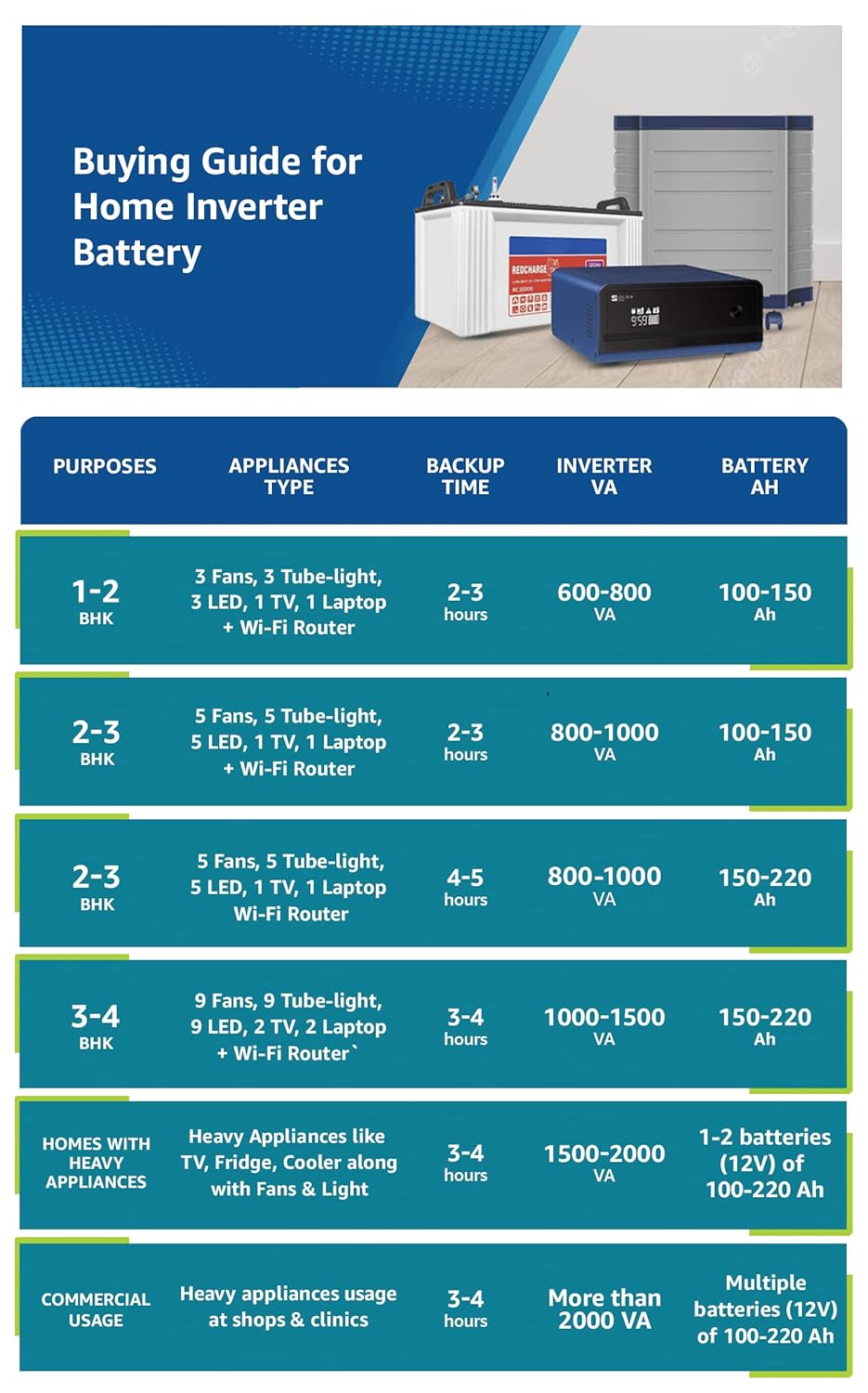
Image: A comprehensive buying guide table illustrating recommended inverter and battery capacities based on different home sizes (BHK) and commercial usage, along with typical appliance types and expected backup times.
Maintenance
Regular maintenance ensures the longevity and optimal performance of your Luminous inverter and battery system.
Battery Maintenance:
- Water Level Check: Periodically check the electrolyte levels in the batteries using the provided water level indicators. Ensure the level is between the minimum and maximum marks.
- Distilled Water Top-Up: If the water level is low, top up with only distilled water. Do not use tap water or acid.
- Terminal Cleaning: Keep battery terminals clean and free from corrosion. Apply petroleum jelly or a suitable terminal protector to prevent corrosion.
- Ventilation: Ensure adequate ventilation around the batteries to dissipate heat and gases.
- Charging: Ensure batteries are fully charged regularly, especially if not in frequent use, to prevent sulfation.
Inverter Maintenance:
- Cleaning: Keep the inverter unit clean and free from dust. Use a soft, dry cloth for cleaning. Do not use liquid cleaners.
- Ventilation: Ensure the inverter's ventilation vents are not blocked to prevent overheating.
- Connections: Periodically check all electrical connections for tightness and signs of wear or damage.
- Professional Check: Consider a professional service check annually to ensure all components are functioning correctly.
Troubleshooting
This section provides solutions to common issues you might encounter with your Luminous inverter and battery system. For problems not listed here, please contact customer support.
| Problem | Possible Cause | Solution |
|---|---|---|
| Inverter not turning on | No mains power; Battery low/disconnected; Inverter switch off; Blown fuse/MCB tripped. | Check mains supply; Verify battery connections and charge; Turn on inverter switch; Reset MCB or replace fuse (if applicable). |
| No output from inverter (on battery mode) | Overload; Battery discharged; Output MCB tripped. | Reduce connected load; Allow batteries to charge; Reset output MCB. |
| Short backup time | Overloading; Battery aging/faulty; Insufficient charging. | Reduce load; Check battery health and water levels; Ensure proper charging (check mains supply). |
| Inverter beeping continuously | Overload; Low battery; Over-temperature. | Reduce load; Allow batteries to charge; Ensure proper ventilation around inverter. |
| Battery not charging | Mains power issue; Loose connections; Inverter fault. | Check mains supply and fuse; Secure all connections; Contact service if issue persists. |
Specifications
Luminous Cruze 3.5KVA Inverter:
- Type: Pure Sine Wave Inverter
- Capacity: 3500 VA / 48V
- Max. Peak Load: 2940 Watts
- Battery Support: Four 12V Batteries
- Dimensions (LxWxH): 28 cm x 30.5 cm x 38 cm
- Weight: Approximately 400 kg (System weight including batteries)
- Power Source: Battery Powered
- Recommended Use: Office, Home Power Backup
Luminous RC 18000 Tall Tubular Battery:
- Type: Tall Tubular Battery
- Rated Capacity: 150 Ah / 12V
- Water Level Indicators: 6
- Construction: Rugged
- Dimensions (LxWxH): 50.2 cm x 19.1 cm x 44.0 cm
Included Components:
- 1 x Luminous Cruze 3.5KVA Sine Wave Inverter
- 4 x Luminous RC 18000 150 Ah Tall Tubular Battery
- Battery Level Indicators
- Nut Bolt Set for connections
- Battery Link Cables
- Warranty Card
Warranty and Support
Warranty Information:
- Inverter Warranty: 2 years from the date of purchase.
- Battery Warranty: 36 months (18 months flat + 18 months pro-rata) from the date of purchase.
Please retain your purchase invoice and warranty card for any warranty claims. The warranty covers manufacturing defects under normal operating conditions. It does not cover damage due to improper installation, misuse, neglect, or unauthorized repairs.
Customer Support:
For technical assistance, service requests, or any queries regarding your Luminous product, please contact Luminous customer service. Refer to the warranty card or Luminous official website for contact details.
Note: Company service is available all over India. For Gujarat delivery, specific conditions may apply as per legal disclaimers.
Related documentsCruze 3.5KVA Inverter with RC 18000 Battery


Ask a question about this manual
Ask about setup, troubleshooting, compatibility, parts, safety, or missing instructions. Manuals+ will review the question and use this page’s manual context to help answer it.