
1. Introduction
Thank you for choosing the XTRONS CM133HDGREY 13.3-inch Car Roof Flip Down Monitor. This device is designed to provide high-definition video entertainment for passengers in your vehicle. Featuring a slim design, 1080P resolution, HDMI input, and multiple audio output options, this monitor enhances your in-car entertainment experience. This manual provides essential information for proper installation, operation, and maintenance of your new monitor.
2. Safety Information
- Read all instructions carefully before installation and operation.
- Professional installation is highly recommended to prevent damage to the unit or vehicle.
- Do not attempt to disassemble or modify the unit. This may cause damage and void the warranty.
- Ensure all wiring is correctly connected and secured to prevent short circuits or electrical hazards.
- Keep the unit away from water, moisture, and extreme temperatures.
- Do not block ventilation openings on the unit.
- Always operate the vehicle safely. Do not allow the monitor to distract the driver.
3. Package Contents
Verify that all items are present in the package:
- 1 x XTRONS CM133HDGREY 13.3-inch Car Roof Flip Down Monitor
- 1 x Remote Control
- 1 x User Manual (this document)
- 6 x Nuts for installation
- 2 x IR Headphones (if included with your specific package)
4. Product Features
- Display: 13.3-inch HD screen with 1920*1080 resolution.
- Design: Ultra-thin and lightweight with a luxurious and solid aluminum frame.
- Connectivity: Built-in HDMI port, USB input, SD card slot, and AUX input.
- Audio: Built-in dual speakers, IR (Infrared) transmitter for wireless headphones, and FM transmitter for vehicle audio integration.
- Lighting: Built-in double dome LED lights (5 LEDs on both sides) for interior illumination.
- Flexibility: Max open angle of 120 degrees for the screen.
- Control: Supports positive and negative door control for automatic light activation.
- Note: This monitor does not include a DVD drive.
5. Setup and Installation
Proper installation is crucial for the performance and safety of your monitor. It is highly recommended to have this unit installed by a qualified professional.
5.1 Mounting the Monitor
The monitor is designed for roof-mount installation. Carefully select a mounting location that does not obstruct the driver's view or interfere with vehicle safety features. Ensure there is sufficient space for the monitor to flip down completely.

Image: Overview of the XTRONS CM133HDGREY monitor, illustrating its ultra-thin design, 120-degree rotating screen, 1080P HD resolution, built-in HDMI port, and positive/negative door control support. Dimensions are also shown, indicating a slim profile.
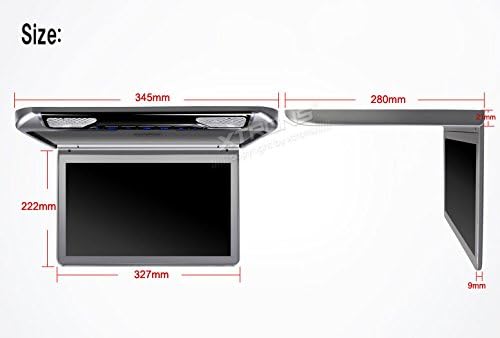
Image: Detailed dimensions of the XTRONS CM133HDGREY monitor, showing measurements of 345mm length, 222mm width, 327mm screen width, and a thickness of 9mm when folded, with a total height of 280mm from the base to the top of the unit.
5.2 Wiring Connections
Connect the power wires to the vehicle's electrical system, ensuring proper polarity. Connect the door control wire if you wish to utilize the automatic dome light feature. Connect any external video or audio sources as needed.
- Power: Connect the red wire to a switched 12V power source and the black wire to ground.
- Door Control: Connect the appropriate wire to your vehicle's door trigger for automatic LED light activation.
- Video/Audio Inputs: Connect HDMI, USB, SD, or AUX cables as required for your media sources.
6. Operating Instructions
6.1 Powering On/Off
Press the power button on the unit or the remote control to turn the monitor on or off. The screen will flip down automatically when powered on and retract when powered off (if configured).
6.2 Media Playback
The monitor supports various media formats via USB, SD card, and AUX input. Insert your USB drive or SD card into the respective slots, or connect an external device via the AUX input. Use the remote control or unit buttons to navigate menus and select media files.
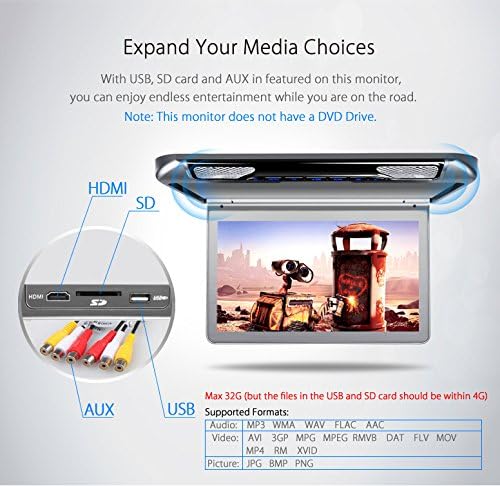
Image: Close-up view of the XTRONS CM133HDGREY monitor's side panel, highlighting the HDMI, SD card, USB, and AUX input ports. A note indicates that the maximum supported storage for USB and SD is 32GB, with individual files limited to 4GB. Supported audio, video, and picture formats are listed.
6.3 HDMI Input
Connect a compatible device (e.g., smartphone, gaming console, media player) to the HDMI port for high-definition video and audio playback. This allows for mirroring content or extending your device's display to the monitor.
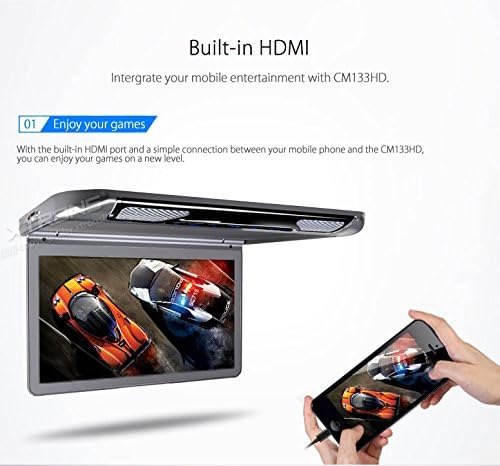
Image: The XTRONS CM133HDGREY monitor displaying a racing game, connected via HDMI to a smartphone, illustrating its use for mobile gaming entertainment.
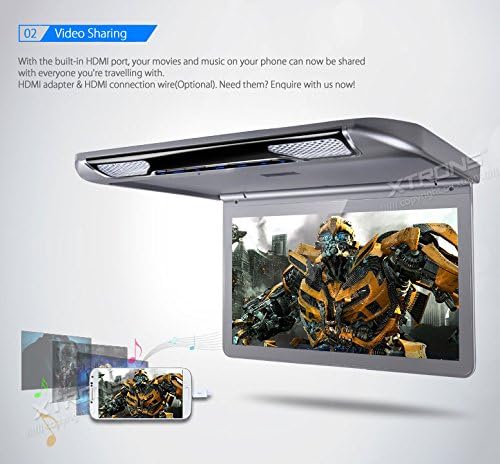
Image: The XTRONS CM133HDGREY monitor displaying a movie, connected via HDMI to a smartphone, demonstrating its capability for video sharing from mobile devices.
6.4 Audio Output Options
The monitor offers multiple ways to enjoy audio:
- Built-in Speakers: For direct audio playback from the monitor.
- IR Transmitter: Activates when the monitor is on, allowing wireless IR headphones to receive audio. Ensure headphones are within range and powered on.
- FM Transmitter: Transmits audio to your vehicle's FM radio. Tune your car radio to the frequency displayed on the monitor to hear the audio through your car's speakers.
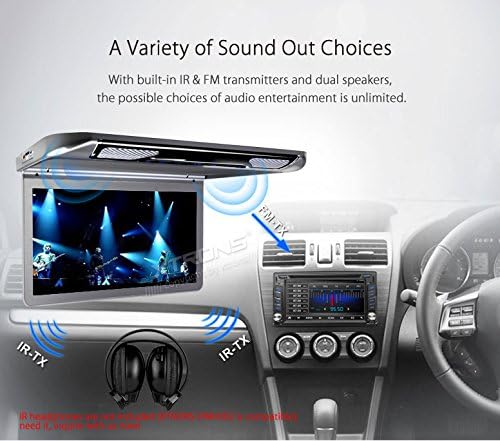
Image: Illustration of the XTRONS CM133HDGREY monitor's audio output capabilities, showing IR transmission to wireless headphones and FM transmission to the car's stereo system, alongside the built-in speakers.
6.5 Dome LED Lights
The monitor features built-in LED dome lights. These can be controlled manually or automatically via the door control connection, providing interior illumination.

Image: The XTRONS CM133HDGREY monitor with its built-in double dome LED lights illuminated, showing the five individual LEDs on each side, designed for energy conservation and durability.
6.6 Screen Adjustment
The screen can be manually adjusted up to a 120-degree open angle for optimal viewing from various seating positions.
7. Maintenance
- Cleaning: Use a soft, dry cloth to clean the screen and exterior of the unit. For stubborn marks, slightly dampen the cloth with water. Avoid harsh chemicals or abrasive cleaners.
- Dust: Regularly remove dust from the unit's surface and ventilation areas to ensure proper heat dissipation.
- Storage: If the vehicle is to be stored for an extended period, ensure the monitor is powered off and the screen is in its closed position.
8. Troubleshooting
If you encounter issues with your XTRONS CM133HDGREY monitor, refer to the following common problems and solutions:
- No Power:
- Check all power connections to ensure they are secure and correctly wired.
- Verify the vehicle's fuse for the monitor is not blown.
- Ensure the vehicle's ignition is on if connected to a switched power source.
- No Picture/Blank Screen:
- Confirm the correct input source (HDMI, USB, SD, AUX) is selected.
- Check the connection of the video source cable (e.g., HDMI cable) for proper seating.
- If using HDMI, ensure the external device is outputting video correctly.
- No Audio:
- Adjust the volume on the monitor and your external audio source.
- If using IR headphones, ensure they are powered on, charged, and within range.
- If using FM transmitter, ensure your car radio is tuned to the correct frequency and the FM transmitter is enabled on the monitor.
- Check if the media file's audio format is supported (e.g., 2-channel stereo is generally supported; 5.1 Dolby may not be).
- Remote Control Not Working:
- Replace the batteries in the remote control.
- Ensure there is a clear line of sight between the remote and the monitor's IR receiver.
- Dome Lights Not Working/Behaving Erratically:
- Check the manual switch for the dome lights on the unit.
- If connected to door control, verify the wiring to the vehicle's door trigger is correct and compatible. Some vehicle systems may require specific wiring or relays.
9. Specifications
| Feature | Specification |
|---|---|
| Model Number | CM133HDGrey |
| Screen Size | 13.3 Inches |
| Display Type | LCD |
| Resolution | 1920*1080 (HD 1080P) |
| Inputs | HDMI, USB, SD Card, AUX |
| Audio Output | Built-in Speakers, IR Transmitter, FM Transmitter |
| Dome Lights | Built-in Double Dome LED Lights (5 LEDs per side) |
| Max Open Angle | 120° |
| Item Weight | 7.72 pounds |
| Manufacturer | XTRONS |
| First Available Date | September 29, 2016 |
10. Warranty and Support
For warranty information, technical support, or service inquiries, please contact XTRONS customer service. Refer to the contact details provided with your purchase documentation or visit the official XTRONS website for assistance.
Please retain your proof of purchase for any warranty claims.


