
1. Introduction
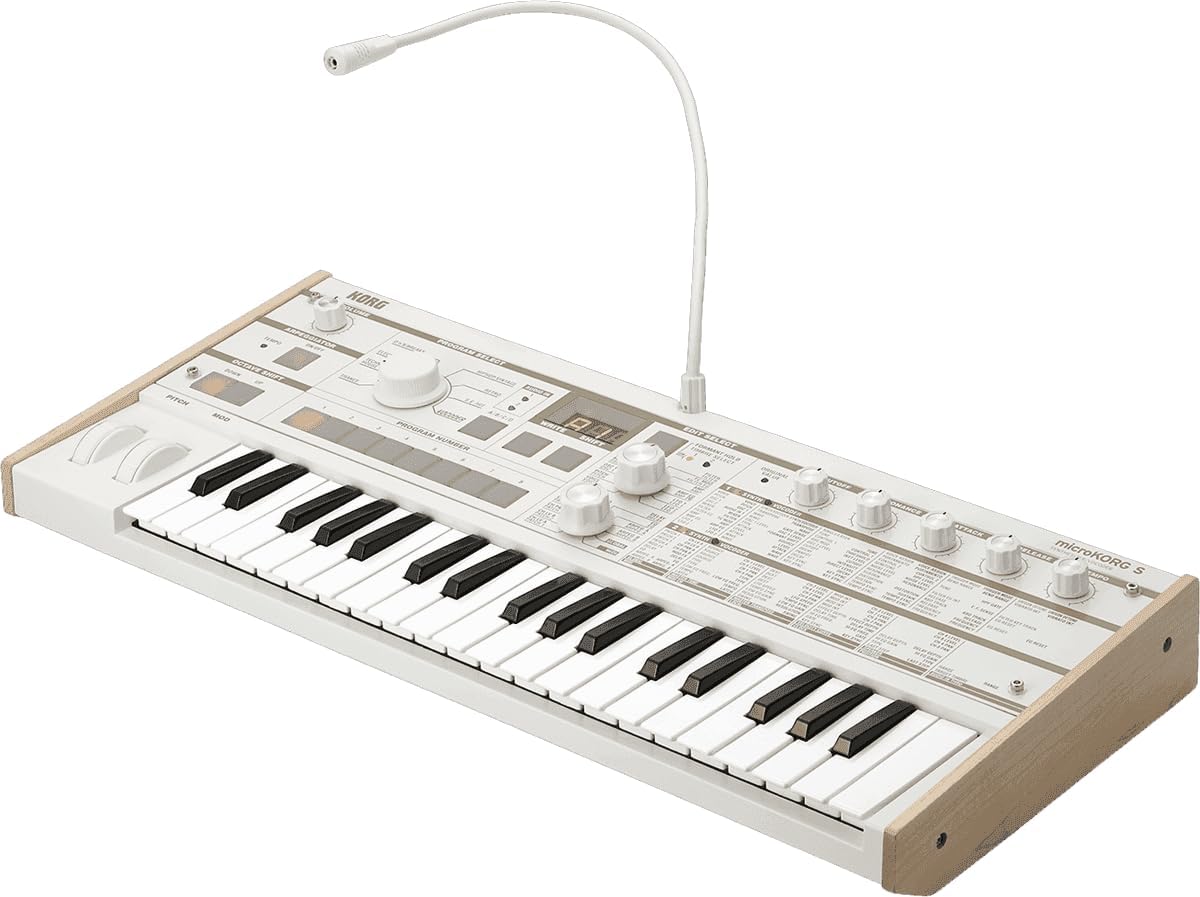
This manual provides detailed instructions for the setup, operation, and maintenance of your Korg microKORG S Compact Analog Modeling Synthesizer. The microKORG S is a versatile instrument featuring a powerful dual-oscillator synthesis engine, an 8-band vocoder, and a built-in 2.1 stereo speaker system, all within a portable, battery-operable chassis. Please read this manual thoroughly to ensure proper use and to maximize your experience with the instrument.
2. Product Overview
The microKORG S combines classic analog modeling synthesis with modern features, offering a wide range of sound creation possibilities. Its compact design and integrated speakers make it suitable for various environments, from studio to live performance.
Key Features:
- Synthesis Engine: Powerful dual-oscillator analog modeling engine with a wide selection of waveforms.
- Speaker System: Built-in 2.1 stereo speaker system with a dedicated woofer for rich, full sound.
- Portability: Battery-powered operation using six AA batteries for mobile use.
- Keyboard: 37 velocity-sensitive mini keys for expressive playing.
- Vocoder: 8-band vocoder with advanced features like formant shifting, includes a mini microphone.
- Memory: Increased memory capacity with 64 additional preset programs and user programs.
- Design: Updated white motif with light wood ends for a sleek, modern aesthetic.
- Versatility: Flexible presets and audio inputs for diverse sound creation.

3. Setup
3.1 Power Supply
The microKORG S can be powered either by an AC adapter or by batteries.
- AC Adapter: Connect the included DC 9V AC adapter to the POWER input jack on the rear panel and then to a standard AC outlet.
- Batteries: For portable use, insert six AA alkaline batteries (sold separately) into the battery compartment on the underside of the unit. Ensure correct polarity.
3.2 Microphone Connection
The dedicated mini microphone is essential for using the vocoder function.
- Connecting the Microphone: Insert the mini microphone into the MIC IN jack located on the top panel of the microKORG S.
3.3 Audio Output
Connect the microKORG S to external audio equipment for monitoring or recording.
- Line Output: Use standard 1/4-inch audio cables to connect the L/MONO and R OUTPUT jacks on the rear panel to your mixer, audio interface, or amplifier.
- Headphones: Plug your headphones into the HEADPHONE jack on the rear panel for private monitoring.
4. Operating Instructions
4.1 Program Selection
The microKORG S features a wide array of preset and user programs.
- Category Selection: Use the PROGRAM SELECT dial to choose a sound category (e.g., D'n'B/Breaks, Electronica, Hiphop/Vintage, Retro, Techno/House, Trance, S.E./Hit, Vocoder).
- Program Number: Once a category is selected, use the PROGRAM NUMBER buttons (1-8) to choose a specific program within that category.

4.2 Sound Editing
Adjust various parameters to customize your sounds.
- Edit Select: Use the EDIT SELECT 1 and EDIT SELECT 2 knobs to choose the parameter you wish to edit. The display will show the selected parameter.
- Value Adjustment: Turn the VALUE knob to change the value of the selected parameter.
- Common Parameters: Dedicated knobs are available for quick adjustments of CUTOFF, RESONANCE, EG ATTACK, EG RELEASE, and TEMPO.
4.3 Vocoder Usage
The 8-band vocoder allows for unique vocal effects.
- Activate Vocoder: Select a vocoder program from the PROGRAM SELECT dial.
- Speak into Microphone: Speak or sing into the connected mini microphone while playing notes on the keyboard. The synthesizer will process your voice according to the selected vocoder program.
- Formant Shifting: Use the EDIT SELECT knobs to access and adjust formant shifting parameters for unique vocal transformations.
4.4 Arpeggiator
The arpeggiator creates rhythmic patterns from held notes.
- Activate Arpeggiator: Press the ARPEGGIATOR ON/OFF button to activate or deactivate the arpeggiator.
- Tempo Adjustment: Use the TEMPO knob to set the arpeggiator's speed.
4.5 Octave Shift
Shift the keyboard's octave range.
- Octave Up/Down: Use the OCTAVE SHIFT UP and DOWN buttons to transpose the keyboard's pitch range.
5. Maintenance
5.1 Cleaning
Regular cleaning helps maintain the instrument's appearance and functionality.
- Exterior: Wipe the surface with a soft, dry cloth. For stubborn dirt, use a slightly damp cloth and then dry thoroughly. Avoid abrasive cleaners or solvents.
- Keys: Clean the keys with a soft cloth. Do not use excessive moisture.
5.2 Battery Replacement
Replace batteries when the power indicator dims or the unit behaves erratically.
- Procedure: Turn off the power. Open the battery compartment cover on the underside of the unit. Remove old batteries and insert six new AA alkaline batteries, observing correct polarity. Close the cover securely.
6. Troubleshooting
- No Power: Ensure the AC adapter is securely connected or that fresh batteries are correctly installed. Check the power switch.
- No Sound: Verify that the VOLUME knob is turned up. Check audio cable connections to external equipment and ensure the equipment is powered on and set to the correct input. If using headphones, ensure they are properly plugged in.
- Vocoder Not Working: Ensure the mini microphone is securely connected to the MIC IN jack. Confirm a vocoder program is selected.
- Unexpected Behavior: Try turning the unit off and then on again. If issues persist, consult the full user manual available on the Korg website.
7. Specifications
| Feature | Description |
|---|---|
| Model Name | MICROKORGS |
| Keyboard | 37 velocity-sensitive mini keys |
| Sound Engine | Analog Modeling Synthesis System |
| Vocoder | 8-band vocoder |
| Speakers | Built-in 2.1 stereo speaker system |
| Power Supply | DC 9V (AC adapter) or 6 AA alkaline batteries |
| Included Components | Microphone |
| Dimensions (L x W x H) | 20.63 x 9.13 x 2.76 inches |
| Item Weight | 9.25 pounds |
| Body Material | Plastic with Bass Wood ends |
| Color | White |
| Manufacturer | Korg USA Inc. |
8. Warranty and Support
For warranty information and technical support, please refer to the documentation included with your product or visit the official Korg website. Keep your proof of purchase for warranty claims.


