
Introduction
This manual provides essential instructions for the safe and efficient operation of your Pioneer DMH-100BT Digital Media Receiver. Please read this manual thoroughly before use and retain it for future reference. The DMH-100BT is designed to enhance your in-car audio and connectivity experience with its 6.2-inch touchscreen, Bluetooth capabilities, and various media options.
Safety Information
WARNING: Read all safety instructions in the product documentation before use. Distracted driving can result in serious injury or death. Only use a function when it is safe and legal in your location, pay attention to the road and your surroundings, and obey all traffic rules.
This product contains chemicals known to the State of California to cause cancer and birth defects or other reproductive harm. For more information, visit www.P65Warnings.ca.gov.
- Always operate the vehicle in a safe manner.
- Keep the volume at a level where you can still hear outside traffic and emergency vehicles.
- Do not disassemble or modify the unit. This could lead to accidents, fire, or electric shock.
- Consult a professional for installation to ensure proper wiring and functionality.
What's in the Box
- DMH-100BT Digital Media Receiver
- External Microphone
- Wiring Harness
- Mounting Hardware
- User Manual (this document)
Setup
Installation Recommendations
Professional installation is highly recommended for the Pioneer DMH-100BT Digital Media Receiver to ensure correct wiring and optimal performance. Incorrect installation can lead to damage to the unit, vehicle, or personal injury.
Mounting
The DMH-100BT is a standard 2-DIN receiver. Use the provided mounting brackets and hardware to secure the unit in your vehicle's dashboard. Ensure the unit is firmly seated to prevent movement during driving.
Wiring
Connect the included wiring harness to your vehicle's existing wiring. Refer to your vehicle's specific wiring diagram and the DMH-100BT's wiring diagram for accurate connections. Key connections include power, ground, speaker outputs, and accessory power. If your vehicle requires a specific wiring harness adapter or dash kit, ensure these are acquired and used for proper integration.
Connect the external microphone for hands-free calling. Position the microphone in a location that allows for clear voice pickup, typically near the driver's sun visor or steering column.
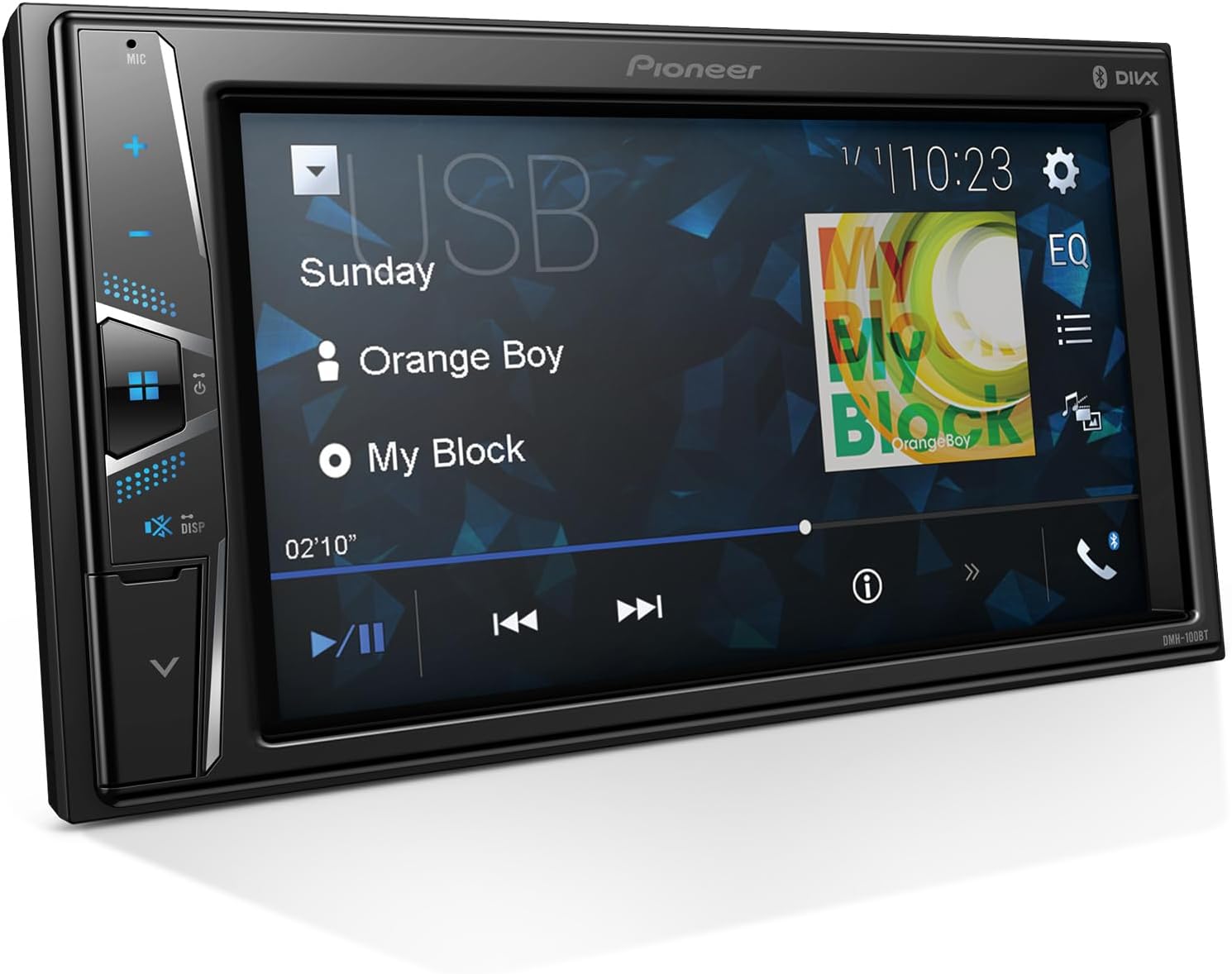
Figure 1: Front view of the Pioneer DMH-100BT Digital Media Receiver.
Operating Instructions
Power On/Off
- To turn the unit on, ensure your vehicle's ignition is on. The unit should power on automatically.
- To turn the unit off, turn off your vehicle's ignition.
Touchscreen Display
The 6.2-inch WVGA resistive touchscreen display allows for intuitive control of the receiver's functions. Tap icons to select options, swipe to navigate menus, and use the on-screen controls for media playback and settings adjustments.

Figure 2: The 6.2-inch WVGA resistive touchscreen display, showing media source options.
Bluetooth Connectivity
The DMH-100BT features built-in Bluetooth for hands-free calling and audio streaming.
- Pairing a Device:
- On the receiver, navigate to the Bluetooth settings menu.
- Enable Bluetooth on your compatible smartphone or device.
- Search for available devices on your phone and select "DMH-100BT".
- Confirm the pairing code on both devices if prompted.
- The receiver can register up to three devices for seamless switching.
- Hands-Free Calling:
- Once paired, you can make and receive calls directly through the receiver.
- Use the external microphone for clear communication.
- On-screen controls allow you to answer, end, or reject calls.
- Audio Streaming:
- Stream music, podcasts, and audiobooks from your paired device.
- Use the receiver's touchscreen controls for playback (play, pause, skip tracks).

Figure 3: Bluetooth audio streaming interface, showing options for music, podcasts, and audiobooks.
Media Playback
- USB Input: Connect a USB device to play audio files. The receiver supports various formats including AAC, MP3, WAV, and WMA.
- AUX Input: Use an AUX cord to connect compatible audio devices.
- Radio: Tune into FM/AM radio stations using the on-screen controls.

Figure 4: Media playback screen displaying supported audio formats and controls.
Rear Camera Input
The DMH-100BT supports a single rear-view camera input. When a compatible camera is connected and the vehicle is in reverse, the display will automatically switch to the camera view.
- Parking Guides: The receiver provides built-in parking guides with customizable lines to assist with safer parking maneuvers.
- Full-Screen Display: Enjoy a clear, full-screen display of the rear camera feed.

Figure 5: Rear camera view displayed on the DMH-100BT screen with parking guidelines.
Audio Settings
Access the audio settings menu to customize your sound experience:
- Equalizer (EQ): Adjust frequency bands to tailor the sound to your preference.
- Fader/Balance: Control the sound distribution between front/rear and left/right speakers.
- Subwoofer Control: If a subwoofer is connected, adjust its output level.
- Source Level Adjuster: Balance volume levels between different audio sources.
System Settings
The system settings menu allows for personalization and configuration:
- Language: Select your preferred display language.
- Theme/Background: Customize the visual appearance of the interface.
- Clock: Set the time and date.
- Beep Tone: Enable or disable button press sounds.
Maintenance
- Cleaning the Display: Use a soft, dry cloth to gently wipe the touchscreen. Avoid abrasive cleaners or solvents.
- Software Updates: Periodically check the Pioneer website for any available firmware updates to ensure optimal performance and new features.
- General Care: Avoid exposing the unit to extreme temperatures, direct sunlight for prolonged periods, or excessive moisture.
Troubleshooting
| Problem | Possible Cause | Solution |
|---|---|---|
| No power | Incorrect wiring; blown fuse | Check power connections; replace fuse if necessary. Consult a professional if unsure. |
| No sound | Volume too low; incorrect speaker wiring; mute activated | Increase volume; check speaker connections; deactivate mute function. |
| Bluetooth not connecting | Device not in pairing mode; interference; previously paired device conflict | Ensure device Bluetooth is on and discoverable; move closer to the unit; delete old pairings and re-pair. |
| Rear camera not displaying | Camera not connected; vehicle not in reverse; camera settings incorrect | Check camera connection; ensure vehicle is in reverse; verify camera settings in the system menu. |
| Touchscreen unresponsive | Temporary software glitch; screen calibration needed | Restart the unit (turn vehicle off and on); perform screen calibration via system settings if available. |
Specifications
| Feature | Detail |
|---|---|
| Model Number | DMH-100BT |
| Display Type | 6.2" WVGA Resistive Touchscreen |
| Bluetooth | Built-in, Hands-Free Calling, Audio Streaming, Multiple Device Connectivity (up to 3) |
| Inputs | USB, AUX, Rear Camera (1-Camera) |
| Supported Audio Formats | AAC, MP3, WAV, WMA |
| Dimensions (Product) | 9.6 x 6 x 10.8 inches |
| Weight | 1 pound |
| Manufacturer | Pioneer |
Warranty & Support
The Pioneer DMH-100BT Digital Media Receiver comes with a 1-Year Warranty from the date of purchase. For warranty claims, technical support, or service inquiries, please contact Pioneer customer service or visit their official website. Keep your proof of purchase for warranty validation.
For further assistance, please refer to the official Pioneer support resources available online.


