
Duluth Forge DFS-400R-2AW
Duluth Forge DFS-400R-2AW Dual Fuel Ventless Gas Fireplace with Mantel Instruction Manual
Model: DFS-400R-2AW | Brand: Duluth Forge
Product Overview
The Duluth Forge DFS-400R-2AW is a dual fuel ventless gas fireplace system designed to provide efficient heating and aesthetic appeal. This unit features a furniture-quality mantel in an antique white finish and a 32,000 BTU vent-free gas fireplace insert. It operates on either natural gas or liquid propane and includes a remote control for convenient operation. The system is capable of heating up to 1,500 square feet of living space.
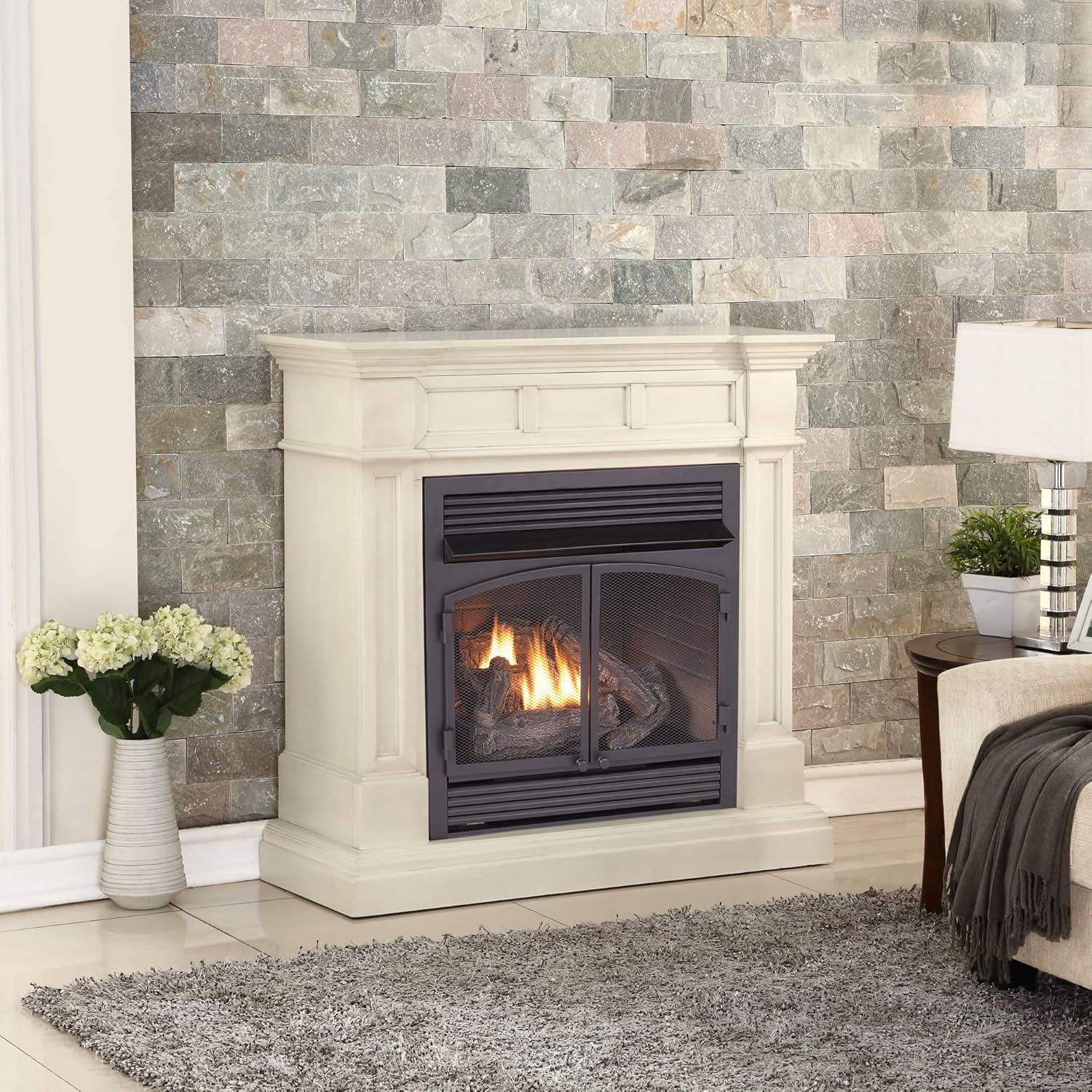
Image: The Duluth Forge DFS-400R-2AW Dual Fuel Ventless Gas Fireplace with Mantel in Antique White, showcasing its elegant design in a living room setting.
Important Safety Information
WARNING: Improper installation, adjustment, alteration, service, or maintenance can cause injury or property damage. Read the installation, operating, and maintenance instructions thoroughly before installing or servicing this equipment.
- This appliance is for use with Natural Gas or Liquid Propane only.
- Do not store or use gasoline or other flammable vapors and liquids in the vicinity of this or any other appliance.
- An Oxygen Depletion Sensor (ODS) is included with automatic shut-off to ensure safety in case of low oxygen levels.
- Ensure adequate ventilation as per local codes and regulations.
- Keep children and pets away from the fireplace when in operation.
- Never place items on top of the fireplace or block air vents.
Proposition 65 Warning: This product can expose you to chemicals including carbon monoxide, which is known to the State of California to cause birth defects or other reproductive harm. For more information go to www.P65Warnings.ca.gov.
Setup and Installation
1. Unpacking and Inspection
- Carefully remove all components from the packaging.
- Inspect for any shipping damage. Contact customer support immediately if damage is found.
- Verify all included items are present: 6 ceramic logs, iron grate, 1 AAA battery, remote control & receiver.
2. Mantel Assembly
Some assembly of the mantel (Model CM400-2-AW) is required. Follow the detailed instructions provided in the separate assembly guide for the mantel. Ensure all connections are secure.
3. Fireplace Insert Placement
- Place the fireplace insert (Model FDF400RT-ZC) into the assembled mantel.
- Ensure proper clearance: Minimum 42 inches from the top of the fireplace to the ceiling.
- Position the 6 hand-painted ceramic fiber logs according to their numbered and pinned placement for optimal flame pattern.

Image: Components of the Duluth Forge DFS-400R-2AW, including the Oxygen Depletion Sensor, assembly tools icon, solid wood mantel icon, and hand-painted logs icon.
4. Gas Connection
- This unit is designed for dual fuel technology, allowing operation with either Natural Gas or Liquid Propane.
- Professional installation by a qualified gas technician is highly recommended for gas line connection to ensure safety and compliance with local codes.
- Ensure the gas supply is turned off before making any connections.
Operating Instructions
1. Initial Startup (Pilot Light)
- Locate the control knob and Piezo ignition button on the fireplace insert.
- Turn the control knob to the "PILOT" position.
- Press and hold the Piezo ignition button while simultaneously pressing the ignitor button until the pilot light ignites.
- Continue to hold the Piezo ignition button for approximately 30-60 seconds after ignition to ensure the thermocouple is heated and holds the pilot light.
- Release the button. If the pilot light goes out, repeat the process.
- Once the pilot is stable, turn the control knob to the "ON" position.
Video: A demonstration of a Duluth Forge Dual Fuel Gas Fireplace (Model FDI32R-M-WN), showing the pilot light ignition and remote control functionality. This video is from the seller and provides relevant operational guidance.
2. Remote Control Operation
The included remote control allows for convenient adjustment of the fireplace settings.
- ON/OFF: Press the "ON" button to ignite the main burner. Press "OFF" to turn it off.
- MODE: Toggle between manual operation and thermostat control.
- SET: In thermostat mode, use the "SET" button to adjust the desired room temperature. The fireplace will automatically turn on/off to maintain this temperature.

Image: The remote control for the Duluth Forge fireplace, featuring ON, OFF, MODE, and SET buttons, along with a digital display for temperature.
Video: An overview of the Duluth Forge 400 Series Fireplace System, demonstrating its operation and features. This video is from the seller and directly relevant to the product series.
Maintenance
Regular maintenance ensures safe and efficient operation of your fireplace.
- Annual Inspection: Have a qualified service person inspect the appliance and venting system annually.
- Cleaning:
- Clean the exterior surfaces with a soft, damp cloth. Do not use abrasive cleaners.
- Periodically vacuum the air intake and exhaust vents to remove dust and debris.
- Inspect ceramic logs for damage or soot buildup. Clean gently if necessary.
- Pilot Light Assembly: Keep the pilot light assembly clean. Remove any lint or dust from the pilot burner and ODS sensor.
- Gas Connections: Check all gas connections for leaks using a soap solution (never an open flame).
Troubleshooting
| Problem | Possible Cause | Solution |
|---|---|---|
| Pilot light will not light or stay lit. | No gas supply, air in gas line, dirty pilot, faulty thermocouple/ODS. | Check gas supply. Bleed air from line. Clean pilot assembly. Contact qualified service person. |
| Main burner will not ignite. | Pilot light not lit, gas valve closed, remote control issue. | Ensure pilot is lit. Open gas valve fully. Check remote battery/settings. |
| Fireplace produces an odor. | Initial burn-off of manufacturing oils, dust accumulation, inadequate ventilation. | Ensure proper ventilation during initial use. Clean unit. Check for obstructions. |
| Remote control not responding. | Dead batteries, receiver switch in wrong position, remote not paired. | Replace remote batteries (1 AAA). Ensure receiver switch is on "REMOTE". Re-pair remote with receiver (refer to remote manual). |
Specifications
- Model Number: DFS-400R-2AW
- Brand: Duluth Forge
- Heat Output: 32,000 BTU (Maximum)
- Heating Coverage: Up to 1,500 sq. ft.
- Fuel Type: Dual Fuel (Natural Gas or Liquid Propane)
- Ventilation Type: Vent Free
- Dimensions (W x H x D): 45" x 45" x 15"
- Material: Cast Iron (Insert), Furniture Grade Wood (Mantel)
- Finish Type: Painted (Antique White)
- Special Features: Remote Control, Oxygen Depletion Sensor (ODS), Battery-assisted Piezo ignition
- Included Components: Burner, Remote Control, 6 Ceramic Logs, Iron Grate
- Item Weight: 150 Pounds
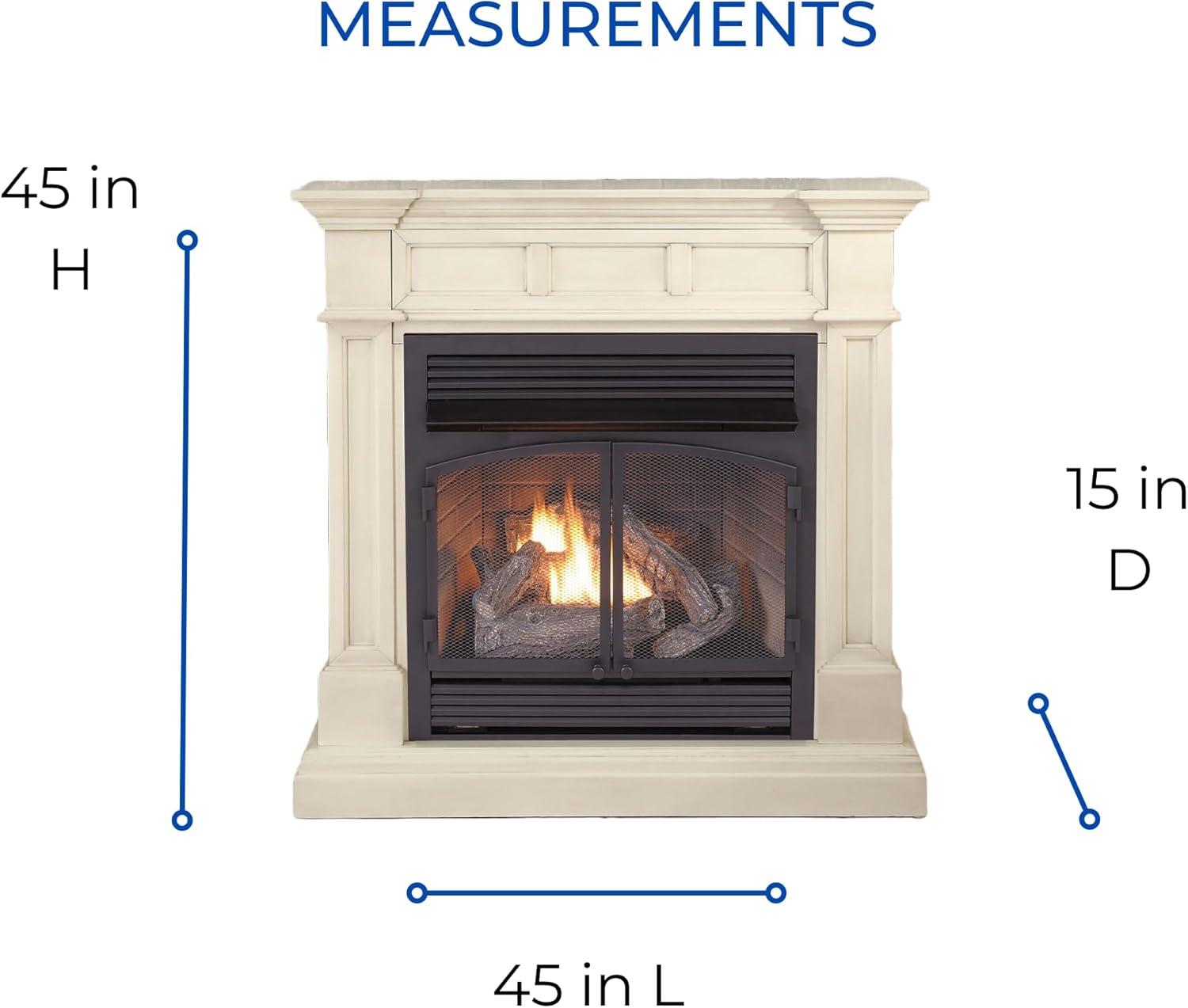
Image: Diagram illustrating the dimensions of the Duluth Forge DFS-400R-2AW fireplace, showing 45 inches in height, 45 inches in width, and 15 inches in depth.
Warranty Information
This Duluth Forge fireplace comes with a 1-year manufacturer's limited warranty. For specific terms, conditions, and to register your product, please refer to the warranty card included with your purchase or visit the official Duluth Forge website.
Customer Support
For technical assistance, replacement parts, or warranty claims, please contact Duluth Forge customer service. Contact information can typically be found in your product packaging or on the official Duluth Forge website. When contacting support, please have your model number (DFS-400R-2AW) and purchase date available.
Manufacturer: Factory Buys Direct
Related documentsDFS-400R-2AW


Ask a question about this manual
Ask about setup, troubleshooting, compatibility, parts, safety, or missing instructions. Manuals+ will review the question and use this page’s manual context to help answer it.