
1. Introduction
This manual provides essential information for the safe and effective installation, operation, and maintenance of the Schneider Electric LRD313 Thermal Overload Relay. Please read this manual thoroughly before attempting any installation or operation to ensure proper function and prevent potential hazards.
The LRD313 is a 9-13A Class 10 thermal overload relay designed to protect AC circuits and motors against overloads, phase failure, and prolonged starting times. It features Everlink Power Terminals for reliable connections.
2. Product Overview
The Schneider Electric LRD313 is a robust thermal overload relay. Key components include:
- Main Power Terminals (1L1, 3L2, 5L3): For incoming power connections.
- Load Terminals (2T1, 4T2, 6T3): For outgoing connections to the motor or load.
- Control Contacts (97 NO, 98 NO, 95 NC, 96 NC): Auxiliary contacts for control circuits, indicating overload status.
- RESET Button (Blue): Used to manually reset the relay after an overload trip.
- STOP Button (Red): Used to manually trip the relay or stop the protected circuit.
- Current Adjustment Dial (LRD): Allows setting the nominal current for overload protection.
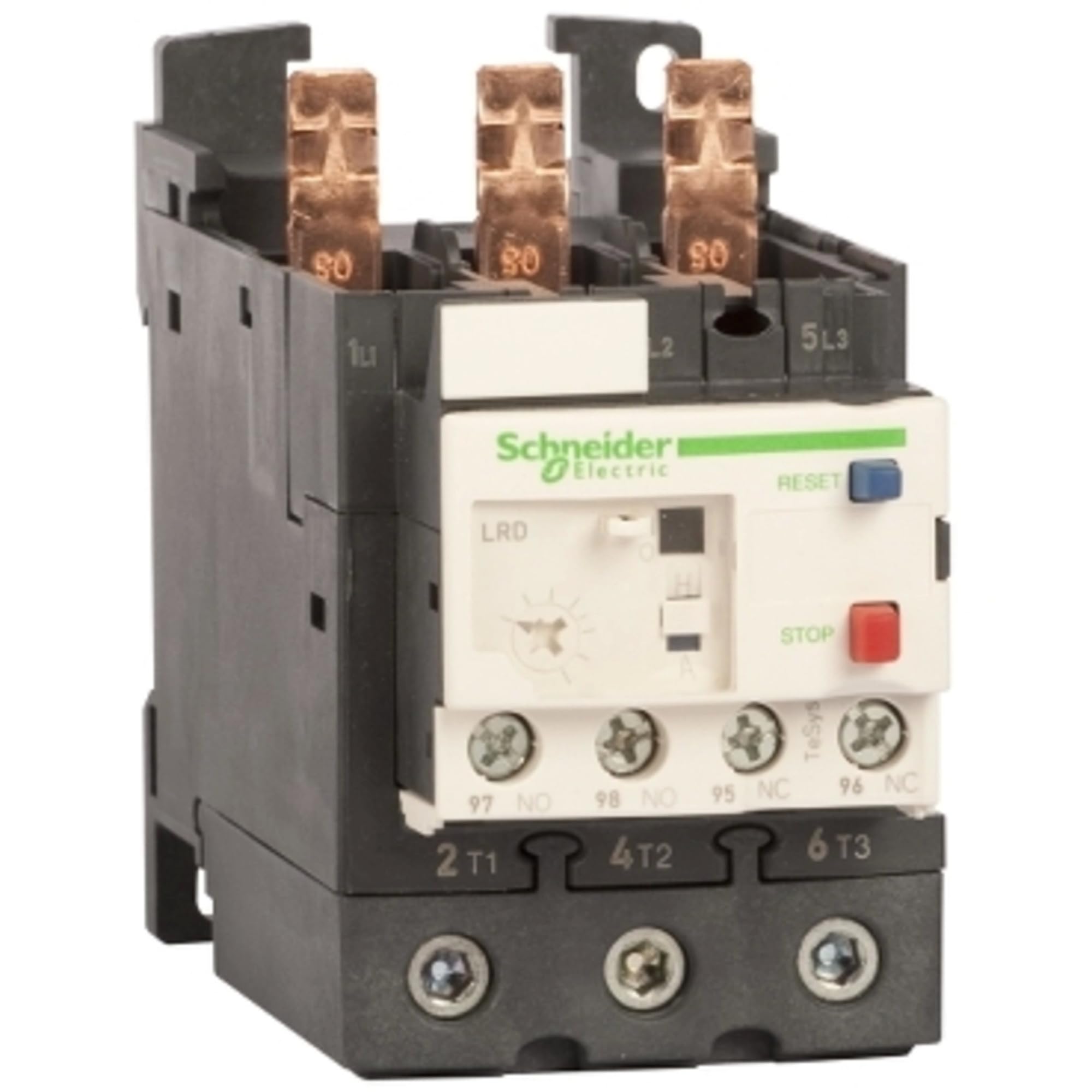
Figure 1: Front view of the Schneider Electric LRD313 Thermal Overload Relay. Visible components include the main power terminals (1L1, 3L2, 5L3), load terminals (2T1, 4T2, 6T3), control contacts (97 NO, 98 NO, 95 NC, 96 NC), the blue RESET button, the red STOP button, and the current adjustment dial labeled 'LRD'.
3. Safety Information
WARNING: Risk of electric shock or arc flash. Only qualified personnel should install, operate, or service this equipment. Failure to follow these instructions can result in death or serious injury.
- Always disconnect power before working on the relay or associated equipment.
- Use appropriate personal protective equipment (PPE).
- Ensure all connections are tight and secure to prevent overheating and arcing.
- Verify the relay's current rating matches the motor or load requirements.
- Do not bypass or modify safety devices.
4. Installation (Setup)
The LRD313 thermal overload relay is designed for direct mounting to TeSys D contactors or stand-alone mounting using an adapter block (not included).
- Power Disconnection: Ensure all power to the circuit is disconnected and locked out according to safety procedures.
- Mounting:
- Direct Mounting: Align the LRD313 with the corresponding TeSys D contactor terminals. Push firmly until it clicks into place.
- Stand-alone Mounting: If using an adapter block, mount the adapter block to a DIN rail or panel, then attach the LRD313 to the adapter block.
- Wiring Main Power Circuit:
- Connect the incoming power lines to the LRD313's 1L1, 3L2, 5L3 terminals.
- Connect the motor or load lines to the LRD313's 2T1, 4T2, 6T3 terminals.
- Utilize the Everlink Power Terminals for secure and reliable connections. Ensure proper torque is applied to all terminal screws.
- Wiring Control Circuit:
- Integrate the 95 NC (Normally Closed) and 96 NC (Normally Closed) contacts into the contactor coil control circuit. These contacts will open upon an overload trip, de-energizing the contactor.
- The 97 NO (Normally Open) and 98 NO (Normally Open) contacts can be used for alarm or indication circuits, closing upon an overload trip.
- Current Setting: Adjust the current setting dial (labeled 'LRD') to match the full load current (FLA) of the protected motor or load. Refer to the motor's nameplate for the correct FLA value.
- Verification: Double-check all wiring for correctness and tightness.
5. Operation
Once installed and properly configured, the LRD313 operates automatically to protect the circuit.
- Normal Operation: During normal operation, the relay allows current to flow to the motor. The NC contacts (95-96) remain closed, and the NO contacts (97-98) remain open.
- Overload Trip: If an overload condition occurs (current exceeds the set value for a prolonged period), the thermal elements in the relay will heat up and trip the mechanism. This opens the NC contacts (95-96), stopping the motor, and closes the NO contacts (97-98), activating any connected alarm.
- Resetting the Relay: After an overload trip, allow the relay to cool down for a few minutes. Then, press the blue RESET button to reset the relay. If the overload condition persists, the relay will trip again. Investigate and resolve the cause of the overload before attempting to reset repeatedly.
- Manual Stop/Trip: The red STOP button can be pressed to manually trip the relay, opening the main circuit and stopping the motor. This can be used for testing or emergency shutdown.
6. Maintenance
The LRD313 thermal overload relay is designed for minimal maintenance. However, periodic checks are recommended:
- Visual Inspection: Regularly inspect the relay for any signs of physical damage, discoloration, or loose connections.
- Terminal Tightness: Periodically check the tightness of all terminal screws, especially in environments with vibration.
- Cleanliness: Keep the relay free from dust, dirt, and moisture. Use a dry, lint-free cloth for cleaning.
- Functionality Test: Periodically test the trip and reset functions using the manual STOP button and then the RESET button.
7. Troubleshooting
| Problem | Possible Cause | Solution |
|---|---|---|
| Relay trips frequently. | Motor overload, incorrect current setting, phase imbalance, motor fault. | Check motor load, verify current setting matches motor FLA, inspect motor for faults, check power supply for phase imbalance. |
| Relay does not reset. | Relay still hot after trip, mechanical issue, persistent overload. | Allow sufficient cooling time. If issue persists, check for mechanical damage or a continuous overload condition. |
| Motor does not start. | Relay tripped, control circuit wiring error, contactor fault. | Check if relay is tripped and reset if necessary. Verify control circuit wiring, check contactor operation. |
| Relay appears damaged. | Physical impact, excessive heat, electrical fault. | Disconnect power immediately. Replace the relay. Investigate cause of damage. |
8. Specifications
- Model Number: LRD313
- Current Range: 9-13A
- Thermal Class: Class 10
- Manufacturer: SCHNEIDER ELECTRIC
- Connection Type: Everlink Power Terminals
- Auxiliary Contacts: 1 NO + 1 NC
- Reset Type: Manual/Automatic (depending on configuration, LRD series typically manual)
- Package Dimensions: 1 x 1 x 1 inches (approximate)
- Item Weight: 15.04 ounces (approximate)
9. Warranty and Support
Specific warranty details for the Schneider Electric LRD313 are typically provided at the point of purchase or can be found on the official Schneider Electric website. Please retain your proof of purchase for warranty claims.
For technical support, product inquiries, or service, please contact Schneider Electric directly or visit their official website. You may also find additional resources on the Schneider Electric Store on Amazon.


