
Pluto ARM
Contents
Pluto Black 11" Adjustable Articulated Magic Arm Instruction Manual
Model: ARM | Brand: Pluto
1. Product Overview
The Pluto Black 11" Adjustable Articulated Magic Arm is a versatile accessory designed to securely hold various photographic and video equipment. It features a flexible, articulated design with a central locking knob for precise positioning and stability. This magic arm is ideal for attaching digital SLR cameras, action cameras, smartphones, LCD monitors, LED video lights, microphones, and other accessories to a wide range of fixtures.
Key Features:
- Versatile Compatibility: Designed to hold digital SLR cameras, action cameras (e.g., DJI OSMO ACTION), smartphones, photography lights, tripods, sliding car equipment, LCD monitors, DV monitors, and microphones.
- Multi-Angle Positioning: Offers 90-degree pivotable and 360-degree rotatable end entry positioning for flexible multi-angle shooting.
- Durable Construction: Constructed from high-quality aluminum alloy and stainless steel for enhanced durability and stability.
- Secure Attachment: Features a super clip with built-in non-slip rubber pads to increase friction and prevent scratches on mounting surfaces.
- Easy Adjustment: A single lock control knob allows for quick and easy adjustment, release, or amplification of tension for all positional movements.
- Standard Threading: Equipped with 1/4" threads on both ends for broad compatibility with various accessories.

Figure 1.1: The Pluto 11-inch Magic Arm shown connected to a Super Clamp. This image illustrates the primary components of the product, including the articulated arm with its central locking knob and the robust clamp for secure mounting.
2. Product Components
The Pluto 11" Adjustable Articulated Magic Arm typically includes the following components:
- 11-inch Articulated Magic Arm: The main adjustable arm with 1/4" threads on both ends and a central locking knob.
- Super Clamp (Optional/Included with some kits): A robust clamp designed for secure attachment to various surfaces, often featuring 1/4" and 3/8" thread holes and non-slip pads.

Figure 2.1: Close-up view of the Super Clamp, highlighting its robust construction and ergonomic handle for tightening. This clamp provides a secure mounting point for the magic arm.
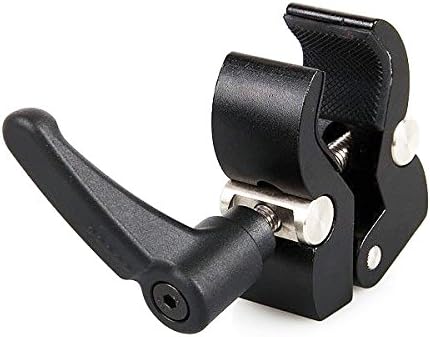
Figure 2.2: Another perspective of the Super Clamp, showing the various mounting holes and the textured grip surfaces designed to prevent slippage when attached to poles or flat surfaces.
3. Setup Instructions
Follow these steps to set up your Pluto Magic Arm:
- Attach the Magic Arm to a Mounting Point:
- If using the Super Clamp: Loosen the clamp handle and attach it to a stable surface such as a tripod leg, light stand, table edge, or pole. Tighten the handle securely until the clamp is firmly in place.
- Screw one end of the Magic Arm (1/4" thread) into the corresponding 1/4" thread hole on the Super Clamp or directly onto any compatible mounting point (e.g., camera cage, tripod head).
- Attach Your Device:
- Screw your camera, monitor, LED light, or other accessory onto the 1/4" thread at the other end of the Magic Arm. Ensure it is securely fastened.
- Note: The maximum load capacity for the arm is 2 kg (approximately 4.4 lbs). Do not exceed this weight to prevent damage or instability.
- Adjust Position:
- Loosen the central locking knob on the Magic Arm to adjust the angle and position of your attached device.
- Once the desired position is achieved, tighten the central locking knob firmly to secure the arm in place.

Figure 3.1: An example setup demonstrating the Pluto Magic Arm in use, holding a device and attached to a tripod. This illustrates how the arm can be integrated into a photography or videography rig.
4. Operating Instructions
The Pluto Magic Arm is designed for simple and intuitive operation:
- Adjusting the Arm: To change the angle or extension of the arm, rotate the large central knob counter-clockwise to loosen it. This will allow the articulated joints to move freely.
- Securing the Position: Once your device is in the desired position, rotate the central knob clockwise until it is firmly tightened. This will lock all three joints simultaneously, ensuring the arm and attached equipment remain stable.
- Checking Stability: After tightening, gently test the arm's stability to ensure it can support the attached equipment without sagging or shifting. If any movement occurs, tighten the knob further.
- Load Capacity: Always adhere to the maximum load capacity of 2 kg (4.4 lbs). Overloading the arm can lead to instability, damage to the arm, or damage to your equipment.
5. Maintenance
Proper maintenance will extend the lifespan of your Pluto Magic Arm:
- Cleaning: Wipe the arm and clamp with a soft, dry cloth after each use to remove dust and debris. For stubborn dirt, a slightly damp cloth can be used, followed by immediate drying. Avoid abrasive cleaners or solvents.
- Storage: Store the magic arm in a clean, dry place away from extreme temperatures and humidity. It is recommended to store it in a protective bag or case to prevent scratches and impacts.
- Joint Inspection: Periodically inspect the articulated joints and the central locking knob for any signs of wear or loosening. Ensure the 1/4" threads are clean and free of obstruction.
- Rubber Pads: Check the non-slip rubber pads on the Super Clamp (if applicable) for wear or detachment. Re-affix if necessary to maintain grip.
6. Troubleshooting
If you encounter issues with your Pluto Magic Arm, refer to the following common problems and solutions:
- Arm Sags or Doesn't Hold Position:
- Cause: The central locking knob is not tightened sufficiently, or the attached equipment exceeds the maximum load capacity.
- Solution: Ensure the central knob is tightened firmly. If the issue persists, verify that the weight of your equipment does not exceed 2 kg (4.4 lbs). Reduce the load if necessary.
- Super Clamp Slips or Scratches Surface:
- Cause: The clamp is not tightened enough, or the non-slip rubber pads are worn or missing.
- Solution: Tighten the Super Clamp handle securely. Inspect the rubber pads and replace them if they are damaged or missing. Ensure the mounting surface is clean and dry.
- Difficulty Attaching/Detaching Devices:
- Cause: Threads are dirty, cross-threaded, or damaged.
- Solution: Clean the 1/4" threads on both the arm and your device. Ensure proper alignment before screwing. Do not force connections. If threads are damaged, contact customer support.
7. Specifications
| Model Number | ARM |
| Brand | Pluto |
| Maximum Length | 11 inches (27.94 cm) |
| Maximum Load Capacity | 2 kg (4.4 lbs) |
| Net Weight | 277.8 grams (9.8 ounces) |
| Product Dimensions (LxWxH) | 7.87 x 2.76 x 1.57 inches (19.99 x 7.01 x 3.99 cm) |
| Material | Aluminum Alloy, Stainless Steel |
| Mounting Threads | 1/4" on both ends |
| Compatible Devices | Digital SLR Cameras, Action Cameras (e.g., DJI OSMO ACTION), Smartphones, LCD Monitors, DV Monitors, LED Video Lights, Microphones, Tripods, Camera Cages |
| UPC | 732240367963 |
8. Warranty and Support
For warranty information or technical support regarding your Pluto Magic Arm, please refer to the official Pluto website or contact their customer service department. Keep your purchase receipt as proof of purchase for any warranty claims.
For further assistance, please visit: www.plutodevices.com (Note: This is a placeholder URL as no specific support link was provided in the product data.)
Documents and downloads
Ask a question about this manual
Ask about setup, troubleshooting, compatibility, parts, safety, or missing instructions. Manuals+ will review the question and use this page’s manual context to help answer it.