
Beats MP582LL/A
Beats Solo3 Wireless On-Ear Headphones User Manual
Model: MP582LL/A
Introduction
The Beats Solo3 Wireless On-Ear Headphones offer a premium listening experience with up to 40 hours of battery life, powered by the efficient Apple W1 chip. Designed for everyday use, these headphones provide Class 1 Bluetooth wireless connectivity, adjustable comfort-cushioned ear cups, and intuitive on-ear controls. They are compatible with both iOS and Android devices, ensuring a seamless audio experience.
What's in the Box
- Beats Solo3 Wireless On-Ear Headphones - Matte Black
- Protective Case
- Quick Start Case
- Warranty Card
- 3.5mm RemoteTalk cable
- Universal USB charging cable (USB-A to USB Micro-B)
- Quick Start Guide
Setup
Your Beats Solo3 Wireless Headphones are designed for quick and easy setup. For Apple devices, simply power them on and hold them near your iPhone; they will then simultaneously connect to your Apple Watch, iPad, and Mac. For other devices, follow the standard Bluetooth pairing process.
Powering On & Pairing
To power on your headphones, locate the power button on the right earcup. Press and hold the power button for a few seconds until the indicator lights illuminate. For initial pairing, a long press will activate seeking mode, allowing your device to discover the headphones.
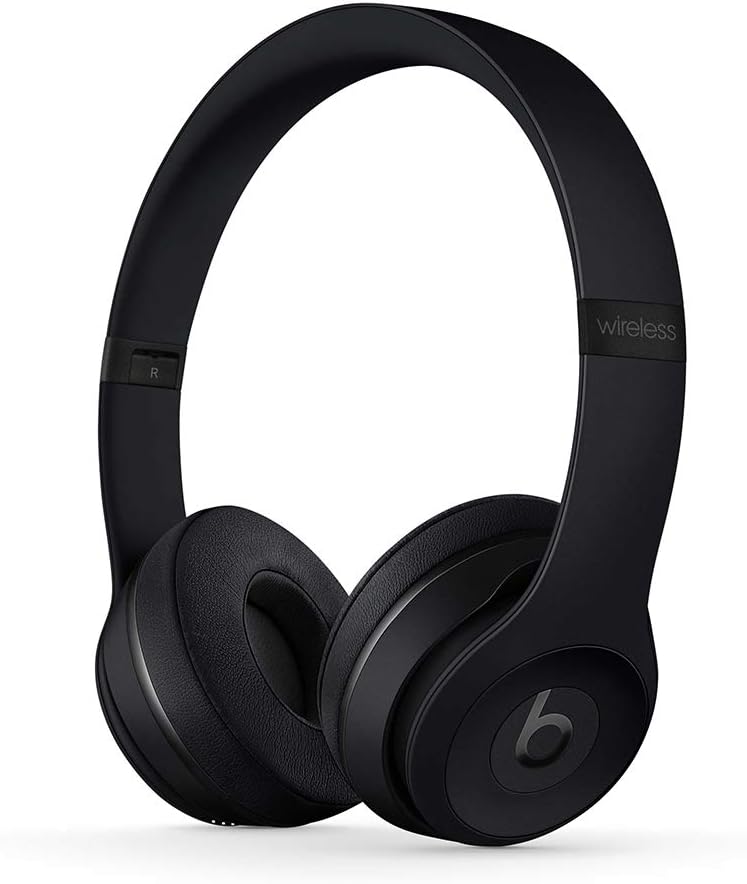
Figure 1: Beats Solo3 Wireless On-Ear Headphones in Matte Black. The headphones are shown unfolded, ready for use, highlighting their sleek design.
Charging
The Beats Solo3 headphones are charged via a Micro USB port located on the earcup. A 5-minute charge provides 3 hours of playback when the battery is low, thanks to Fast Fuel technology. A full charge can provide up to 40 hours of listening time.

Figure 2: Close-up view of the right earcup, displaying the Micro USB charging port and the power indicator lights. The headphones can be charged using any compatible Micro USB cable.
Operating Instructions
The Beats Solo3 headphones feature intuitive on-ear controls for managing your audio and calls.
On-Ear Controls
The multifunction on-ear controls allow you to take calls, control your music (play, pause, skip tracks), and activate Siri (or your device's voice assistant).
Wired Listening
In addition to wireless connectivity, the Beats Solo3 headphones can be used in wired mode. A 3.5mm RemoteTalk cable is included for this purpose. Simply plug the cable into the 3.5mm jack on the earcup to continue listening even if the battery is depleted.

Figure 3: The left earcup of the Beats Solo3, displaying the 3.5mm audio jack. This allows for wired connection to devices, extending usability even without battery power.
Maintenance
To ensure the longevity and optimal performance of your Beats Solo3 Wireless Headphones, follow these maintenance guidelines:
- Cleaning: Use a soft, dry cloth to clean the earcups and headband. Avoid using harsh chemicals or abrasive materials.
- Storage: When not in use, fold the headphones and store them in the provided protective carrying case to prevent damage.
- Battery Care: For optimal battery life, avoid fully discharging the headphones frequently. Charge them regularly, even if not in constant use.
- Avoid Extreme Conditions: Do not expose the headphones to extreme temperatures, humidity, or direct sunlight for prolonged periods.

Figure 4: Beats Solo3 headphones shown in their folded position, demonstrating their compact design for easy storage and portability. This helps protect them during travel.

Figure 5: The black protective carrying case for the Beats Solo3 headphones. The case is designed to snugly fit the folded headphones, offering protection against impacts and scratches.
Troubleshooting
No Power / Not Charging
- Ensure the charging cable is securely connected to both the headphones and a power source.
- Try a different Micro USB cable and power adapter.
- Check the power source (USB port, wall adapter) to ensure it is functional.
Bluetooth Pairing Issues
- Make sure Bluetooth is enabled on your device.
- Place the headphones and device close to each other.
- Turn the headphones off and on again.
- Forget the headphones from your device's Bluetooth settings and attempt to re-pair.
- For Apple devices, ensure your iCloud account is active and devices are updated to the latest OS versions.
Sound Quality Issues / No Sound
- Ensure the volume on both the headphones and your connected device is turned up.
- Check if the headphones are properly paired and connected.
- If using wired mode, ensure the 3.5mm cable is fully inserted into both the headphones and the audio source.
- Try playing audio from a different application or device to isolate the issue.
Specifications
| Brand | Beats |
| Model Name | MP582LL/A |
| Connectivity Technology | Bluetooth |
| Wireless Communication Technology | Bluetooth |
| Battery Life | Up to 40 Hours |
| Charging Time (Fast Fuel) | 5 minutes for 3 hours playback |
| Control Type | Volume Control, Multifunction On-Ear Controls |
| Headphones Jack | 3.5 mm Jack |
| Ear Placement | On Ear |
| Noise Control | Sound Isolation |
| Item Weight | 7.6 ounces (215 g) |
| Product Dimensions | 8.3 x 2.7 x 2.5 inches |
Warranty & Support
For detailed warranty information and support, please refer to the Warranty Card included in your product packaging.
You can also access the official User Manual in PDF format: User Manual (PDF)
For additional support, visit the official Beats Store: Beats Store on Amazon
Related documentsMP582LL/A


Ask a question about this manual
Ask about setup, troubleshooting, compatibility, parts, safety, or missing instructions. Manuals+ will review the question and use this page’s manual context to help answer it.