
ECHOGEAR EGHWTV
ECHOGEAR Universal TV Mount Hardware Pack
Model: EGHWTV - Instruction Manual
1. Product Overview
The ECHOGEAR Universal TV Mount Hardware Pack provides a comprehensive selection of screws, spacers, and washers designed to facilitate the attachment of most televisions up to 80 inches to a wall mount. This kit addresses common compatibility challenges, ensuring you have the necessary components for a secure installation.
It includes M4, M5, M6, and M8 TV screws in various lengths, along with spacers to accommodate different TV back designs, including curved screens. The hardware is engineered for durability and resistance to stripping, promoting a reliable connection between your TV and its mount.

Image 1.1: ECHOGEAR Universal TV Mounting Hardware Pack.
2. Package Contents
Your ECHOGEAR Universal TV Mount Hardware Pack contains the following components, pre-divided and labeled for ease of use:
- Screws: M4 x 12mm, M4 x 35mm, M5 x 12mm, M5 x 35mm, M6 x 12mm, M6 x 20mm, M6 x 35mm, M8 x 16mm, M8 x 20mm, M8 x 25mm, M8 x 30mm, M8 x 35mm, M8 x 40mm, M8 x 45mm, M8 x 50mm (specifically for curved TVs).
- Washers: M4/M5 Washers, M6/M8 Washers.
- Spacers: 2.5mm Spacers, 22mm "Bump-Out" Spacers.
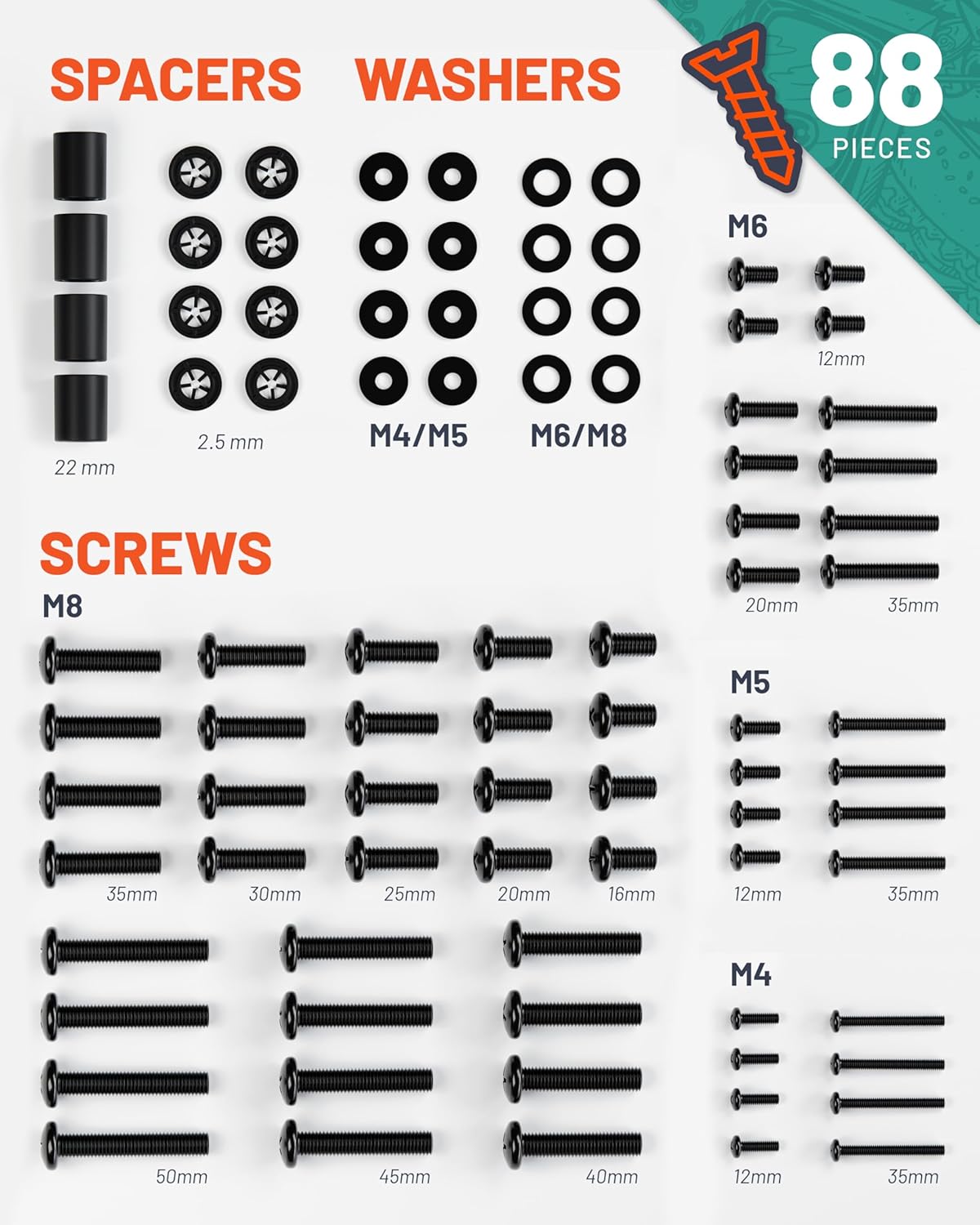
Image 2.1: Detailed view of included screws, washers, and spacers.

Image 2.2: Hardware components are sorted and labeled for easy identification.
3. Setup and Installation
Before beginning installation, consult your television's instruction manual to determine the correct VESA screw size and length required for mounting. This information is crucial for a secure and proper installation.
- Identify Screw Size: Refer to your TV's manual for the recommended screw diameter (M4, M5, M6, or M8) and length.
- Select Screws and Washers: Locate the corresponding screws from the labeled bags in your ECHOGEAR hardware pack. Use the appropriate washers (M4/M5 or M6/M8) with your selected screws.
- Utilize Spacers (if needed): If your TV has an uneven back, recessed mounting holes, or a curved screen, use the included spacers to create a flat mounting surface and ensure proper screw engagement. Spacers can be combined to achieve the desired depth.
- Attach Mount Brackets: Secure the TV mount brackets to the back of your television using the selected screws, washers, and spacers. Ensure all connections are tight but do not overtighten to avoid damaging the TV or hardware.
- Mount TV to Wall Mount: Follow the instructions provided with your specific wall mount to attach the television securely.

Image 3.1: Example of TV mounting using the hardware pack.

Image 3.2: Combining spacers for optimal fit.
4. Compatibility and Usage
This hardware pack is designed for universal compatibility with virtually all TV wall mounts and televisions up to 80 inches. It supports major TV brands including TCL, Sony, LG, Sharp, Philips, Panasonic, Samsung, Hisense, and Vizio.
The assortment of screws and spacers ensures suitability for both flat-back and curved-back televisions, providing flexibility for various mounting scenarios.

Image 4.1: Universal compatibility with various TV brands and designs.
5. Maintenance
The ECHOGEAR Universal TV Mount Hardware Pack components require no specific maintenance. It is recommended to periodically check the tightness of all screws connecting the TV to the mount, especially after initial installation and during routine cleaning, to ensure continued security.
6. Troubleshooting
- Screws do not fit: Double-check your TV's manual for the exact VESA screw specifications. The pack includes a wide range of sizes; ensure you are using the correct diameter (M4, M5, M6, M8) and length.
- TV back is uneven or curved: Use the provided spacers to create a level surface for the mount brackets. Experiment with different spacer combinations to achieve the best fit.
- Screw feels loose or strips: While ECHOGEAR screws are designed to be durable and strip-resistant, ensure you are not overtightening. If a screw feels loose, verify the correct length and consider if a washer or spacer is needed to achieve proper thread engagement.
7. Specifications
| Product Dimensions | 6.3 x 3.5 x 1.6 inches |
| Item Weight | 1.6 pounds |
| Model Number | EGHWTV |
| Manufacturer | ECHOGEAR |
| Mounting Type | Wall Mount (Hardware for) |
| Material | Metal, hard plastic |
| Color | Black |
| Compatible Devices | Television |
| UPC | 793795531469 |
8. Warranty and Support
For warranty information or technical assistance, please contact ECHOGEAR customer support. Our Minnesota-based team is available to help with any questions or issues you may encounter during installation or use of your hardware pack.
Please refer to the official ECHOGEAR website or your purchase documentation for specific warranty terms and contact details.
Related documentsEGHWTV


Ask a question about this manual
Ask about setup, troubleshooting, compatibility, parts, safety, or missing instructions. Manuals+ will review the question and use this page’s manual context to help answer it.