
Introduction
The CASIO G-Shock MUDMASTER GWG-1000-1A3CR is a robust timepiece designed for challenging environments. It features a dust-proof and mud-resistant structure, providing protection against sand and debris. The watch also incorporates a vibration-resistant structure to withstand impacts and heavy machinery vibrations. Equipped with a Triple Sensor Ver.3, it measures direction (compass), barometric pressure/altitude, and temperature. These features make it suitable for outdoor activities such as mountaineering and rescue operations.
Product Overview
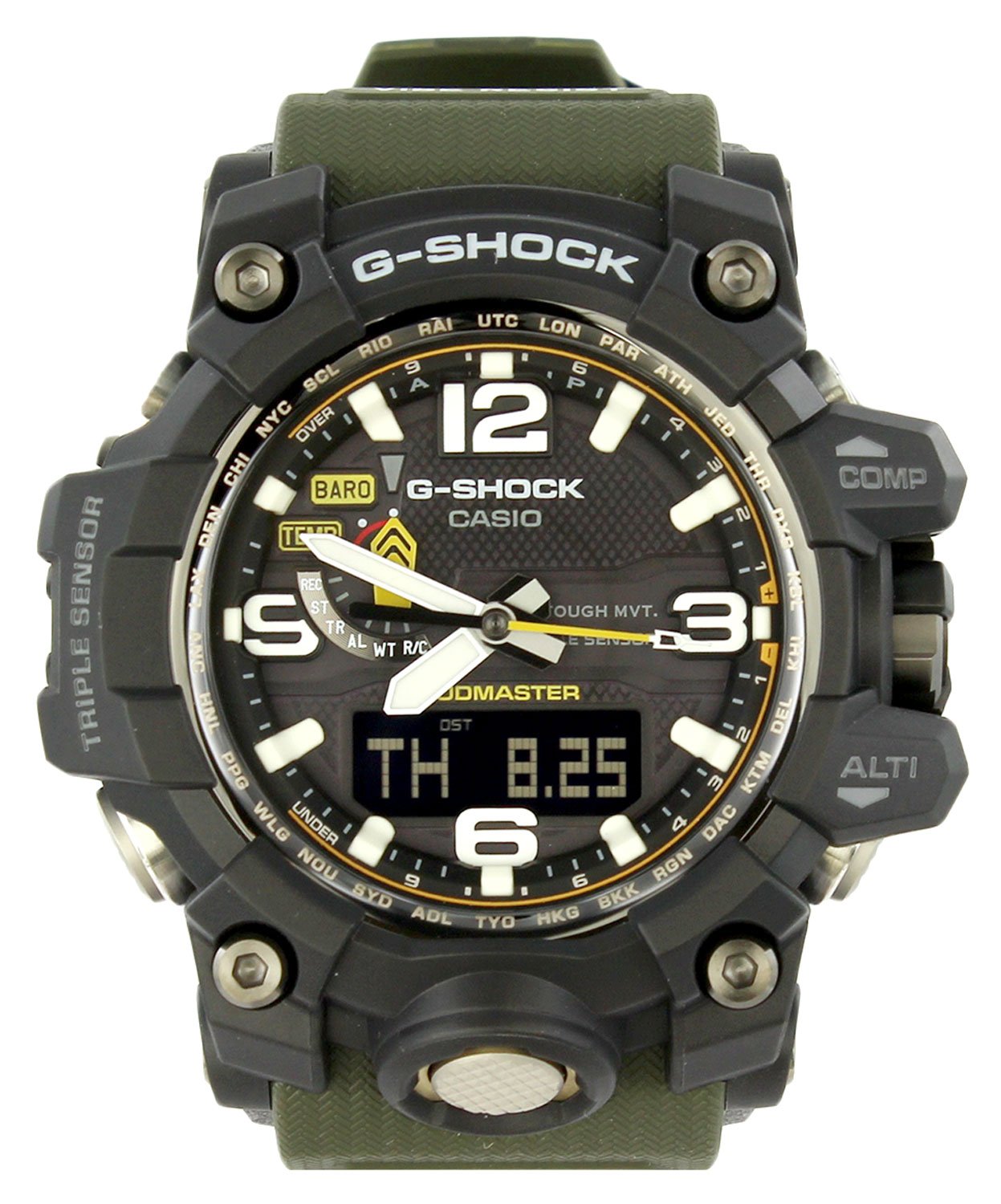
Front view of the CASIO G-Shock MUDMASTER GWG-1000-1A3CR watch, displaying the analog and digital time, and various sensor indicators.

Side view of the watch, highlighting the robust case design and the function buttons for COMP (Compass) and ALTI (Altimeter).

Close-up of the stainless steel case back, showing the G-SHOCK logo, 'SHOCK RESIST' inscription, 'MULTI BAND 6', and 'WATER RESIST 20BAR'.
The GWG-1000-1A3CR features a combination of analog hands and a digital display. Key buttons are located on the sides of the watch for accessing various functions and sensor modes. The watch is designed with a durable resin case and band, and a stainless steel case back for enhanced protection.
Setup
1. Initial Time Setting
Upon first use or after a battery change, set the home city (time zone) and the current time. Refer to the detailed instructions in the full user manual for specific button operations. The watch supports Multi Band 6 atomic timekeeping, which automatically adjusts the time based on radio signals in supported regions.
2. Date Setting
Adjust the current date, including the year, month, and day. Ensure the correct leap year setting if applicable.
3. Sensor Calibration (Optional)
For optimal accuracy of the compass, altimeter, and barometer, perform a sensor calibration in a stable environment. Consult the full user manual for detailed calibration procedures.
Operating Instructions
Basic Watch Functions
- Timekeeping Mode: Displays the current time, day, and date.
- World Time Mode: Shows the current time in various cities around the globe.
- Stopwatch Mode: Measures elapsed time, split times, and two finishes.
- Countdown Timer Mode: Counts down from a specified time.
- Alarm Mode: Sets daily alarms and an hourly time signal.
Triple Sensor Functions
- Compass (Direction) Mode: Press the COMP button to enter compass mode. The second hand indicates North, and the digital display shows the direction angle.
- Altimeter/Barometer Mode: Press the ALTI button to display current altitude and barometric pressure. The watch records altitude changes.
- Thermometer Mode: Temperature is displayed in conjunction with barometric pressure. For accurate temperature readings, remove the watch from your wrist for at least 20-30 minutes to avoid body heat interference.
Button Operations
- MODE Button: Cycles through the different watch modes (Timekeeping, World Time, Stopwatch, Countdown Timer, Alarm, Sensor Modes).
- ADJUST Button: Used to enter and exit setting modes, and to confirm settings.
- LIGHT Button: Illuminates the watch face for visibility in low light conditions.
- COMP Button: Activates the digital compass function.
- ALTI Button: Activates the altimeter and barometer functions.
Maintenance
Cleaning
Wipe the watch regularly with a soft, dry cloth to remove dirt and moisture. For stubborn dirt, use a soft brush and mild soap solution, then rinse thoroughly with fresh water and dry completely. Avoid using chemical cleaners or solvents.
Water Resistance
The GWG-1000-1A3CR is water resistant to 200 meters (20 BAR). This rating allows for swimming, showering, and snorkeling. Do not operate buttons or the crown while the watch is wet or submerged to prevent water ingress.
Battery
This watch uses a quartz movement. While many G-Shock models feature Tough Solar power, if your specific model requires battery replacement, it should be performed by a qualified technician to maintain water resistance and proper function.
Troubleshooting
- Time is incorrect: Ensure your home city setting is correct. If in a Multi Band 6 reception area, check for successful signal reception. Manual time adjustment may be necessary if outside reception range or if automatic adjustment fails.
- Sensor readings are inaccurate: Perform a sensor calibration as described in the full user manual. Ensure the watch is not exposed to extreme temperature changes or strong magnetic fields when taking readings.
- Display is blank or dim: Check the battery level. If the watch has a power-saving feature, ensure it is not activated. Exposure to light may be required for solar-powered models.
- Buttons are unresponsive: Ensure no mud or debris is obstructing the buttons. Clean the watch thoroughly. If the issue persists, contact customer support.
Specifications
| Model Number | GWG-1000-1A3CR |
| Module Number | 5463 |
| Movement | Quartz |
| Display Type | Analog-Digital |
| Water Resistance | 200 Meters (20 BAR) |
| Case Diameter | 52.8 mm |
| Band Length | 21.5 cm |
| Item Weight | 120 g (0.12 Kilograms) |
| Case Shape | Round |
| Band Color | Khaki |
| Dial Color | Black |
| Special Features | Triple Sensor (Compass, Altimeter/Barometer, Thermometer), Dust-proof, Mud-resistant, Vibration-resistant, Multi Band 6 Atomic Timekeeping |
Warranty Information

Contents of the watch packaging, including the CASIO G-Shock MUDMASTER GWG-1000-1A3CR watch, user's guide (Module No. 5463), and international warranty card.
Your CASIO G-Shock MUDMASTER GWG-1000-1A3CR comes with an international warranty. Please refer to the included warranty card for specific terms, conditions, and duration of coverage. Retain your proof of purchase for warranty claims. The warranty typically covers manufacturing defects under normal use.
Support
For further assistance, detailed operating instructions, or service inquiries, please visit the official CASIO website or contact CASIO customer support in your region. You can often find a comprehensive user manual (Module No. 5463) available for download on the CASIO support page.


