
Beatfoxx MC-DVD-90
Beatfoxx MC-DVD-90 Design Stereo System User Manual
Model: MC-DVD-90
1. Introduction
Thank you for purchasing the Beatfoxx MC-DVD-90 Design Stereo System. This compact multimedia system is engineered to provide versatile audio and video playback options, including DVD, CD, MP3, and MPEG4 formats, along with FM/MW radio and Bluetooth connectivity. Its sleek design allows for flexible placement, either freestanding or wall-mounted. Please read this manual thoroughly before operating the device to ensure proper use and to maximize its performance and longevity.
2. Safety Instructions
- Power Source: Ensure the power supply matches the voltage requirements specified on the unit. Use only the provided power cord.
- Ventilation: Do not block any ventilation openings. Allow adequate space around the unit for proper airflow to prevent overheating.
- Water and Moisture: Do not expose the unit to rain, moisture, dripping, or splashing. Do not place objects filled with liquids, such as vases, on the apparatus.
- Heat Sources: Keep the unit away from heat sources such as radiators, heat registers, stoves, or other apparatus (including amplifiers) that produce heat.
- Cleaning: Unplug the unit from the wall outlet before cleaning. Use a dry cloth for cleaning. Do not use liquid cleaners or aerosol cleaners.
- Servicing: Do not attempt to service this product yourself as opening or removing covers may expose you to dangerous voltage or other hazards. Refer all servicing to qualified service personnel.
- Laser Safety: This product utilizes a Class 1 laser. Do not open the disc compartment during playback.
3. Package Contents
Please check that all items are present and in good condition:
- Beatfoxx MC-DVD-90 Stereo System
- Remote Control
- Power Adapter
- Composite Video Cable (RCA)
- FM Antenna

Image: Included cables and FM antenna for the Beatfoxx MC-DVD-90 system.
4. Product Overview
4.1 Front Panel

Image: Front view of the Beatfoxx MC-DVD-90 stereo system, showing the central display, control buttons, and speakers.
The front panel features the main display, disc loading slot, and essential control buttons. On the right side, you will find the Standby button, Volume control knob, and buttons for DVD/USB/CARD source selection, Play/Pause, Stop, Mode, and navigation (Skip/Search, Channel Up/Down). The orange illuminated LCD screen provides clear information on the current mode and playback status.

Image: Close-up view of the USB and SD card slots located on the front panel for media playback.
The USB and SD card slots are conveniently located on the lower right side of the front panel, allowing easy access for playing digital media files.

Image: The Beatfoxx MC-DVD-90 with its vertical DVD loading tray open, ready for disc insertion.
The vertical disc loading mechanism is located centrally on the front panel, designed for easy insertion and removal of DVDs and CDs.
4.2 Rear Panel
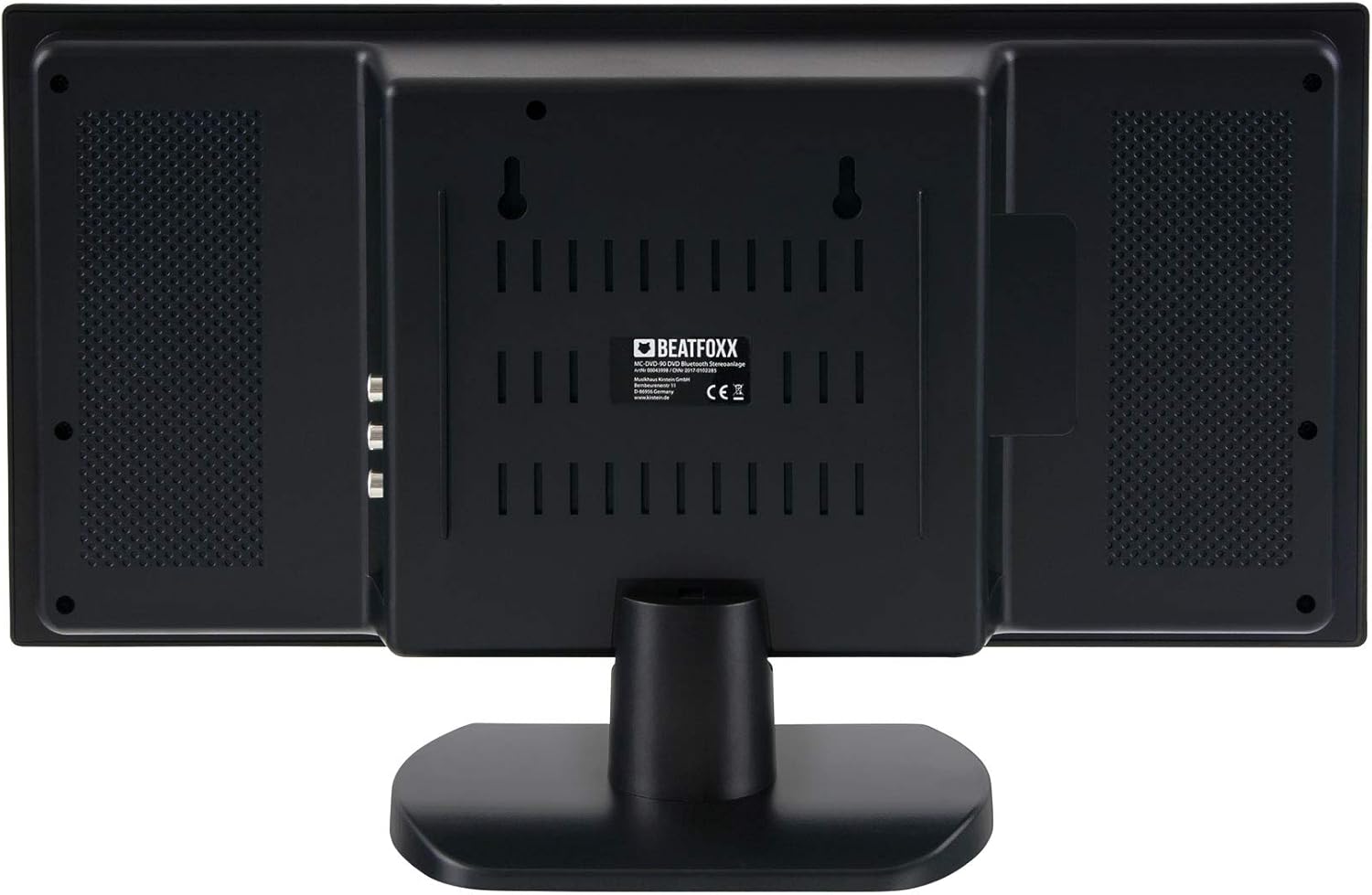
Image: Rear view of the Beatfoxx MC-DVD-90 stereo system, showing the various connection ports and wall-mounting points.
The rear panel houses all necessary input and output connections, including HDMI, composite video, stereo cinch line output, AUX input, FM antenna input, and the power input. It also features mounting points for wall installation.

Image: Side view of the Beatfoxx MC-DVD-90, highlighting the HDMI output and composite video (RCA) output ports.

Image: Side view of the Beatfoxx MC-DVD-90, showing the FM antenna input, 3.5mm AUX input, and the AC power input.
4.3 Remote Control

Image: Layout of the Beatfoxx MC-DVD-90 remote control, displaying various function buttons for comprehensive control.
The included remote control provides full functionality for operating the system from a distance. It allows control over power, display settings, mode selection, playback functions (play, pause, stop, skip, repeat, zoom, slow motion, resume), volume, radio tuning, and more. Ensure batteries (not included) are inserted correctly before use.
5. Setup
5.1 Placement
The Beatfoxx MC-DVD-90 offers flexible placement options:
- Freestanding: Use the included stand for stable placement on a flat surface such as a desk or shelf.
- Wall Mounting: The unit can be mounted on a wall using the integrated mounting points on the rear panel. Ensure appropriate wall anchors and screws are used for secure installation.

Image: The Beatfoxx MC-DVD-90 stereo system shown mounted on a wall, demonstrating its space-saving design.
5.2 Connections
Before connecting, ensure the unit is powered off and unplugged from the mains.
- HDMI Output: Connect an HDMI cable from the unit's HDMI OUT port to the HDMI input on your TV or display for high-quality video and audio transmission.
- Composite Video Output: If your TV does not have an HDMI input, connect the yellow RCA cable from the VIDEO OUT port on the unit to the video input on your TV.
- Stereo Cinch Line Output: Connect the red and white RCA cables from the L/R AUDIO OUT ports to an external amplifier or audio system if desired.
- AUX Input: Connect external audio devices (e.g., smartphone, MP3 player) to the 3.5mm AUX IN jack using a 3.5mm audio cable.
- FM Antenna: Connect the included FM antenna to the FM ANT jack for radio reception. Extend the antenna for better signal.
- Power Connection: After all other connections are made, connect the power adapter to the DC IN port on the unit and then plug it into a wall outlet.
6. Operating Instructions
6.1 Power On/Off
- Press the STANDBY button on the front panel or remote control to turn the unit on or off (to standby mode).
6.2 Source Selection
- Press the MODE button on the front panel or remote control repeatedly to cycle through available sources: DVD/USB/CARD, Bluetooth, FM/MW Radio, AUX.
6.3 DVD/CD Playback
- Select the DVD/USB/CARD source.
- Gently insert a DVD or CD into the vertical disc slot with the label side facing forward. The disc will be automatically pulled in.
- Playback should begin automatically. If not, press the PLAY/PAUSE button.
- Use the STOP, PLAY/PAUSE, and SKIP (forward/backward) buttons for control.
- The remote control offers advanced functions like ZOOM, SLOW MOTION, REPEAT, and RESUME.
6.4 USB/SD Playback
- Insert a USB flash drive into the USB slot or an SD card into the SD/MMC slot.
- Select the DVD/USB/CARD source. The system will automatically detect the media.
- Navigate through folders and files using the navigation buttons on the front panel or remote control.
- Supported formats include MP3, MPEG4, and JPEG.
6.5 Bluetooth Operation
- Select the Bluetooth source. The display will show "BT" or a similar indicator, and the unit will enter pairing mode.
- On your Bluetooth-enabled device (e.g., smartphone), search for available devices and select "Beatfoxx MC-DVD-90".
- Once paired, you can stream audio wirelessly from your device to the stereo system. The effective range is approximately 10 meters.
6.6 FM/MW Radio
- Select the FM/MW Radio source.
- Press the SCAN button on the front panel or remote control to automatically scan and store available stations.
- Use the CH+/- buttons to navigate through stored stations or manually tune.
- The PLL receiver allows for precise tuning and storage of up to 50 stations.
7. Maintenance
- Cleaning: Disconnect the power cord before cleaning. Use a soft, dry cloth to wipe the exterior of the unit. Do not use abrasive cleaners, waxes, or solvents.
- Disc Care: Handle discs by their edges. Keep them clean and free of scratches. Store discs in their cases when not in use.
- Ventilation: Regularly check that the ventilation openings are not blocked by dust or debris.
8. Troubleshooting
| Problem | Possible Cause | Solution |
|---|---|---|
| No power | Power cord not connected; power outlet faulty. | Ensure power cord is securely plugged in. Try a different outlet. |
| No sound | Volume too low; incorrect source selected; audio cables loose. | Increase volume. Select correct source. Check audio cable connections. |
| Disc not playing | Disc inserted incorrectly; disc is dirty or scratched; unsupported format. | Re-insert disc correctly. Clean disc. Try a different disc. Check supported formats. |
| Bluetooth not connecting | Device not in pairing mode; out of range; interference. | Ensure unit is in Bluetooth pairing mode. Move device closer. Reduce interference. |
| Poor radio reception | Antenna not extended; weak signal. | Fully extend the FM antenna. Try repositioning the antenna or the unit. |
9. Specifications
| Feature | Specification |
|---|---|
| Model | MC-DVD-90 |
| Power Output (RMS) | 2 x 3 Watts |
| Playable Formats | DVD, CD, MP3, MPEG4, DVD-R, DVD+R, DVD-RW, DVD+RW, CD-R, CD-RW, HDCD, VCD, SVCD, JPEG, WMA |
| Connectivity | USB, SD Card, Bluetooth, HDMI, Composite Video Out, Stereo Cinch Line Out, AUX In (3.5mm) |
| Bluetooth Range | Up to 10 meters |
| Radio Tuner | FM/MW PLL Receiver with 50 Station Memory |
| Display | Orange Illuminated LCD Screen |
| Supported Aspect Ratios | 16:9, 4:3 (Panscan and Letterbox) |
| Dimensions (H x W x D) with stand | 25 x 40 x 11 cm |
| Dimensions (H x W x D) without stand | 20 x 40 x 6 cm |
| Weight | Approx. 1.3 kg |
| Color | Black High Gloss |
10. Warranty and Support
This product comes with a standard manufacturer's warranty. Please refer to the warranty card included in your package for specific terms and conditions. For technical support, troubleshooting assistance, or warranty claims, please contact your retailer or the Beatfoxx customer service department. Keep your proof of purchase for warranty validation.
Related documentsMC-DVD-90

Ask a question about this manual
Ask about setup, troubleshooting, compatibility, parts, safety, or missing instructions. Manuals+ will review the question and use this page’s manual context to help answer it.