
1. Introduction
This manual provides essential information for the proper use and maintenance of your Beyution VR1 Replacement Remote Control. It is designed to be a direct replacement for various Vizio TV models, offering immediate functionality without complex setup procedures. Please read this manual thoroughly to ensure optimal performance and longevity of your remote control.
2. Product Overview
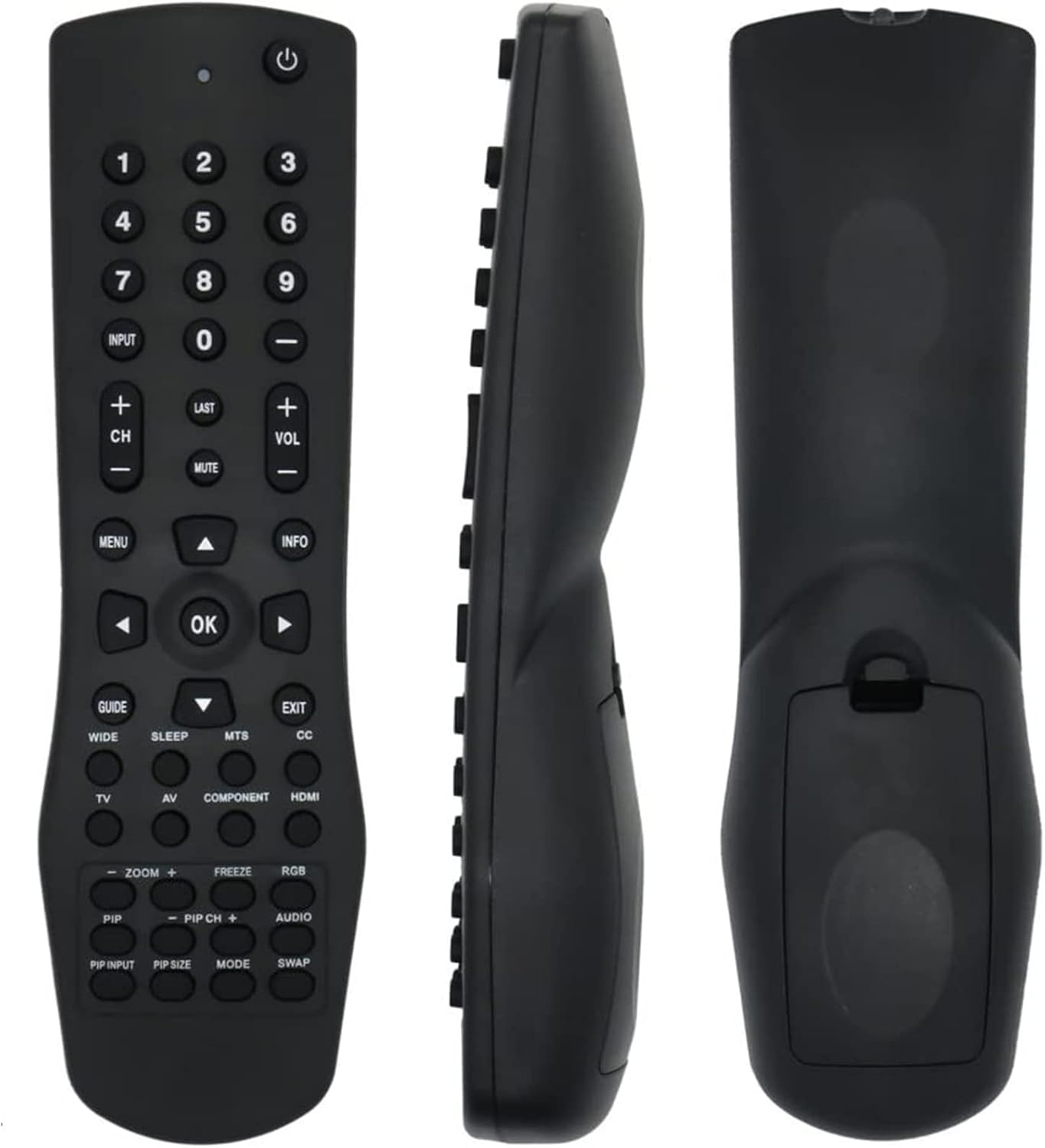
Image 1: Beyution VR1 Replacement Remote Control showing front, side, and back views. This image provides a comprehensive look at the remote's design and physical characteristics.
The Beyution VR1 is an infrared replacement remote control constructed from durable ABS plastic. It features an ergonomic design for comfortable handling and robust buttons for reliable operation. The remote operates via infrared technology, requiring a clear line of sight to the television's IR receiver. Its maximum effective distance is approximately 10 meters (33 feet).
3. Compatibility
This remote control is compatible with a wide range of Vizio TV models. A partial list of compatible models includes:
- VW32LHDTV10A, VW37LHDTV10A, VW37LHDTV20A, VW37LHDTV40A, VW42LHDTV10A
- VX37LHDTV10A, VX42LHDTV10A, VA22LFHDTV10T, VS42LFHDTV10A, JV50P
- VX52L, VX37L, VW22L, VU42L, VS42L, VA19L, L42, L37, L32
- GV47L, GV46L, GV42L, HDTV40A, VA19LHDTV10A, VA22LFHDTV10A, VO47LFHDTV10A
- VA19LHDTV10T, VA26LHDTV10T, VW22LHDTV10T, VW26LHDTV10F, VW26LHDTV20F
- VW32LHDTV40A, VX32LHDTV10A, VX32LHDTV20A, VX37LHDTV20A
If your specific Vizio TV model is not listed, please refer to the product packaging or contact customer support for further compatibility verification.
4. Setup
4.1 Battery Installation

Image 2: Rear view of the Beyution VR1 remote control with the battery cover removed, illustrating the battery compartment.
- Locate the battery compartment on the back of the remote control.
- Slide the battery cover downwards or press the latch and lift to open.
- Insert two (2) AAA batteries, ensuring the positive (+) and negative (-) terminals align correctly with the markings inside the compartment.
- Replace the battery cover by sliding it back into position until it clicks securely.
4.2 Initial Use
The Beyution VR1 Replacement Remote Control is designed for immediate use with compatible Vizio TV models. No programming or complex setup procedures are required. Once batteries are installed, the remote is ready to operate your television.
5. Operating Instructions

Image 3: Beyution VR1 Remote Control with labeled buttons and corresponding functions. This image details the layout and purpose of each control button.
Point the remote control directly at the infrared sensor on your Vizio TV. Press the desired button to perform the corresponding function:
- Power (⏻): Turns the TV on or off.
- Number Buttons (0-9): Directly select channels or input numerical values.
- INPUT: Selects the video input source (e.g., HDMI, AV).
- LAST: Returns to the previously viewed channel.
- VOL +/-: Adjusts the volume level.
- CH +/-: Changes channels sequentially.
- MUTE: Silences or restores the TV audio.
- MENU: Displays the main on-screen menu.
- INFO: Displays information about the current program or TV status.
- GUIDE: Accesses the Electronic Program Guide (EPG).
- EXIT: Closes the current menu or on-screen display.
- Navigation Buttons (Up, Down, Left, Right, OK): Used to navigate menus and confirm selections.
- SLEEP: Sets the sleep timer for automatic TV shutdown.
- CC (Closed Caption): Controls the caption decoder.
- TV: Selects the TV mode directly.
- AV: Selects the Audio/Video input.
- COMPONENT: Selects the Component video input.
- HDMI: Selects the HDMI input directly.
- WIDE: Adjusts the screen aspect ratio.
- MTS: Selects Multi-channel Television Sound options.
- PIP (Picture-in-Picture) Controls (PIP, PIP INPUT, PIP SIZE, PIP CH+, PIP CH-, MODE, SWAP): Manages Picture-in-Picture functions, if supported by your TV.
- ZOOM +/-: Zooms in or out on the picture.
- FREEZE: Pauses the current image on screen.
- RGB: Selects the RGB input.
- AUDIO: Selects the language track when multi-lingual tracks are available or selects the sound track on CDs.
6. Maintenance
6.1 Cleaning
To clean your remote control, use a soft, dry cloth. For stubborn dirt, slightly dampen the cloth with water or a mild, non-abrasive cleaner. Avoid using harsh chemicals, solvents, or abrasive materials, as these can damage the remote's surface or internal components.
6.2 Battery Replacement
Replace batteries when the remote's response becomes sluggish or stops working. Always replace both batteries at the same time with new AAA batteries. Do not mix old and new batteries, or different types of batteries, as this can lead to leakage or improper function. Dispose of used batteries according to local regulations.
6.3 Storage
Store the remote control in a cool, dry place away from direct sunlight, extreme temperatures, and high humidity. If the remote will not be used for an extended period, it is advisable to remove the batteries to prevent potential leakage and damage.
7. Troubleshooting
- Remote not responding:
- Ensure batteries are correctly installed with proper polarity.
- Replace old batteries with new AAA batteries.
- Check for any obstructions between the remote and the TV's infrared sensor.
- Ensure you are within the effective operating range (up to 10 meters).
- Specific buttons not working:
- Some advanced functions (e.g., certain PIP controls) may depend on your TV model's capabilities.
- If multiple buttons are unresponsive, try replacing the batteries.
- Remote appears damaged or defective:
- If the remote control is damaged upon receipt or does not function as expected, please contact customer support for assistance.
8. Specifications
| Model Number | VR1-F |
| Connectivity Technology | Infrared |
| Maximum Distance | 10 Meters (33 feet) |
| Material | ABS Plastic |
| Power Source | 2 x AAA Batteries (not included) |
| Product Dimensions | 7 x 5 x 2 inches (approximate) |
| Item Weight | 3 ounces (approximate) |
| Compatible Devices | Vizio Televisions |
9. Warranty and Support
9.1 Warranty Information
This Beyution VR1 Replacement Remote Control comes with a 1-year return policy. This warranty covers manufacturing defects and ensures that the product functions as intended under normal use. Please retain your proof of purchase for warranty claims.
9.2 Customer Support
For any questions, concerns, or assistance with your Beyution VR1 Replacement Remote Control, please do not hesitate to contact our customer support team. We are committed to providing a satisfactory response within 24 hours.
Contact information can typically be found on the product packaging or through the retailer where the item was purchased.