
1. Introduction
Thank you for choosing the Makita ML807 Rechargeable LED Work Light. This manual provides essential information for the safe and effective use of your work light. Please read this manual thoroughly before operation and retain it for future reference.
2. Safety Information
WARNING: Read all safety warnings and all instructions. Failure to follow the warnings and instructions may result in electric shock, fire, and/or serious injury.
General Safety
- Always wear appropriate personal protective equipment, such as safety glasses, when operating the work light.
- Do not expose the work light to rain or wet conditions. Water entering the light will increase the risk of electric shock.
- Do not operate the work light in explosive atmospheres, such as in the presence of flammable liquids, gases, or dust.
- Keep children and bystanders away while operating the work light. Distractions can cause you to lose control.
- Do not stare directly into the light source. This can cause serious eye injury.
Battery Safety
- Use only Makita 14.4V or 18V Lithium-Ion batteries with this work light. Use of any other batteries may create a risk of injury and fire.
- Do not short-circuit a battery pack.
- Do not store the battery pack where the temperature may reach or exceed 50°C (122°F).
- Do not incinerate the battery pack even if it is severely damaged or is completely worn out. The battery pack can explode in a fire.
- Dispose of used battery packs properly according to local regulations.
3. Product Overview
The Makita ML807 is a versatile rechargeable LED work light designed for various job site and outdoor applications. It features multiple lighting modes, a USB charging terminal, and a durable design.
Key Features
- Compatible with Makita 14.4V and 18V Lithium-Ion batteries (battery sold separately).
- Three-stage switch for selecting different illumination modes.
- Integrated USB charging terminal for charging mobile devices.
- Foldable and 360° rotatable metal hook for convenient hanging.
- Soft grip handle for enhanced comfort and control.

Figure 3.1: A full view of the Makita ML807 Rechargeable LED Work Light, showing its teal and black body, the cylindrical LED light source, and the integrated metal hook at the top. The base is designed to accept a Makita 14.4V or 18V battery (not included).
Component Identification

Figure 3.2: A line drawing diagram illustrating the components of the Makita ML807 work light. Labels point to the metal hook, lamp cover, main LED array (5 lights x 4 rows), sub LED (1 light), switch, USB terminal, USB switch, and battery (sold separately).
- Metal Hook
- Lamp Cover
- Main LED (20 lights)
- Sub LED (1 light)
- Power Switch
- USB Terminal
- USB ON/OFF Switch
- Battery (Sold Separately)
4. Setup
Battery Installation
- Ensure the work light is turned off before installing or removing the battery.
- Align the battery pack with the grooves in the work light's base.
- Slide the battery pack into the base until it clicks securely into place.
- To remove the battery, press the release button on the battery pack and slide it out of the base.
5. Operating Instructions
Powering On and Lighting Modes
The ML807 features a 3-stage switch to cycle through different lighting modes:

Figure 5.1: A diagram showing the three-stage lighting sequence of the Makita ML807. It illustrates the progression from 20 main LEDs on, to 10 main LEDs on (specifically the two rows opposite the switch), then to the single sub LED on, and finally off.
- Press the power switch once to activate the first mode: 20 Main LEDs On (Full Illumination).
- Press the power switch a second time to activate the second mode: 10 Main LEDs On (Half Illumination, specifically the two rows opposite the switch).
- Press the power switch a third time to activate the third mode: 1 Sub LED On (Flashlight Tip).
- Press the power switch a fourth time to turn the light Off.
Using the Metal Hook
The integrated metal hook can be used to hang the work light for hands-free operation.

Figure 5.2: A diagram demonstrating the functionality of the metal hook on the Makita ML807. It shows the hook being pulled out from its stored position and then rotating 360 degrees for versatile hanging options.
- To deploy the hook, pull it gently away from the light body.
- The hook can rotate 360 degrees, allowing you to position the light as needed.
- When not in use, fold the hook back into its stored position against the light body.
USB Charging Terminal
The ML807 includes a USB terminal for charging compatible electronic devices.
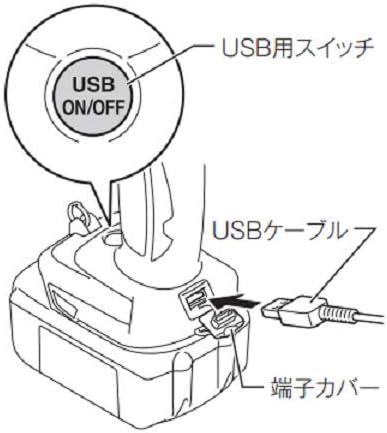
Figure 5.3: A diagram detailing the USB charging function of the Makita ML807. It shows a USB cable being inserted into the USB terminal, which is protected by a terminal cover. An inset circle highlights the "USB ON/OFF" switch.
- Open the terminal cover to access the USB port.
- Connect your device's USB charging cable to the USB terminal on the work light.
- Press the USB ON/OFF switch to activate the charging function. The switch will illuminate when active.
- The USB output will automatically turn off after approximately 30 minutes if no current is detected.
- After charging, disconnect the USB cable and close the terminal cover to protect the port from dust and moisture.
6. Maintenance
Cleaning
- Regularly clean the work light with a soft, dry cloth.
- Do not use harsh chemicals, solvents, or abrasive cleaners, as these can damage the plastic components.
- Ensure the battery terminals are clean and free of debris.
Storage
- Store the work light in a cool, dry place, away from direct sunlight and moisture.
- If storing for an extended period, remove the battery pack from the work light.
- Keep the work light and battery packs out of reach of children.
7. Troubleshooting
| Problem | Possible Cause | Solution |
|---|---|---|
| Light does not turn on. | Battery is not installed correctly or is depleted. | Ensure battery is fully inserted. Charge or replace battery. |
| USB device is not charging. | USB ON/OFF switch is off or battery is depleted. | Press the USB ON/OFF switch. Charge or replace battery. |
| Light output is dim. | Battery is low. | Charge or replace battery. |
8. Specifications
| Feature | Specification |
|---|---|
| Model Number | ML807 |
| Voltage | 14.4V / 18V (Battery Dependent) |
| Light Source | LED |
| Luminous Flux (20 lights) | 710 lm |
| Luminous Flux (10 lights) | 340 lm |
| Illumination (20 lights, 50cm) | 340 lx |
| Illumination (10 lights, 50cm) | 310 lx |
| Continuous Usage Time (14.4V 3Ah) | Approx. 4 hours (20 lights) |
| Continuous Usage Time (18V 3Ah) | Approx. 6.5 hours (20 lights) |
| Item Weight | 0.6 kg (1.32 lbs) (without battery) |
| Product Dimensions | Approx. 0.79 x 1.18 x 0.5 inches (20 x 30 x 12.7 mm) |
| Material | Metal (hook), Plastic (body) |
| Water Resistance Level | Not Water Resistant |
9. Warranty and Support
Makita products are manufactured under strict quality control standards. For information regarding warranty coverage, service, or technical support, please refer to the warranty card included with your product or visit the official Makita website. Keep your purchase receipt as proof of purchase.


