
Introduction
This manual provides comprehensive instructions for the installation, operation, and maintenance of the Truck-Lite Model 21251R LED Marker Light. Please read this manual thoroughly before installation and use to ensure proper function and safety. This LED marker light is designed for heavy-duty and commercial vehicle applications.
Safety Information
Always observe the following safety precautions:
- Disconnect vehicle battery before performing any electrical work.
- Ensure proper wiring connections to prevent short circuits or electrical fires.
- Wear appropriate personal protective equipment (PPE) such as safety glasses and gloves during installation.
- Do not modify the light unit. Unauthorized modifications may void the warranty and compromise safety.
- Ensure the mounting location is secure and does not obstruct other vehicle functions or safety devices.
Package Contents
Verify that all items are present in the package:
- 1 x Truck-Lite Model 21251R LED Marker Light (Red)
- (Mounting hardware and wiring connectors may be sold separately or included depending on specific kit.)
Setup and Installation
Follow these steps for proper installation:
- Choose Mounting Location: Select a flat, secure surface on the vehicle that complies with local regulations for marker light placement. Ensure the light will be visible and not obstructed.
- Prepare Mounting Surface: Clean the mounting surface thoroughly to ensure a strong attachment.
- Mount the Light: Secure the LED marker light using appropriate fasteners (not always included). Ensure the light is firmly attached and does not vibrate loose during vehicle operation.
- Wiring Connections:
- Identify the positive (+) and negative (-) wires from the vehicle's electrical system.
- Connect the positive wire from the light to the vehicle's positive power source (e.g., marker light circuit).
- Connect the negative wire from the light to a suitable vehicle ground point.
- Ensure all connections are secure and insulated to prevent corrosion and short circuits.
- Test Functionality: Reconnect the vehicle battery and test the marker light to ensure it illuminates correctly.
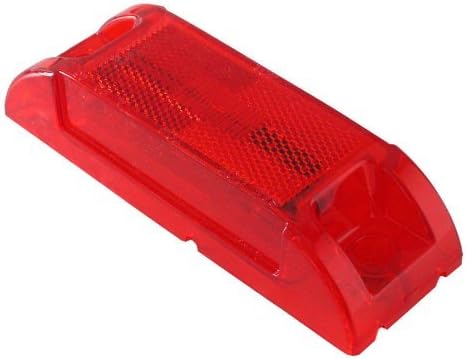
An image showing the red Truck-Lite Model 21251R LED Marker Light, a rectangular unit with a textured reflective surface and mounting points at each end. This illustrates the physical appearance of the light for installation reference.
Operating Instructions
The Truck-Lite Model 21251R LED Marker Light operates automatically when connected to the vehicle's marker light circuit. When the vehicle's lights are activated, the LED marker light will illuminate, providing enhanced visibility as required by regulations.
- Ensure the vehicle's lighting system is functioning correctly.
- Regularly check that the marker light is clean and free from obstructions.
Maintenance
The Truck-Lite Model 21251R LED Marker Light requires minimal maintenance due to its durable LED design. However, periodic checks are recommended:
- Cleaning: Clean the lens periodically with a soft cloth and mild soap and water to remove dirt, dust, or road grime. Avoid abrasive cleaners that could scratch the lens.
- Inspection: Regularly inspect the light for any physical damage, loose connections, or signs of corrosion. Ensure the mounting remains secure.
- Wiring: Check wiring for fraying, cuts, or loose connections, especially after prolonged use or exposure to harsh conditions.
Troubleshooting
| Problem | Possible Cause | Solution |
|---|---|---|
| Light does not illuminate. |
|
|
| Light flickers or is dim. |
|
|
Specifications
| Model | 21251R (Model 21) |
| Brand | Truck-Lite |
| Light Source Type | LED |
| Color | Red |
| Item Weight | 5 ounces (approx. 141.7 grams) |
| Product Dimensions | 1 x 1 x 1 inches (approx. 2.54 x 2.54 x 2.54 cm) |
| Specific Uses | Fleet and plant maintenance, heavy-duty and commercial vehicle marker light. |
Warranty and Support
For warranty information and technical support, please refer to the official Truck-Lite website or contact their customer service directly. Keep your purchase receipt as proof of purchase for any warranty claims.
Truck-Lite Contact Information:
- Website: www.truck-lite.com
- Customer Service: Refer to the website for contact numbers or email.