
Introduction
Thank you for choosing the Daewoo DFR-32210GNP Top Mount Refrigerator with Dispenser. This manual provides essential information for the safe installation, operation, and maintenance of your appliance. Please read it thoroughly before using your refrigerator and keep it for future reference.
Your Daewoo refrigerator is designed for convenience and efficiency, featuring a multi-purpose drawer, LED lighting, a Smart Cooling system, and a spacious rack for large bottles.
Safety Information
To reduce the risk of fire, electric shock, or injury when using your refrigerator, follow these basic precautions:
- Ensure the refrigerator is properly grounded.
- Do not use electrical appliances inside the food storage compartments unless they are of the type recommended by the manufacturer.
- Unplug the refrigerator before cleaning or performing any maintenance.
- Keep ventilation openings, in the appliance enclosure or in the built-in structure, clear of obstruction.
- Do not damage the refrigerant circuit.
- Do not store explosive substances such as aerosol cans with a flammable propellant in this appliance.
- Children should be supervised to ensure they do not play with the appliance.
Setup and Installation
Unpacking
Remove all packaging materials, including foam and adhesive tape. Inspect the refrigerator for any damage during transit. Keep packaging materials out of reach of children.
Placement
Choose a location with a solid, level floor that can support the weight of the refrigerator when fully loaded. Ensure adequate clearance around the appliance for proper ventilation (at least 5 cm on sides and back, 10 cm on top). Avoid direct sunlight, heat sources, or extreme cold. The refrigerator operates on 120 Volts.

Figure 1: Refrigerator dimensions. The unit measures 178 cm in height, 65 cm in width, and 72 cm in depth.
Leveling
Adjust the leveling feet at the bottom front of the refrigerator to ensure it is stable and level. This helps with door alignment and proper operation.
Electrical Connection
Plug the refrigerator into a dedicated, grounded 120 Volt AC outlet. Do not use extension cords or adapter plugs. Allow the refrigerator to stand for at least 2-3 hours before plugging it in to allow refrigerants to settle.
Initial Cleaning
Before storing food, clean the interior of the refrigerator with a mild detergent and warm water. Wipe dry with a soft cloth.
Operating Instructions
Temperature Control
Your refrigerator is equipped with a temperature control system. Refer to the control panel inside the fresh food compartment to adjust the temperature settings. Start with a medium setting and adjust as needed based on food load and ambient temperature.
Smart Cooling System
The Smart Cooling system ensures optimal temperature distribution throughout the refrigerator, maintaining consistent cooling and freshness for your food items.
LED Lighting
The interior of your refrigerator is illuminated with energy-efficient LED lighting, providing clear visibility of your stored items.
Multi-Purpose Drawer
Utilize the multi-purpose drawer for versatile storage. It can be used to store ice in the freezer compartment or other food items in the refrigerator section, adapting to your needs.
Large Bottle Rack
The specially designed rack allows for convenient storage of large bottles, maximizing space and organization within the refrigerator door.
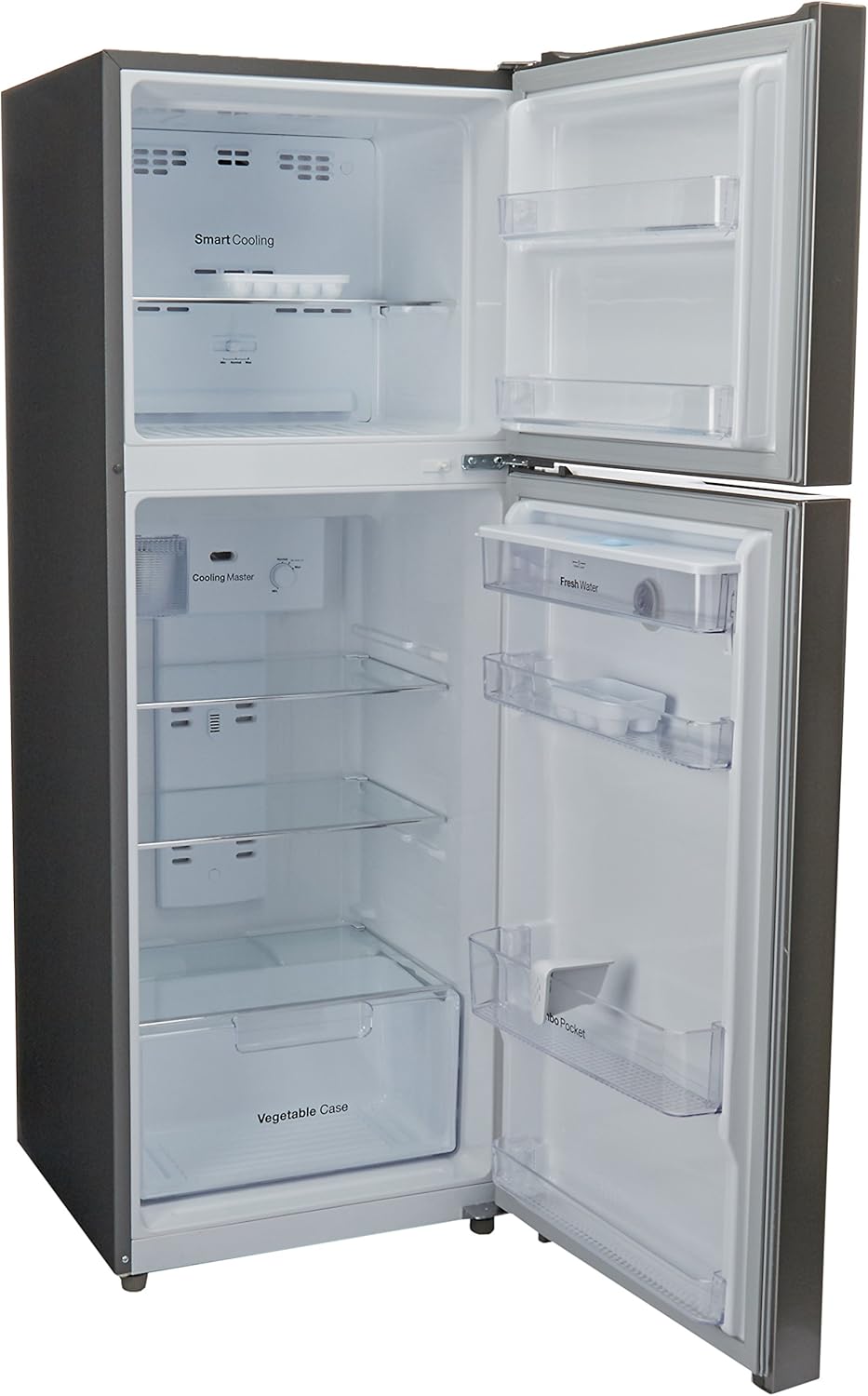
Figure 2: Interior layout of the Daewoo DFR-32210GNP refrigerator, highlighting storage features.
Water Dispenser
Your refrigerator includes a water dispenser for convenient access to chilled water. Refer to the specific instructions for filling and maintaining the water reservoir, typically located inside the fresh food compartment door.
Maintenance
Cleaning the Interior
Clean the interior regularly with a solution of mild detergent and warm water. Rinse thoroughly and dry with a soft cloth. Avoid abrasive cleaners or harsh chemicals.
Cleaning the Exterior
Wipe the exterior surfaces with a soft cloth dampened with mild detergent. For stainless steel finishes, use a specialized stainless steel cleaner. Do not spray water directly onto the refrigerator.
Door Seals
Clean the door gaskets regularly to ensure a tight seal. A dirty or damaged gasket can lead to inefficient cooling.
Automatic Defrost System
This refrigerator features an automatic defrost system, eliminating the need for manual defrosting of the freezer compartment. Ensure the drain hole is not blocked to allow defrost water to escape.
Power Outages
In case of a power outage, keep the refrigerator doors closed to maintain the internal temperature for as long as possible. Avoid opening the doors unnecessarily.
Troubleshooting
Before contacting service, check the following common issues:
- Refrigerator not cooling: Check if the power cord is securely plugged in, the circuit breaker has tripped, or the temperature control is set correctly.
- Unusual noises: Some operating noises are normal (e.g., refrigerant flowing, compressor starting/stopping). Ensure the refrigerator is level and not touching a wall.
- Water on floor: Check if the drain pan is correctly positioned or if the defrost drain is clogged.
- Excessive frost in freezer: Ensure the freezer door is closing completely and the door gasket is sealing properly.
If the problem persists after checking these points, please contact customer support.
Specifications
| Feature | Specification |
|---|---|
| Brand | Daewoo |
| Model Number | DFR-32210GNP |
| Configuration | Top Mount |
| Total Capacity | 11 Cubic Feet (322 Liters) |
| Fresh Food Capacity | 7 Cubic Feet |
| Freezer Capacity | 4 Cubic Feet |
| Dimensions (D x W x H) | 72 cm x 65 cm x 178 cm |
| Color | Silver |
| Number of Doors | 2 |
| Defrost System | Automatic |
| Voltage | 120 Volts |
| Cooling Method | Compressor |
| Number of Shelves | 4 |
| Door Orientation | Right |
| Annual Energy Consumption | 1000 Kilowatts |
| BEE Rating | 5 Star |
| Installation Type | Freestanding |
Warranty and Support
Your Daewoo DFR-32210GNP Refrigerator comes with a 3-year warranty. Please retain your proof of purchase for warranty claims.
For technical assistance, service, or warranty inquiries, please contact Daewoo customer support. Refer to the contact information provided with your purchase documentation or visit the official Daewoo website for your region.
