
Important Safeguards
When using electrical appliances, basic safety precautions should always be followed, including the following:
- Read all instructions before operating.
- Do not touch hot surfaces. Use handles or knobs.
- To protect against electrical shock, do not immerse cord, plugs, or appliance in water or other liquid.
- Close supervision is necessary when any appliance is used by or near children.
- Unplug from outlet when not in use and before cleaning. Allow to cool before putting on or taking off parts.
- Do not operate any appliance with a damaged cord or plug or after the appliance malfunctions or has been damaged in any manner. Return appliance to the nearest authorized service facility for examination, repair, or adjustment.
- The use of accessory attachments not recommended by the appliance manufacturer may cause injuries.
- Do not use outdoors.
- Do not let cord hang over edge of table or counter, or touch hot surfaces.
- Do not place on or near a hot gas or electric burner, or in a heated oven.
- Extreme caution must be used when moving an appliance containing hot oil or other hot liquids.
- Always attach plug to appliance first, then plug cord into the wall outlet. To disconnect, turn any control to "off", then remove plug from wall outlet.
- Do not use appliance for other than intended use.
- This appliance has a polarized plug (one blade is wider than the other). To reduce the risk of electric shock, this plug will fit in a polarized outlet only one way. If the plug does not fit fully in the outlet, reverse the plug. If it still does not fit, contact a qualified electrician. Do not modify the plug in any way.
- Ensure the unit is placed on a stable, level surface.
- Do not block ventilation openings.
- Use only induction-compatible cookware.
Product Overview
The Avantco IC3500 is a high-power countertop induction range designed for commercial use. It features a durable ceramic glass surface and precise temperature control for efficient cooking.
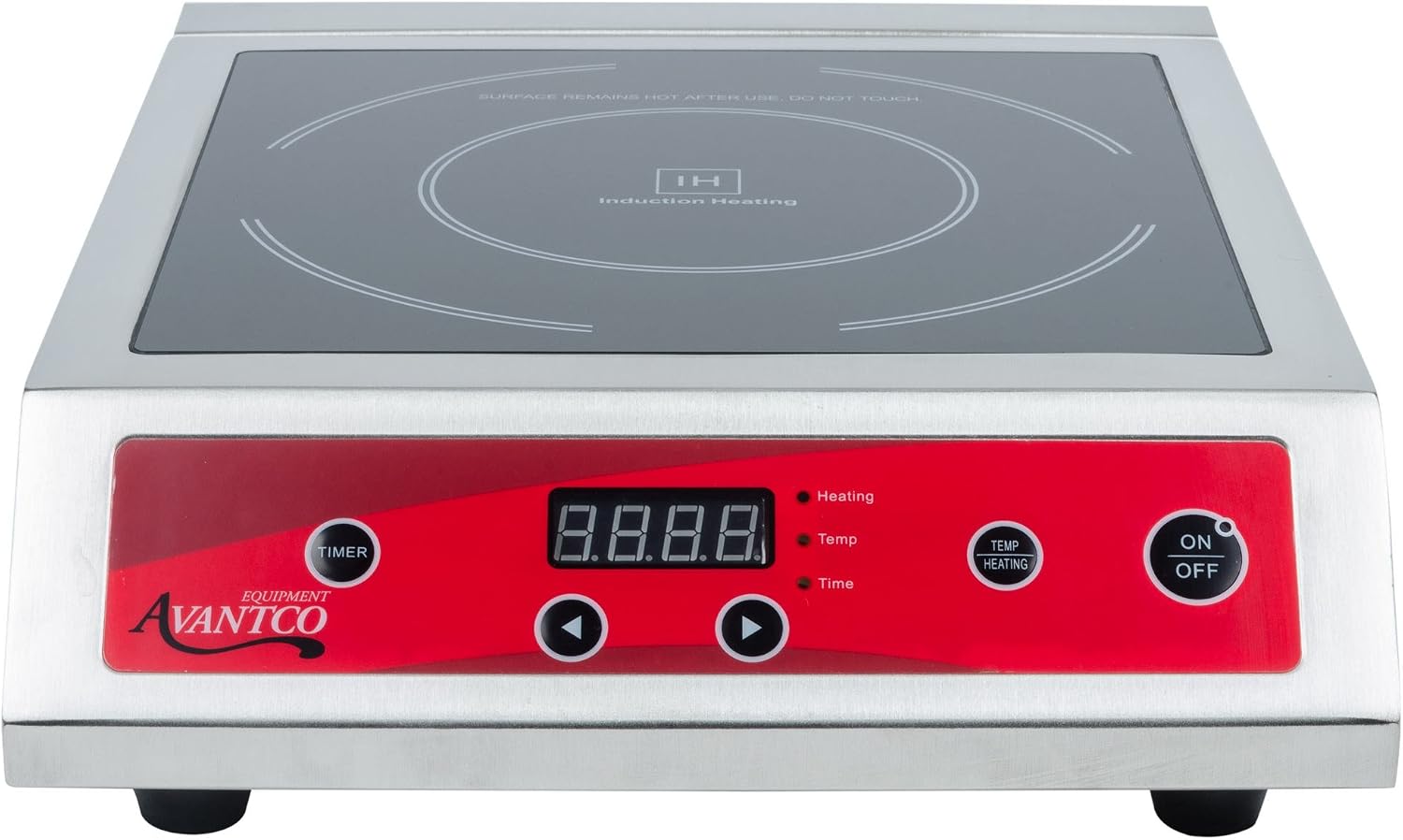
Figure 1: Front view of the Avantco IC3500 Countertop Induction Range. This image shows the sleek ceramic glass cooking surface, the red control panel with a digital display, and clearly labeled buttons for timer, temperature/heating, and power (ON/OFF).

Figure 2: Side and rear view of the Avantco IC3500 Countertop Induction Range. This perspective highlights the robust stainless steel casing, the ventilation grilles on the side for heat dissipation, and the power cord extending from the rear of the unit.
Specifications
| Feature | Detail |
|---|---|
| Model | IC3500 |
| Voltage | 208/240V |
| Wattage | 3500W |
| Material | Ceramic Glass (cooking surface), Stainless Steel (body) |
| Controls | Knob with Digital Control Panel |
| Heating Elements | 1 |
| Power Source | Induction |
| UPC | 703168628719 |
Setup and Installation
- Unpacking: Carefully remove the induction range from its packaging. Inspect for any shipping damage. Report any damage to your supplier immediately.
- Placement: Place the unit on a stable, level, heat-resistant surface. Ensure there is adequate ventilation around the unit. Do not place it directly against a wall or in an enclosed space. Maintain at least 4 inches of clearance on all sides.
- Power Connection: Ensure the electrical supply matches the specifications of the unit (208/240V, 3500W). Plug the unit into a dedicated, grounded electrical outlet. Do not use extension cords or multi-outlet adapters.
- Initial Cleaning: Before first use, wipe down the ceramic glass surface and the stainless steel body with a damp cloth. Do not use abrasive cleaners.
Operating Instructions
Compatible Cookware
The Avantco IC3500 requires induction-compatible cookware. Look for cookware with a flat bottom and made of magnetic materials such as cast iron, magnetic stainless steel, or enameled steel. Cookware with a diameter between 4.7 inches (12 cm) and 10.2 inches (26 cm) is recommended for optimal performance.
Basic Operation
- Power On: Place induction-compatible cookware with contents on the center of the ceramic glass surface. Press the ON/OFF button to turn the unit on. The display will illuminate.
- Select Mode: The unit typically defaults to a power level setting. Use the TEMP/HEATING button to toggle between temperature mode and power (heating) mode.
- Adjust Settings: Use the arrow buttons (▼ and ▲) to adjust the power level or temperature. Power levels typically range from 1 to 10, and temperature settings from 140°F to 460°F (60°C to 238°C).
- Set Timer (Optional): Press the TIMER button. Use the arrow buttons to set the desired cooking time. The timer can be set for up to 180 minutes. Once the timer expires, the unit will automatically shut off.
- Power Off: Press the ON/OFF button to turn the unit off when cooking is complete. The fan may continue to run for a short period to cool the unit.
Error Codes
If an error code appears on the display, refer to the following table:
| Code | Description | Solution |
|---|---|---|
| E0 | No cookware detected or incompatible cookware. | Place induction-compatible cookware on the unit. Ensure cookware is centered. |
| E1 | Internal temperature too high. | Allow unit to cool down. Ensure ventilation openings are not blocked. |
| E2 | Cookware temperature too high. | Remove cookware and allow it to cool. Reduce cooking temperature/power. |
| E3 | Voltage too low. | Check power supply. Ensure unit is connected to a stable 208/240V outlet. |
| E4 | Voltage too high. | Check power supply. Ensure unit is connected to a stable 208/240V outlet. |
| E5 | Internal circuit malfunction. | Unplug the unit, wait 5 minutes, then plug back in. If error persists, contact service. |
Cleaning and Maintenance
Regular cleaning and maintenance will ensure the longevity and optimal performance of your Avantco IC3500 induction range.
- Always Unplug: Before cleaning, always unplug the unit from the power outlet and allow it to cool completely.
- Ceramic Glass Surface: Wipe the ceramic glass surface with a damp cloth and mild detergent. For stubborn stains, use a non-abrasive ceramic cooktop cleaner. Do not use abrasive pads, scouring powders, or harsh chemicals.
- Stainless Steel Body: Clean the stainless steel exterior with a damp cloth and mild soap. Dry thoroughly with a soft cloth to prevent water spots.
- Ventilation Openings: Periodically check and clean the ventilation openings to ensure they are free from dust and debris. Use a soft brush or vacuum cleaner to remove any blockages.
- Do Not Immerse: Never immerse the unit in water or any other liquid.
- Storage: Store the unit in a dry, clean place when not in use.
Troubleshooting
If you encounter issues with your Avantco IC3500, refer to the following common troubleshooting steps before contacting service.
| Problem | Possible Cause | Solution |
|---|---|---|
| Unit does not turn on. | No power supply; Unit not plugged in; Circuit breaker tripped. | Check power cord connection. Ensure outlet has power. Reset circuit breaker if tripped. |
| Cookware not heating. | Incompatible cookware; Cookware not centered; Cookware too small/large. | Use induction-compatible cookware. Center cookware on the cooking zone. Ensure cookware diameter is within recommended range (4.7" - 10.2"). |
| Unit shuts off unexpectedly. | Overheating (E1/E2 error); Timer expired; Power fluctuation. | Allow unit to cool. Check for blocked ventilation. Reset timer if applicable. Check power supply stability. |
| Fan runs continuously after unit is off. | Normal cooling process. | This is normal. The fan will stop once the internal components have cooled sufficiently. |
| Display shows an error code (e.g., E0, E1, E2, E3, E4, E5). | Specific malfunction indicated by the code. | Refer to the "Error Codes" section in Operating Instructions for specific solutions. |
Warranty and Support
Avantco products are backed by a manufacturer's warranty. For specific warranty terms and conditions, please refer to the warranty card included with your product or visit the official Avantco website.
For technical support, service, or parts inquiries, please contact Avantco customer service. Have your model number (IC3500) and serial number ready when contacting support.
Avantco Customer Service:
- Contact information typically found on the manufacturer's website or product documentation.
- Online resources and FAQs may also be available.


