
Introduction
This manual provides instructions for the proper installation, operation, and maintenance of the Spectra Precision C59 Mounting Bracket. This bracket is designed to securely attach Spectra Precision HR320, HR350, and HR250 laser receivers to grade rods or other suitable poles, facilitating accurate laser level measurements on job sites.
Product Overview
The Spectra Precision C59 is a durable accessory engineered for compatibility with specific Spectra Precision laser receivers. Its robust construction ensures stability and reliability in various working conditions.

Figure 1: Side view of the Spectra Precision C59 Mounting Bracket, showing its overall form and attachment points.

Figure 2: Another side view of the C59 bracket, highlighting the receiver slot and pole clamp mechanism.
Setup and Installation
- Prepare the Receiver: Ensure your Spectra Precision HR320, HR350, or HR250 laser receiver is clean and free from debris.
- Attach Receiver to Bracket:
Align the laser receiver with the designated slot on the C59 mounting bracket. Gently slide the receiver into the bracket until it is seated securely. The bracket is designed for a snug fit to prevent movement during operation.

Figure 3: The C59 bracket with the receiver slot visible and the pole clamp mechanism partially open, ready for receiver insertion.
- Mount to Pole/Grade Rod:
Open the clamp mechanism on the C59 bracket by rotating the knob. Position the bracket onto your grade rod or pole at the desired height. Close the clamp by rotating the knob in the opposite direction until the bracket is firmly secured to the pole. Do not overtighten.
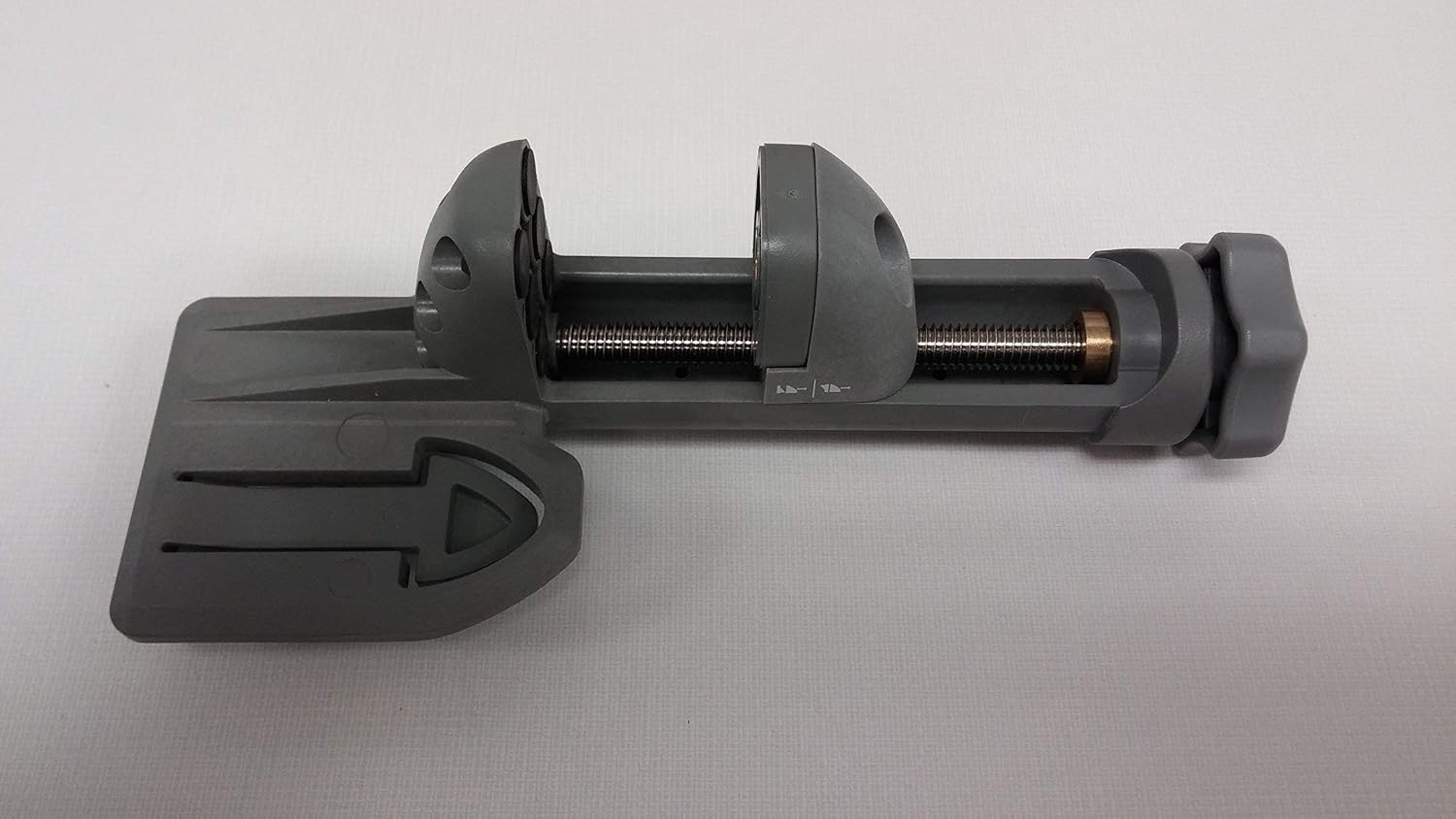
Figure 4: Top view of the C59 bracket, illustrating the threaded screw mechanism for clamping onto a pole.
- Verify Stability: After mounting, gently test the receiver and bracket assembly to ensure it is stable and does not wobble. Adjust the clamp tension if necessary.
Operating Instructions
Once the Spectra Precision C59 Mounting Bracket is securely installed with your laser receiver on a grade rod, you can proceed with your leveling tasks. The bracket holds the receiver at a consistent height, allowing for accurate readings as you move the grade rod across the work area.
- Ensure the laser receiver is powered on and correctly calibrated according to its own user manual.
- Position the grade rod with the attached receiver in the path of the laser beam.
- Adjust the height of the receiver on the grade rod as needed to detect the laser beam, using the bracket's secure clamping mechanism.
- Read the level indications on your laser receiver.
Maintenance
- Cleaning: Clean the bracket periodically with a damp cloth to remove dirt, dust, and debris. Avoid using harsh chemicals or abrasive materials that could damage the plastic.
- Inspection: Regularly inspect the clamping mechanism and the receiver slot for any signs of wear, damage, or loose components. Ensure the threaded screw operates smoothly.
- Storage: Store the C59 mounting bracket in a clean, dry environment when not in use. Protect it from extreme temperatures and direct sunlight to prolong its lifespan.
Troubleshooting
| Problem | Possible Cause | Solution |
|---|---|---|
| Bracket does not fit receiver. | Incorrect receiver model. The C59 is designed for HR320, HR350, and HR250. | Verify your laser receiver model. If it is not an HR320, HR350, or HR250, this bracket may not be compatible. For example, it is known not to fit the Spectra LL200. |
| Bracket is loose on the pole. | Clamp not tightened sufficiently or pole diameter is too small. | Ensure the clamping knob is fully tightened. Confirm the pole diameter is within the bracket's acceptable range. |
| Receiver is loose in the bracket. | Receiver not fully seated or bracket is damaged. | Push the receiver firmly into the bracket slot until it clicks or feels secure. Inspect the bracket for cracks or deformation. |
Specifications
- Model: C59
- Brand: Spectra Precision
- Compatible Receivers: HR320, HR350, HR250
- Material: Plastic
- Color: Grey
- Package Dimensions: 6.73 x 5.39 x 4.41 inches
- Item Weight: Approximately 9.14 ounces
- Date First Available: August 31, 2016
Warranty Information
Specific warranty details for the Spectra Precision C59 Mounting Bracket are typically provided at the point of purchase or included with the product packaging. Please refer to your purchase documentation or contact the authorized Spectra Precision dealer or the manufacturer directly for comprehensive warranty terms and conditions.
Customer Support
For technical assistance, replacement parts, or further inquiries regarding the Spectra Precision C59 Mounting Bracket, please contact your authorized Spectra Precision dealer or visit the official Spectra Precision website for support resources and contact information.
