
GRANBOARD Dash
GRANBOARD Dash Electronic Dartboard User Manual
Model: Dash
Introduction
Welcome to the GRANBOARD Dash Electronic Dartboard user manual. This document provides essential information for setting up, operating, maintaining, and troubleshooting your new electronic dartboard. Please read these instructions carefully to ensure optimal performance and longevity of your product.
The GRANBOARD Dash is designed to offer an engaging darting experience by connecting to your smart device via Bluetooth, providing a wide range of games and features.

Image Description: A clear, front-facing view of the GRANBOARD Dash Electronic Dartboard. The board features a standard dart target layout with black, white, red, and green segments, numbered from 1 to 20, and a red power indicator light at the bottom.
Safety Information
- Ensure the dartboard is securely mounted before use to prevent it from falling.
- Use only soft-tip darts with this electronic dartboard. Hard-tip darts can damage the board.
- Keep children and pets away from the throwing area during play.
- Do not expose the dartboard to excessive moisture or extreme temperatures.
- When replacing batteries, ensure correct polarity and use only the specified battery type (AA).
Setup
1. Unboxing and Included Components
Carefully remove all components from the packaging. The GRANBOARD Dash package includes:
- GRANBOARD Dash Electronic Dartboard
- 2 Sets of Soft-Tip Darts
- Hanging Instructions
- Mounting Screws
2. Powering the Dartboard
The GRANBOARD Dash operates on 2 AA batteries. Locate the battery compartment on the back of the dartboard, insert the batteries according to the polarity indicators, and close the compartment securely.
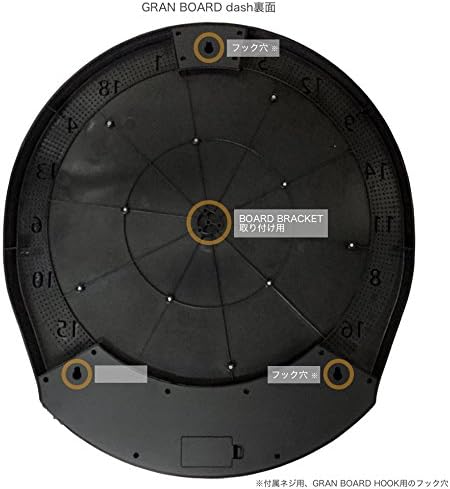
Image Description: A close-up view of the battery compartment on the rear of the dartboard, showing two AA batteries correctly placed. This illustrates how to power the device.
3. Mounting the Dartboard
The dartboard can be mounted directly to a wall using the included screws. Refer to the hanging instructions for detailed steps and recommended height. Ensure the mounting surface is sturdy enough to support the dartboard's weight (approximately 5.5 pounds).
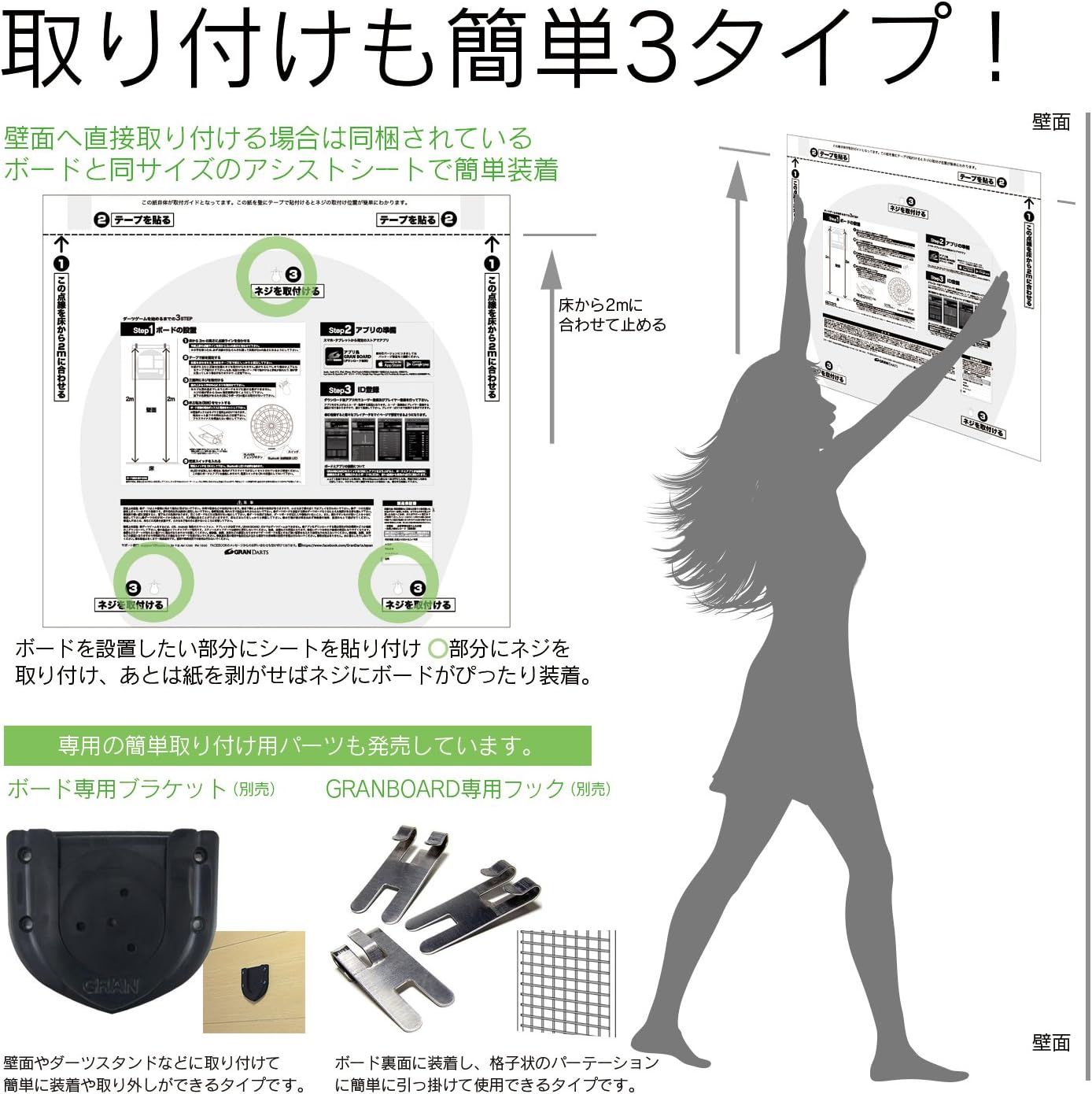
Image Description: The reverse side of the GRANBOARD Dash, highlighting the three designated screw holes for wall mounting. This image helps users identify where to secure the board.

Image Description: A visual guide demonstrating the process of mounting the dartboard. It shows a person positioning the board on a wall, with an overlay of instructions for using a template and screws to achieve proper installation. The image also displays optional mounting accessories like a board bracket and hooks.
4. App Installation and Initial Pairing
Download the official GRANBOARD app from your device's app store (available for iOS and Android). Ensure your device has Bluetooth 4.0 or later. Once installed, open the app and follow the on-screen prompts to pair with your GRANBOARD Dash. The dartboard will automatically connect when powered on and the app is open.
- iOS Compatibility: iOS7 or later, iPhone 4s or later, iPad 3 or later, iPod Touch 5th Generation or later.
- Android Compatibility: Android OS Ver 4.3 or later. Compatible with Google Nexus 5, Nexus 7 (2013 version or later), ASUS MeMo Pad 7 ME170C, MeMO Pad 7 ME176C. Not compatible with Amazon Fire devices.

Image Description: A tablet screen showing the GRANBOARD app's game interface, with a dartboard visible in the background. Blue waves emanate from the dartboard, symbolizing its Bluetooth connection to the tablet. Text on the image indicates "Bluetooth 4.0" and "automatic connection" to the app.
Operating Instructions
1. Game Modes
The GRANBOARD app offers a variety of game modes to choose from:
- 01 Games: Classic dart games like 301, 501, 701.
- Cricket: A strategic game involving closing numbers.
- Count-Up: Aim for the highest score within a set number of rounds.
- Half It: A game where you lose half your score if you miss a target.
- Animal Battle: Play against a computer opponent.
- New games are regularly added through free app upgrades.

Image Description: A dynamic collage showcasing multiple game screens from the GRANBOARD app, illustrating the diverse range of dart games available, such as 01 games, Cricket, and Count-Up. The image emphasizes that new games are added with free app updates.
2. Online Play
Connect with players worldwide through the app's online play feature. Challenge friends or compete against random opponents in real-time.

Image Description: A person is shown throwing a dart at the GRANBOARD Dash. In the foreground, a smartphone displays the GRANBOARD app interface, showing an online match in progress with another player's profile picture and scores. This illustrates the online multiplayer functionality.
3. Playing Against the Computer
The GRANBOARD Dash offers 9 levels of difficulty when playing against the computer, allowing you to adjust the challenge to your skill level.
4. Customization Features
Personalize your gaming experience within the app. You can customize game backgrounds, award videos, and hit sounds. New customization options are delivered via app updates.
5. Data Tracking and Statistics
The app tracks your play data, including ratings, practice statistics, and match statistics (up to the last 30 matches). This data is stored in the cloud and automatically synchronizes across devices, allowing you to monitor your progress and performance over time.

Image Description: A smartphone screen showing the GRANBOARD app's statistics interface. It displays a player's rating, detailed game statistics for 01 games and Cricket, and a graph illustrating performance trends. The image highlights the app's ability to track and display comprehensive play data, all managed in the cloud.

Image Description: A smartphone screen displaying the GRANBOARD app's awards graph. It shows a bar chart representing awards earned over different periods (Today, This Week, This Month), along with a list of specific awards like "3 IN THE BLACK" and "TON80". The image emphasizes real-time award tracking and cloud management of all records.

Image Description: A smartphone and a tablet are depicted side-by-side, both displaying the GRANBOARD app interface with player statistics. A cloud icon with arrows between the devices signifies that all data is saved to the cloud and automatically synchronizes across different devices.
Maintenance
1. Cleaning the Dartboard
Wipe the surface of the dartboard with a soft, dry cloth. Avoid using abrasive cleaners or excessive moisture, which can damage the electronic components.
2. Dart Care
Regularly inspect your soft-tip darts for wear and tear, especially the tips. Replace worn or broken tips to ensure proper dart registration and prevent damage to the dartboard segments.
3. Battery Replacement
When the dartboard's power indicator light dims or connectivity issues arise, it may be time to replace the AA batteries. Follow the instructions in the "Powering the Dartboard" section for safe replacement.
4. Impact Mat
The GRANBOARD Dash features an impact mat designed to increase durability and dampen sound, contributing to a quieter playing experience.
Troubleshooting
- Dartboard not connecting to app:
- Ensure the dartboard is powered on and batteries are fresh.
- Verify Bluetooth is enabled on your smart device.
- Confirm your device meets the minimum Bluetooth 4.0 requirement.
- Restart the app and/or your smart device.
- Try re-pairing the dartboard through your device's Bluetooth settings if necessary.
- Darts not registering or incorrect scores:
- Ensure darts are soft-tip and in good condition. Worn or broken tips may not register correctly.
- Check if any dartboard segments are stuck. Gently press on the segment to ensure it returns to its original position.
- The board registers darts that hit the outer scoring area. Ensure darts are hitting the board firmly.
- Avoid using darts heavier than 18 grams, as heavier darts may cause glitches or damage.
- App glitches or freezing:
- Ensure your app is updated to the latest version.
- Close and reopen the app.
- Restart your smart device.
- Accidental player switching:
- The red button on the dartboard can switch players. Be mindful of its location during play to avoid accidental presses.
Specifications
| Brand | GRANBOARD |
| Model | Dash |
| Product Dimensions | 21-3/4" (W) x 19-3/4" (H) x 1-3/16" (D) |
| Item Weight | 5.5 pounds |
| Material | Plastic (Body), Wood (Back Cover) |
| Power Source | 2 AA Batteries |
| Connectivity | Bluetooth 4.0 |
| Included Components | Dartboard, 2 Sets of Darts, Hanging Instructions, Screws |

Image Description: A front view of the GRANBOARD Dash dartboard with labels indicating measurements of 8.48 inches in height and 7.7 inches in width. These measurements may refer to a specific section or aspect of the board, while the full product dimensions are 21-3/4" (W) x 19-3/4" (H) x 1-3/16" (D).
Warranty and Support
For warranty information or technical support, please refer to the official GRANBOARD website or contact their customer service directly. Keep your purchase receipt as proof of purchase.
Related documentsDash


Ask a question about this manual
Ask about setup, troubleshooting, compatibility, parts, safety, or missing instructions. Manuals+ will review the question and use this page’s manual context to help answer it.