
Introduction
Thank you for purchasing the REMAX RB-H6 Desktop Bluetooth Speaker. This manual provides essential information for setting up, operating, and maintaining your speaker. Please read it thoroughly before use to ensure optimal performance and safety.
The REMAX RB-H6 is designed to deliver a superior audio experience with its 2.1 channel system, featuring powerful bass, surround stereo sound, and 3D audio capabilities. It offers versatile connectivity options including Bluetooth 4.0, NFC, and AUX input, along with a convenient USB port for charging your mobile devices.
Safety Information
- Do not expose the speaker to extreme temperatures, humidity, or direct sunlight.
- Avoid dropping or subjecting the speaker to strong impacts.
- Do not disassemble or attempt to repair the speaker yourself. Refer all servicing to qualified personnel.
- Keep the speaker away from water and liquids. While listed as waterproof, this typically refers to splash resistance for electronic devices of this type, not submersion.
- Use only the provided power adapter to prevent damage.
- Clean the speaker with a soft, dry cloth. Do not use abrasive cleaners or solvents.
Package Contents
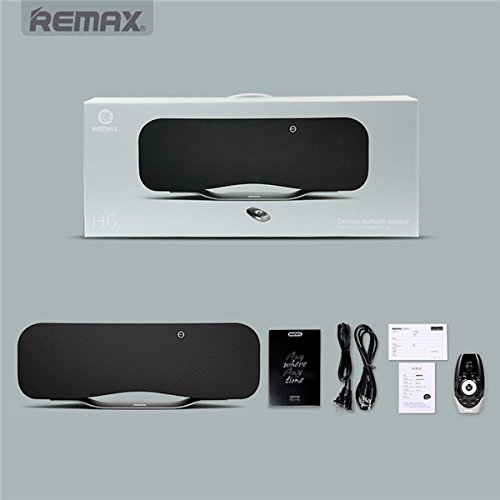
Image: Contents of the REMAX RB-H6 speaker package.
This image displays the REMAX RB-H6 speaker along with its accessories, including the remote control, power adapter, and user manual, as they would appear when unboxed.
Please check the package for the following items:
- REMAX RB-H6 Desktop Bluetooth Speaker
- Remote Control
- Power Adapter (100-240V 50/60Hz)
- User Manual
Product Overview

Image: Front view of the REMAX RB-H6 Desktop Bluetooth Speaker.
This image showcases the sleek black design of the REMAX RB-H6 Desktop Bluetooth Speaker from the front.

Image: Internal speaker configuration.
An internal diagram illustrating the speaker's 2.1 channel audio system, featuring two 6W full-range drivers (left and right) and one 45W heavy bass driver for rich sound.

Image: REMAX RB-H6 features overview.
The REMAX RB-H6 speaker displayed with icons highlighting its key functionalities: Music playback, Remote control, HiFi audio, USB charging, AUX input, NFC, and Bluetooth 4.0 connectivity.
The REMAX RB-H6 speaker features a sophisticated design with intuitive controls. Key components include:
- Front Panel: Speaker grille, status indicator.
- Rear Panel: Power input, AUX interface, USB charging port.
- Top Panel: NFC touch area (if applicable, based on image).
- Remote Control: Power, Mute, Pair, Mode, Volume, Track Skip, Call Answer/Reject buttons.
Setup
1. Power Connection
- Connect the provided power adapter to the power input port on the rear of the REMAX RB-H6 speaker.
- Plug the power adapter into a standard electrical outlet (100-240V, 50/60Hz).
- Press the power button on the speaker or the remote control to turn on the device.
Operating Instructions
1. Bluetooth Pairing
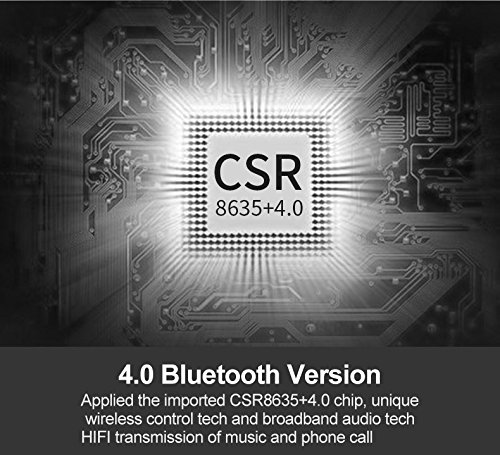
Image: Bluetooth 4.0 Chip.
A technical diagram highlighting the integrated CSR8635+4.0 chip, which enables advanced wireless control and high-fidelity audio transmission for music and phone calls.
- Ensure the speaker is powered on.
- The speaker will automatically enter Bluetooth pairing mode, indicated by a flashing LED light (refer to speaker's LED indicator guide for specific patterns).
- On your mobile device (smartphone, tablet, computer), enable Bluetooth and search for available devices.
- Select "REMAX RB-H6" from the list of found devices.
- Once paired, the LED indicator will become solid, and you will hear a confirmation tone.
- The effective Bluetooth transmission distance is approximately 10 meters (33 feet).
2. NFC Connection (Near Field Communication)
For devices with NFC capability:
- Ensure NFC is enabled on your mobile device.
- Gently tap your NFC-enabled device to the NFC area on the speaker (usually indicated by an NFC logo).
- Your device will automatically connect to the speaker via Bluetooth.
3. AUX Input

Image: AUX Interface.
A detailed view of the rear panel, showing the AUX interface, compatible with 3.5mm audio devices like computers, mobile phones, and MP3 players.
To connect devices without Bluetooth:
- Connect one end of a 3.5mm audio cable (not included) to the AUX interface on the speaker.
- Connect the other end to the headphone jack or audio output of your device (e.g., computer, MP3 player).
- The speaker will automatically switch to AUX mode, or you may need to select it using the "Mode" button on the remote control.
4. Remote Control Operation

Image: Remote Control and Hands-Free Call.
This image displays the remote control for the REMAX RB-H6 speaker, demonstrating its ability to manage music playback, volume, and hands-free calls via Bluetooth connection, with a smartphone shown for context.
The included remote control allows convenient operation of the speaker:
- Power Button: Turns the speaker on/off.
- Mute Button: Mutes/unmutes the audio.
- Pair Button: Initiates Bluetooth pairing mode.
- Mode Button: Switches between input modes (Bluetooth, AUX).
- Volume Up/Down: Adjusts the speaker volume.
- Previous/Next Track: Skips to the previous or next song (in Bluetooth mode).
- Play/Pause: Plays or pauses audio (in Bluetooth mode).
- Call Answer/Reject: Manages incoming calls when connected via Bluetooth.
5. Hands-Free Calling
With the built-in microphone, you can use the speaker for hands-free calls when connected via Bluetooth:
- When a call comes in, the speaker will ring.
- Press the "Call Answer" button on the remote control to answer the call.
- Speak towards the speaker for clear communication.
- Press the "Call Reject" or "End Call" button on the remote control to end the call.
6. Charging External Devices
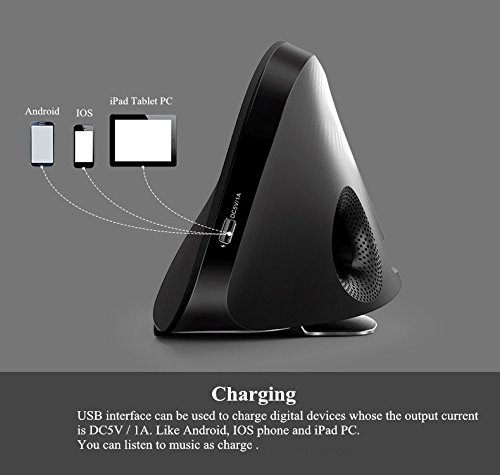
Image: USB Charging for External Devices.
This illustration demonstrates the speaker's USB port, which can be used to charge Android, iOS smartphones, and tablet PCs with a 5V/1A output, allowing you to listen to music while charging.
The REMAX RB-H6 features a USB output port (5V/1A) that allows you to charge your compatible mobile devices:
- Connect your smartphone or tablet's USB charging cable to the USB output port on the speaker.
- Ensure the speaker is powered on.
- Your device will begin charging. You can continue to listen to music while charging.
Maintenance
- Cleaning: Use a soft, dry, lint-free cloth to clean the surface of the speaker. Do not use liquid cleaners, sprays, or solvents.
- Storage: When not in use for extended periods, store the speaker in a cool, dry place, away from direct sunlight and extreme temperatures.
- Handling: Handle the speaker with care. Avoid dropping it or exposing it to strong vibrations.
Troubleshooting
| Problem | Possible Cause | Solution |
|---|---|---|
| No power | Power adapter not connected or faulty outlet. | Ensure the power adapter is securely connected to the speaker and a working electrical outlet. |
| No sound | Volume too low; incorrect input mode; device not paired (Bluetooth); AUX cable not connected. | Increase volume on speaker and connected device. Press "Mode" button to select correct input. Re-pair Bluetooth device. Check AUX cable connection. |
| Bluetooth connection unstable or failing | Device too far; interference; pairing issue. | Move device closer to speaker (within 10m). Avoid obstacles. Disconnect and re-pair the Bluetooth device. Turn off other Bluetooth devices nearby. |
| Remote control not working | Batteries low or depleted; line of sight blocked. | Replace remote control batteries. Ensure there are no obstructions between the remote and the speaker's sensor. |
| Cannot charge external device via USB | Speaker not powered on; cable faulty; device incompatible. | Ensure the speaker is powered on. Try a different USB cable. Verify your device is compatible with 5V/1A charging. |
Specifications
| Model Name | REMAX RB-H6 |
| Speaker Type | Desktop Bluetooth Speaker, Surround Sound, 3D |
| Audio Output | 2.1 Channel (2 x 6W full-range, 1 x 45W bass) |
| Total Consumed Power | 50W |
| Bluetooth Version | 4.0 (CSR8635+4.0 chip) |
| Bluetooth Transmission Distance | ≤10 meters |
| Connectivity | Bluetooth, NFC, AUX (3.5mm), Micro USB (for speaker connectivity, not charging) |
| USB Output (for charging external devices) | 5V/1A |
| Input Power | 100-240V ~ 50/60Hz |
| Microphone | Built-in (for hands-free calls) |
| Control Method | Remote Control |
| Compatible Devices | Android & iOS smartphones/tablets, computers, MP3 players |
| Dimensions (L x W x H) | 59 x 23 x 22 cm (approx. 23.2 x 9.1 x 8.7 inches) |
| Item Weight | 4.53 kg (approx. 9.99 lbs) |
| Material | Plastic |
| Water Resistance Level | Waterproof (Note: For a desktop speaker, this typically implies splash resistance, not submersion.) |
Warranty and Support
REMAX products are manufactured to the highest quality standards. For information regarding warranty coverage, technical support, or service, please refer to the warranty card included in your package or contact your local REMAX distributor or customer service.
Please retain your proof of purchase for warranty claims.


