
1. Product Overview
This manual provides essential information for the safe and efficient use of your Superer 33W Portable AC Charger. This charger is designed to provide reliable power to compatible Asus Chromebook models.

Image: The Superer 33W Portable AC Charger, showcasing its compact design and integrated cable.
2. Safety Information
Your safety is paramount. Please read and follow all safety instructions carefully.
- Do not expose the charger to liquids or extreme temperatures.
- Do not disassemble or attempt to repair the charger.
- Ensure the charger is used with compatible devices only.
- Unplug the charger during lightning storms or when unused for long periods.

Image: This charger is UL Listed, FCC approved, and CE marked, indicating compliance with high safety and quality standards.
This product is UL Listed, meaning it has passed UL safety tests for high-level electronic safety. It is also FCC approved, meeting regulated limits for ionizing radiation, and carries a CE marking, indicating compliance with EU safety, health, and environmental protection requirements.
3. Compatibility
This Superer 33W AC Charger is specifically designed for the following Asus Chromebook models:
- Asus Chromebook C200 Series
- Asus Chromebook C200M Series
- Asus Chromebook C200MA Series (C200MA-DS01, C200MA-DS02, C200MA-EDU, C200MA-EDU2)
- Asus Chromebook C202SA Series
- Asus Chromebook C202S Series
- Asus Chromebook C202 Series
The charger features a round connector tip. Please verify your device's charging port type before use.

Image: A close-up view of the charger's round tip connector, indicating the compatible port shape.

Image: A compatibility chart illustrating that 19V, 1.75A, 33W specifications are compatible with this charger.
4. Setup
- Unpack the Charger: Carefully remove the AC adapter and power cord from its packaging.
- Connect the Power Cord: If the power cord is separate, connect it firmly to the AC adapter unit.
- Plug into Wall Outlet: Insert the AC adapter's plug into a standard wall power outlet (100-240V, 50-60Hz).
- Connect to Laptop: Insert the round connector tip into your Asus Chromebook's charging port.
5. Operating Instructions
Once connected, the charger will automatically begin supplying power to your laptop. The laptop's charging indicator light should illuminate, confirming that it is receiving power.
- The charger provides a consistent and stable power supply for your laptop.
- It is designed for continuous use during operation or for charging the laptop's battery.

Image: The Superer AC charger plugged into a wall outlet, providing power to a laptop, demonstrating consistent power supply.
6. Maintenance
- Cleaning: Disconnect the charger from the power outlet and your laptop before cleaning. Use a soft, dry cloth to wipe the surface. Do not use liquid cleaners.
- Storage: When not in use, store the charger in a cool, dry place. Avoid tightly winding the cable to prevent damage. The included 2.3M (7.5Ft) power cord can be neatly wrapped for portability.
- Inspection: Periodically inspect the cable and adapter for any signs of damage, such as fraying or exposed wires. Discontinue use if damage is found.
7. Troubleshooting
| Problem | Possible Cause | Solution |
|---|---|---|
| Laptop not charging | Loose connection, incompatible device, faulty outlet | Ensure all connections are secure. Verify laptop model compatibility. Try a different wall outlet. |
| Charger feels hot | Normal operation, excessive load, poor ventilation | A slight warmth is normal. Ensure adequate ventilation around the charger. If excessively hot, discontinue use and contact support. |
| Intermittent charging | Damaged cable/connector, unstable power source | Check cable for damage. Ensure the power outlet is stable. |
If troubleshooting steps do not resolve the issue, please contact Superer customer support.
8. Specifications
- Model Number: ADP190175UA
- Input: 100-240V ~ 50-60Hz
- Output: 19V 1.75A 33W
- Connector Type: Round Connector
- Power Cord Length: 2.3M (7.5Ft)
- Product Dimensions: 2.37 x 2.37 x 1.06 inches
- Item Weight: 4.8 ounces
- Special Features: Overcharge Protection, Robust and Drop-Proof, Short Circuit Protection
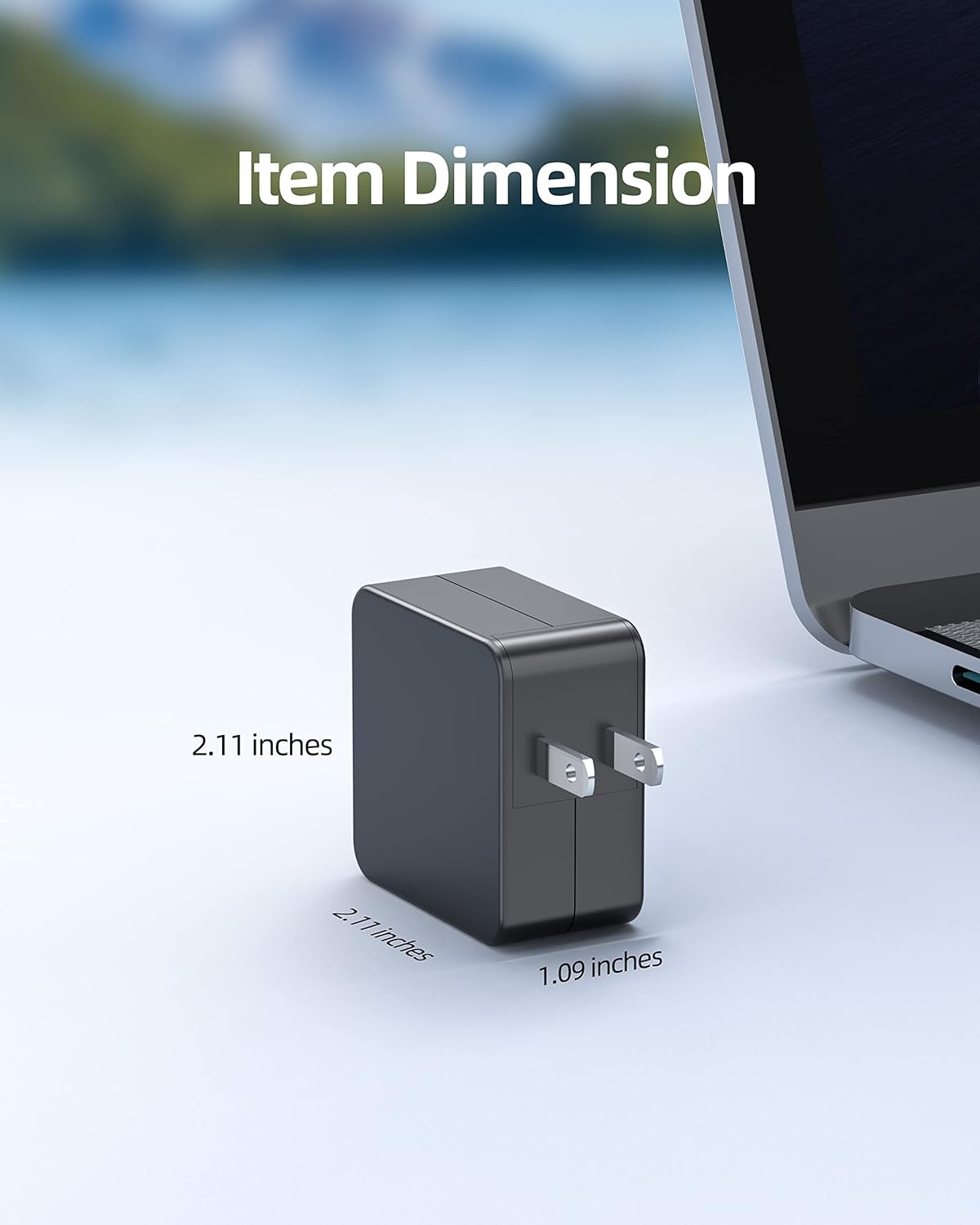
Image: The Superer AC charger displaying its compact dimensions for easy portability.
9. Warranty and Support
Superer provides comprehensive after-sales support for your product.
- 30-Day Replacement or Return: This product is eligible for replacement or returns within 30 days of purchase.
- 12-Month Guarantee: The manufacturer provides an additional 12-month guarantee for replacement service.

Image: An illustration detailing the 12-month replacement service and 30-day refund policy, highlighting customer support.
For any inquiries or support needs, please refer to the contact information provided with your purchase or visit the official Superer website.