
WAC Lighting 9000-MTI-WT
WAC Landscape Lighting Mechanical Timer
Model: 9000-MTI-WT
Product Overview
The WAC Landscape Lighting Mechanical Timer (Model 9000-MTI-WT) is designed to provide precise control over the duration and time of day that power is supplied to your landscape lighting system or other connected electronics. This timer is primarily intended for use with WAC Landscape Lighting magnetic power supplies but can also be installed and used with any standard 120V electrical outlet.

Image: Front view of the WAC Landscape Lighting Mechanical Timer, showing the central dial and the ON/OFF switch at the top.
Important Safety Information
- This device operates on 120 Volts. Ensure proper electrical safety precautions are followed during installation and use.
- Always check and comply with your local electrical codes and regulations before installing or using this product.
- The timer is UL & cUL 1838 and IP65 Rated for Wet Locations, ensuring suitability for outdoor landscape lighting applications.
Setup and Installation
The WAC Mechanical Timer features a simple plug-and-play design for quick and easy installation.
- Identify the appropriate WAC Landscape Lighting power supply. Compatible power supplies include 75W (SKU # 9075-TRN-SS), 150W (SKU # 9150-TRN-SS), 300W (SKU # 9300-TRN-SS), and 600W (SKU # 9600-TRN-SS) sizes.
- Locate the designated timer receptacle on your WAC Landscape Lighting power supply.
- Carefully plug the Mechanical Timer into the power supply's timer receptacle. Ensure a secure connection.
- Alternatively, for standalone use, plug the timer directly into any standard 120V electrical outlet.
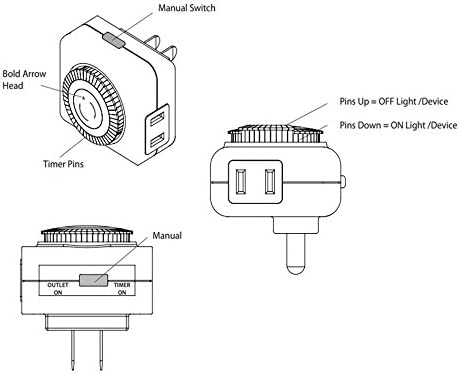
Image: Technical diagram illustrating the manual switch, timer pins, and the function of pins (up for OFF, down for ON) on the mechanical timer.
Operating Instructions
The mechanical timer allows you to set specific ON/OFF times for your connected devices.
- Set Local Time: Rotate the outer dial of the timer until the current local time aligns with the bold arrow head indicator. The dial is marked with 24 hours (1-12 AM/PM).
- Program ON/OFF Times: The timer features small pins around the outer dial. Each pin represents a 30-minute increment.
- Pins Down: Push the pins down for the time periods you want the connected device or lighting system to be ON.
- Pins Up: Leave the pins up for the time periods you want the connected device or lighting system to be OFF.
- Manual Override Switch: The timer includes a manual switch located at the top. This switch has three positions:
- "TIMER ON": The timer will operate according to the programmed ON/OFF pin settings.
- "OUTLET ON": The connected device will remain continuously ON, overriding the timer settings.
- "TIMER OFF": The connected device will remain continuously OFF, overriding the timer settings.
For example, to turn on lights from 6 PM to 11 PM, push down all pins corresponding to the 6 PM, 6:30 PM, ..., 10:30 PM, 11 PM segments on the dial.
Maintenance
The WAC Mechanical Timer requires minimal maintenance. Periodically inspect the timer for any visible damage or wear. Ensure the pins move freely and the dial rotates smoothly. Keep the timer clean and free from dust and debris. Do not attempt to disassemble the unit.
Troubleshooting
- Device not turning ON/OFF as programmed:
- Verify the manual override switch is set to "TIMER ON".
- Check that the current local time is correctly aligned with the bold arrow head on the dial.
- Ensure the pins for the desired ON/OFF times are correctly pushed down (ON) or left up (OFF).
- Confirm the timer is securely plugged into a live power source or power supply.
- Timer dial not rotating:
- Ensure the timer is receiving power.
- Check for any obstructions preventing the dial from rotating.
Specifications

Image: Diagram showing the approximate dimensions of the WAC Mechanical Timer, indicating it is 3 inches by 3 inches by 3 inches.
| Feature | Detail |
|---|---|
| Model Number | 9000-MTI-WT |
| Brand | WAC Lighting |
| Style | Mechanical Timer |
| Color | White |
| Material | Plastic |
| Finish Type | Powder Coated |
| Power Source | Corded Electric |
| Voltage | 120 Volts |
| Item Weight | 2.72 ounces (0.17 Pounds) |
| Product Dimensions | 3 x 3 x 3 inches |
| Mounting Type | Protruding |
| Certifications | EPA, Energy Star, FCC, UL, cUL |
| Usage Rating | UL1838 for Damp Locations |
| UPC | 790576395982 |
Warranty Information
The WAC Landscape Lighting Mechanical Timer comes with a warranty of 5 years for functional components and 2 years for the finish. Please retain your proof of purchase for warranty claims.
Customer Support
For further assistance, technical support, or inquiries regarding your WAC Landscape Lighting Mechanical Timer, please visit the official WAC Lighting store or website. You can find more information and contact details at: WAC Lighting Store on Amazon.
Related documents9000-MTI-WT


Ask a question about this manual
Ask about setup, troubleshooting, compatibility, parts, safety, or missing instructions. Manuals+ will review the question and use this page’s manual context to help answer it.