
TP-Link URC1745
Total Control URC1745 Universal Remote Control
User Manual
Introduction
The Total Control URC1745 is a versatile universal remote control designed to simplify your home entertainment experience. This single remote can control up to four different devices, including your TV, Set Top Box, DVD/Blu-ray player, and VCR. Its intuitive design and comprehensive functionality allow for seamless operation of your connected devices.
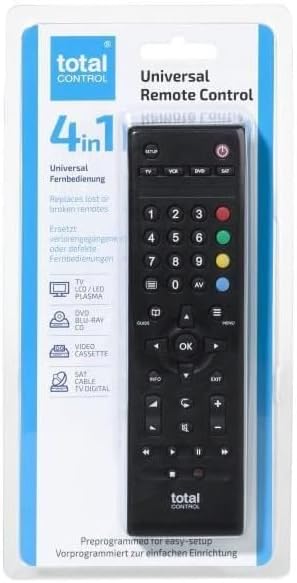
Image: The Total Control URC1745 Universal Remote Control displayed in its retail packaging, highlighting its 4-in-1 capability.
Setup
Before using your Total Control URC1745 remote, you will need to install batteries and program it to control your specific devices.
1. Battery Installation
- Locate the battery compartment on the back of the remote control.
- Slide open the battery cover.
- Insert two (2) AAA batteries, ensuring the correct polarity (+ and -) as indicated inside the compartment.
- Close the battery cover securely.
2. Device Programming
The URC1745 remote can be programmed using a direct code entry method or an automatic search function. Refer to the comprehensive instructions included in your product packaging for specific codes and detailed programming steps for your TV, Set Top Box, DVD/Blu-ray player, and VCR.
- Code Entry: If you know the specific code for your device's brand, you can enter it directly to program the remote.
- Automatic Search: If you do not know the code, the remote can perform an automatic search to find the correct code for your device.

Image: Close-up view of the Total Control URC1745 remote control, displaying its various buttons for device selection, navigation, and playback.
Operating the Remote
Once programmed, operating your devices with the URC1745 is straightforward.
Device Selection
To control a specific device, press the corresponding device button at the top of the remote (TV, VCR, DVD, SAT). The remote will then send commands to the selected device.
Basic Functions
- Power Button: Turns the selected device on or off.
- Number Buttons (0-9): For direct channel entry or menu navigation.
- Volume Up/Down: Adjusts the volume of the selected audio device (typically TV).
- Channel Up/Down: Changes channels on the selected TV or Set Top Box.
- Navigation Pad (Up/Down/Left/Right/OK): Used for menu navigation and selection.
- Playback Controls (Play, Pause, Stop, Rewind, Fast Forward): Controls playback on DVD/Blu-ray players or VCRs.
- Menu/Guide/Info/Exit: Accesses device menus, program guides, information displays, and exits current screens.
Maintenance
Proper care will ensure the longevity of your universal remote control.
Battery Replacement
Replace batteries when the remote's performance diminishes or if the indicator light (if present) signals low power. Always replace both batteries simultaneously with new AAA batteries.
Cleaning
To clean the remote, gently wipe it with a soft, dry cloth. Do not use abrasive cleaners, solvents, or wet cloths, as these can damage the remote's surface or internal components.
Storage
Store the remote in a cool, dry place away from direct sunlight and extreme temperatures. If storing for an extended period, it is advisable to remove the batteries to prevent leakage.
Troubleshooting
If you encounter issues with your Total Control URC1745 remote, try the following solutions:
- Remote not responding:
- Check if the batteries are correctly inserted and have sufficient charge. Replace if necessary.
- Ensure there are no obstructions between the remote's infrared emitter and the device's receiver.
- Device not responding to commands:
- Verify that the correct device button (TV, VCR, DVD, SAT) is selected.
- Re-program the remote for the specific device. The original packaging contains detailed instructions and codes.
- Ensure the device you are trying to control is powered on.
- Some buttons not working:
- This could indicate a programming issue or a specific button malfunction. Try re-programming the remote.
Specifications
| Feature | Detail |
|---|---|
| Model Number | URC1745 |
| Manufacturer | Total Control |
| Max Number of Supported Devices | 4 |
| Compatible Devices | TV, Set Top Box, DVD/Blu-ray Player, VCR |
| Connectivity Technology | Infrared |
| Power Source | 2 x AAA Batteries (required) |
| Maximum Range | 10 Metres |
| Colour | Black |
| Product Dimensions | 4.8 x 2.4 x 17.5 cm |
| Product Weight | 74 g |
Support and Warranty
For detailed support information, including frequently asked questions, additional manuals, and troubleshooting videos, please visit the One For All website. One For All provides comprehensive customer service to assist with setting up and using your universal remote control.
Information regarding product warranty is typically provided within the product packaging or can be found on the manufacturer's official website. Please retain your proof of purchase for warranty claims.
Related documentsURC1745


Ask a question about this manual
Ask about setup, troubleshooting, compatibility, parts, safety, or missing instructions. Manuals+ will review the question and use this page’s manual context to help answer it.