
Barkan 4400.B
Barkan TV Wall Mount User Manual
Model: 4400.B | Brand: Barkan
Introduction
This manual provides instructions for the Barkan Full Motion Articulating TV Wall Mount, designed for flat and curved screens ranging from 13 to 86 inches and supporting weights up to 123 lbs. This mount offers four movement options for optimal viewing flexibility.
Safety Information
Child safety is paramount. To prevent tip-over accidents, always mount your TV securely using a strong and safe mount. All Barkan TV mounts include a Fall Proof system designed to prevent the screen from disengaging after installation.
Always wear safety glasses during installation. Ensure the wall structure can support the combined weight of the mount and the television. This mount has been tested with 421 lbs to ensure its structural integrity.

Image: Key features of the Barkan TV mount, including patented design, lifetime warranty, and safety mechanisms like fall proofing.
What's in the Box
The package includes the following components:
- TV mount
- Assembly instructions
- Hardware kit (screws, anchors, washers, spacers)
- Safety instructions
A drilling template is also included for accurate and fast installation.

Image: The Barkan TV Wall Mount components and its retail packaging.
Setup and Installation
The assembly process is designed to be straightforward. Follow these general steps:
- Attach the adapters to the rear side of the TV: Secure the TV connection plate to the back of your television using the appropriate screws from the hardware kit.
- Install the bracket on the wall: Locate suitable wall studs or use appropriate anchors for concrete/brick walls. Use a drill, level, and stud finder as required. The mount is compatible with drywall with wood studs (16"/40.6cm spacing) and concrete blocks/concrete walls.
- Snap the TV onto the bracket: Carefully lift the TV and engage the TV connection plate with the wall bracket until it securely locks into place.
Refer to the detailed assembly instructions included in the packaging for specific guidance and diagrams. If your screen requires different screen-connection screws than those provided, acquire them from a local hardware store or contact Barkan support.
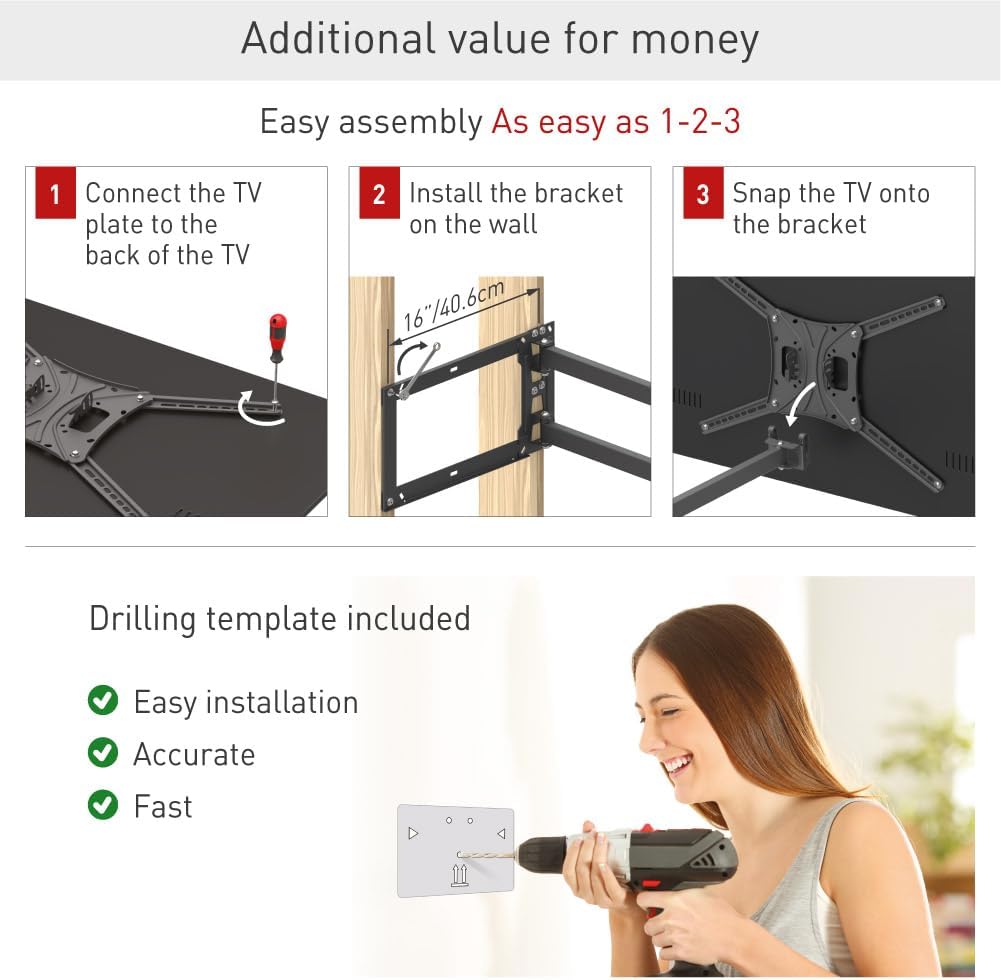
Image: Visual representation of the three-step assembly process: connecting to TV, installing on wall, and snapping TV onto bracket.
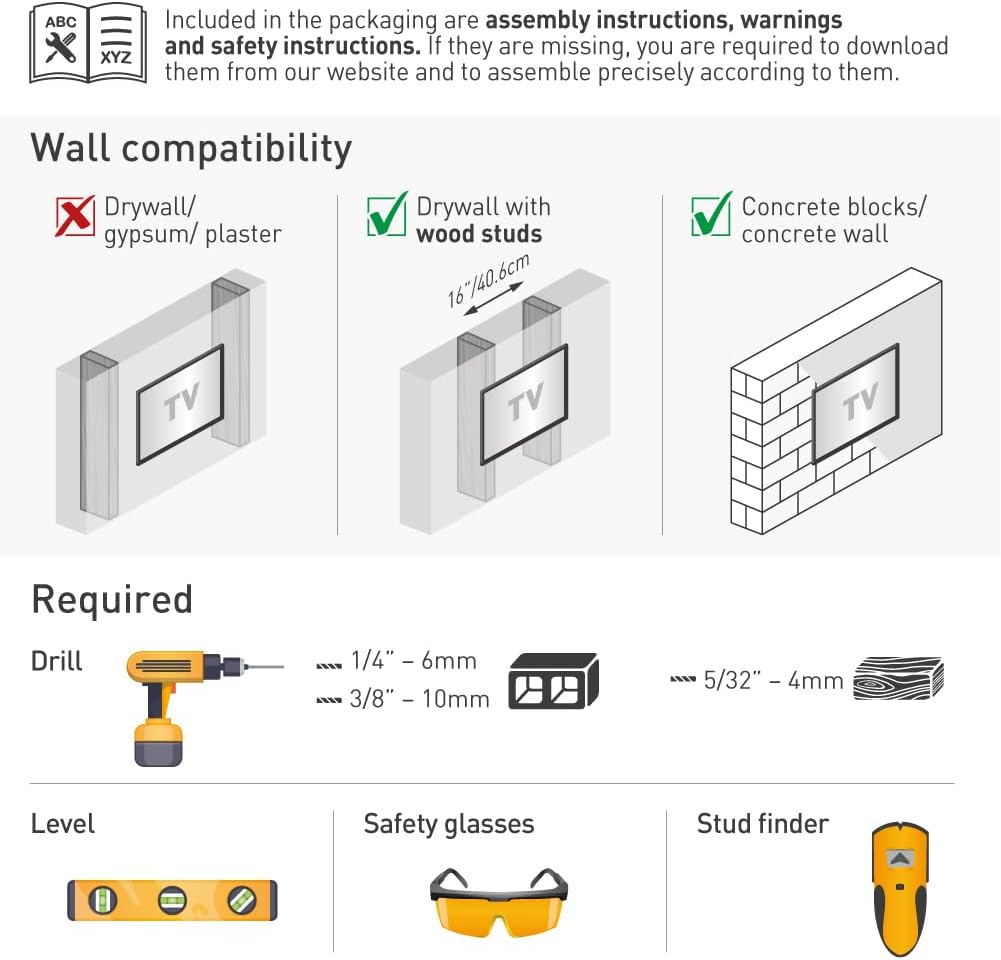
Image: Diagram illustrating wall compatibility (drywall with wood studs, concrete) and necessary tools like a drill, level, safety glasses, and stud finder.
Operating the Mount
The Barkan Full Motion Articulating TV Wall Mount offers versatile positioning for your television:
- Rotation: The mount can rotate near the wall up to 180°.
- Folding: The arm can fold up to 360°.
- Swivel: The screen connection plate allows for 180° swivel.
- Tilt: Adjust the screen tilt from -5° (downward) to 15° (upward) without tools.
- Leveling: After installation, fine-tune the screen's level by +/-5°.
To adjust the TV, gently push or pull it to the desired angle. The mount's patented design, including a ball and socket mechanism, accommodates various screen types, including flat, curved, and those with unique back structures, ensuring a secure fit without additional spacers.

Image: Illustration of the mount's full motion features, including swivel, tilt, and extension from the wall, along with maximum load capacity.

Image: Visual examples demonstrating the mount's compatibility with various screen types, including flat, curved, and those with unique back panel designs.

Image: A television mounted on a wall, with green arrows demonstrating the range of motion for rotation, swivel, and extension.
Maintenance
This TV wall mount requires minimal maintenance. Periodically check all screws and connections to ensure they remain tight and secure. Dust the mount with a soft, dry cloth as needed. Avoid using abrasive cleaners or solvents, as these may damage the finish.
Troubleshooting
If you encounter any issues during installation or operation, review the assembly instructions provided in the package. Ensure all components are correctly installed and tightened according to the diagrams.
- Mount feels unstable: Verify that the wall bracket is securely fastened to wall studs or appropriate anchors. Ensure all TV connection screws are tight.
- Difficulty with movement: Check for any obstructions. Ensure the TV weight does not exceed the maximum capacity of 123 lbs.
- Missing or incorrect screws: Refer to the hardware kit list. If specific screen-connection screws are needed for your TV model, they may need to be purchased separately.
For further assistance, contact Barkan customer support.
Specifications
| Model Number | 4400.B |
| Compatible TV Sizes | 13 to 86 inches |
| Maximum Load Capacity | 123 lbs (56 kg) |
| VESA Compatibility | 75x75, 100x100, 100x200, 200x100, 200x200, 200x300, 300x200, 300x300, 300x400, 400x200, 400x300, 400x400, 600x400 mm and non-VESA up to 600x400 mm |
| Distance from Wall | Minimum: 2.6 inches (6.5 cm), Maximum: 25.2 inches (64 cm) |
| Tilt Angle | -5° to 15° |
| Swivel Angle | 180° (at screen connection plate) |
| Rotation at Wall | 180° |
| Leveling Adjustment | +/-5° (after installation) |
| Material | Metal |
| Color | Metallic black |
| Product Dimensions | 19.68 x 10.63 x 3.03 inches |
| Item Weight | 1.98 pounds |

Image: Technical drawing showing dimensions, movement ranges, and VESA compatibility for the mount.

Image: Diagrams illustrating different backscreen connection positioning options for various VESA patterns.
Warranty Information
The Barkan TV Wall Mount comes with a Lifetime Limited Warranty. This warranty covers defects in materials and workmanship under normal use.
Support and Contact
For any questions, assistance, or if you are not satisfied with the product, please contact Barkan customer support. Our customer service experts are available to help.
Visit our website for more information, FAQs, video demonstrations, and other helpful tools: barkanmounts.com/support
For screen-connection screw inquiries, you may also consult us at sales.usa@barkanmounts.
Related documents4400.B


Ask a question about this manual
Ask about setup, troubleshooting, compatibility, parts, safety, or missing instructions. Manuals+ will review the question and use this page’s manual context to help answer it.