
Bose 760093-1110
Bose Acoustimass 300 Wireless Bass Module User Manual
Model: 760093-1110
Introduction
This manual provides essential information for setting up, operating, and maintaining your Bose Acoustimass 300 Wireless Bass Module. Designed to enhance your home entertainment experience, this bass module delivers deep, dramatic sound when paired with compatible Bose sound systems.
Setup
What's in the Box
- Acoustimass 300 wireless bass module
Placement
For optimal performance, place the Acoustimass 300 Wireless Bass Module in a location that allows for clear, unobstructed sound propagation. Consider placing it near a wall or in a corner to enhance bass response, but avoid placing it directly against a wall if the sound becomes too boomy.

Figure 1: Example placement of the Acoustimass 300 in a living room.
Connecting the Bass Module
The Acoustimass 300 is designed for wireless connection to a compatible Bose soundbar, such as the SoundTouch 300 soundbar. Ensure your soundbar is powered on and in setup mode.
- Power Connection: Connect the power cord to the POWER port on the back of the bass module and then to a wall outlet.
- Wireless Pairing: The bass module should automatically pair with your compatible Bose soundbar. A solid white light on the bass module indicates a successful connection.
- Manual Pairing (if needed): If the bass module does not pair automatically, refer to your soundbar's user manual for specific instructions on manually pairing wireless accessories.
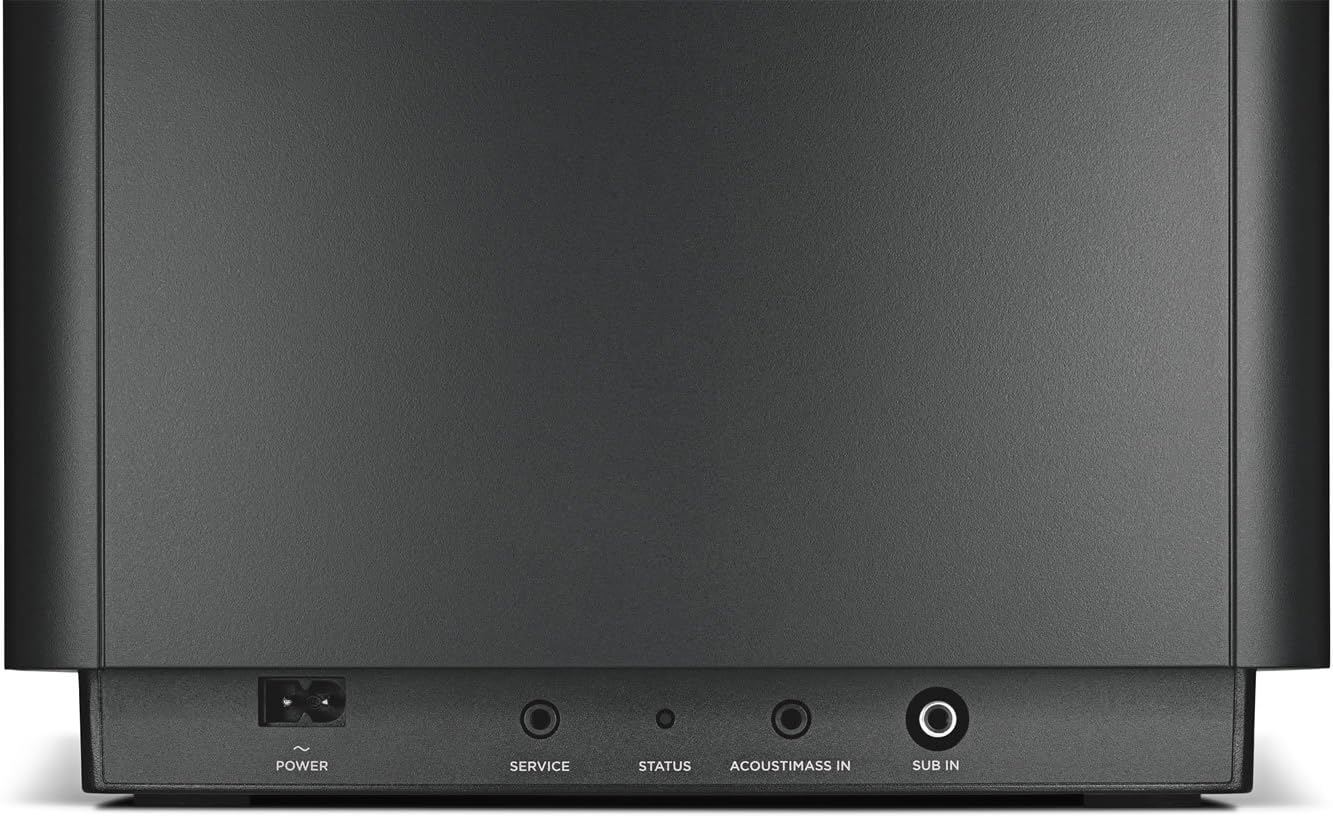
Figure 2: Rear panel connections of the bass module.
The bass module connects wirelessly for easier placement and integrates seamlessly with your existing Bose SoundTouch system.
Operating
Once connected, the Acoustimass 300 Wireless Bass Module operates in conjunction with your paired Bose soundbar. It automatically enhances the low-frequency audio output, providing a richer and more immersive listening experience for music, movies, and television.
Adjusting Bass Levels
Bass levels are typically controlled through the settings of your paired Bose soundbar or via the Bose SoundTouch app. Consult your soundbar's manual or the SoundTouch app interface for options to adjust bass intensity to your preference.

Figure 3: Front view of the Acoustimass 300.
Maintenance
The Bose Acoustimass 300 Wireless Bass Module requires minimal maintenance to ensure long-lasting performance.
- Cleaning: Use a soft, dry cloth to clean the surface of the bass module. Do not use liquid cleaners, sprays, or solvents, as they may damage the finish.
- Ventilation: Ensure the bass module has adequate ventilation. Do not block any ventilation openings.
- Placement: Avoid placing the unit in direct sunlight or near heat sources.
Troubleshooting
| Problem | Possible Cause | Solution |
|---|---|---|
| No sound from bass module | Not powered on or not paired. | Ensure power cord is securely connected. Check the status light on the bass module. If not solid white, re-initiate pairing process from your soundbar. |
| Distorted or weak bass | Improper placement or incorrect bass level settings. | Adjust bass levels via the SoundTouch app or soundbar settings. Experiment with different placements to find optimal bass response. Ensure no objects are obstructing the bass module. |
| Intermittent connection | Wireless interference or distance from soundbar. | Move the bass module closer to the soundbar. Avoid placing it near other wireless devices that may cause interference. Restart both the soundbar and bass module. |
Specifications
| Feature | Detail |
|---|---|
| Model Name | kkkk |
| Speaker Type | Subwoofer |
| Special Feature | Bass Boost |
| Recommended Uses | Music, Movies, Electrical |
| Compatible Devices | Smartphone, Tablet, MP3 Player, Desktop, Television, Projector, Laptop |
| Controller Type | App Control |
| Surround Sound Channel Configuration | 5.1 |
| Color | Black |
| Included Components | Acoustimass 300 wireless bass module |
| Product Dimensions | 11.61"D x 11.61"W x 12.79"H |
| Item Weight | 13.6 Kilograms (29.9 pounds) |
| Is Waterproof | FALSE |
| Number of Items | 1 |
| Control Method | App |
| Wireless Communication Technology | Bluetooth |
| Speaker Size | 10 Inches |
| Power Source | Corded Electric |
| Woofer Diameter | 12 Inches |
| Water Resistance Level | Not Water Resistant |
| Customer Package Type | Standard Packaging |
| Audio Driver Type | Dynamic Driver |
| Bluetooth Range | 10 Meters |
| Audio Driver Size | 12 Inches |
| Subwoofer Connectivity Technology | Wireless |
| Connectivity Protocol | Wi-Fi |
| Includes MP3 player? | No |
| Processor Count | 2 |
| Series Number | 7600931110 |
| UPC | 779177311485 017817738705 |
| Global Trade Identification Number | 00017817738705, 00779177311485 |
| Manufacturer | Bose Corporation |
| First Available | September 14, 2016 |
| Brand | Bose |
| Speaker Maximum Output Power | 300 Watts |
| Connectivity Technology | Bluetooth, Wi-Fi |
| Audio Output Mode | Surround |
| Mounting Type | Bar Mount,Floor Mount |
Note: "kkkk" for Model Name is as provided in the source data.

Figure 4: Product dimensions.
Warranty and Support
The Bose Acoustimass 300 Wireless Bass Module comes with a Limited Warranty. For detailed warranty information, product support, and service inquiries, please refer to the official Bose website or contact Bose customer service.
An electronic version of the User Manual is available for download: Download User Manual (PDF)
Related documents760093-1110


Ask a question about this manual
Ask about setup, troubleshooting, compatibility, parts, safety, or missing instructions. Manuals+ will review the question and use this page’s manual context to help answer it.