
Bose 761682-1110
Bose Lifestyle 600 Home Entertainment System User Manual
Model: 761682-1110
Introduction
The Bose Lifestyle 600 Home Entertainment System is designed to deliver rich, immersive sound for your music, movies, and TV. This system integrates advanced technologies to provide a multi-dimensional audio experience throughout your home. This manual provides essential information for setting up, operating, and maintaining your system.
What's in the Box
Upon unboxing your Bose Lifestyle 600 system, verify that all components are present:
- Acoustimass wireless bass module
- Jewel Cube speakers (4)
- Center channel speaker
- Console
- Universal remote
- Wireless surround speaker receivers
- Power supply
- Necessary cables

Figure 1: All components included with the Bose Lifestyle 600 system.
Setup
Setting up your Lifestyle 600 system involves connecting the console to your television and other devices, positioning the speakers, and pairing wireless components. The Unify technology provides guided onscreen messages to simplify the process.
1. Console Connections
Connect your television and other audio/video sources (e.g., cable box, Blu-ray player) to the console using HDMI cables. The console features 6 HDMI inputs for versatile connectivity.

Figure 2: Rear panel of the console with connection ports.
2. Speaker Placement
Position the four Jewel Cube satellite speakers and the center channel speaker in your room for optimal surround sound. The wireless bass module can be placed discreetly within the room.

Figure 3: Example of a Bose Lifestyle 600 system setup in a living room.
3. Wireless Components
The Acoustimass wireless bass module and wireless rear surround speakers connect wirelessly to the console, simplifying cable management. Ensure they are within range of the console for stable connection.

Figure 4: Acoustimass wireless bass module.

Figure 5: Jewel Cube satellite speakers.
Operating the System
The Lifestyle 600 system offers multiple ways to control your entertainment experience.
1. Universal Remote Control
The included universal remote with an LED display allows you to control the Lifestyle 600 system and connected devices. Follow the onscreen prompts during setup to program the remote for your specific components.
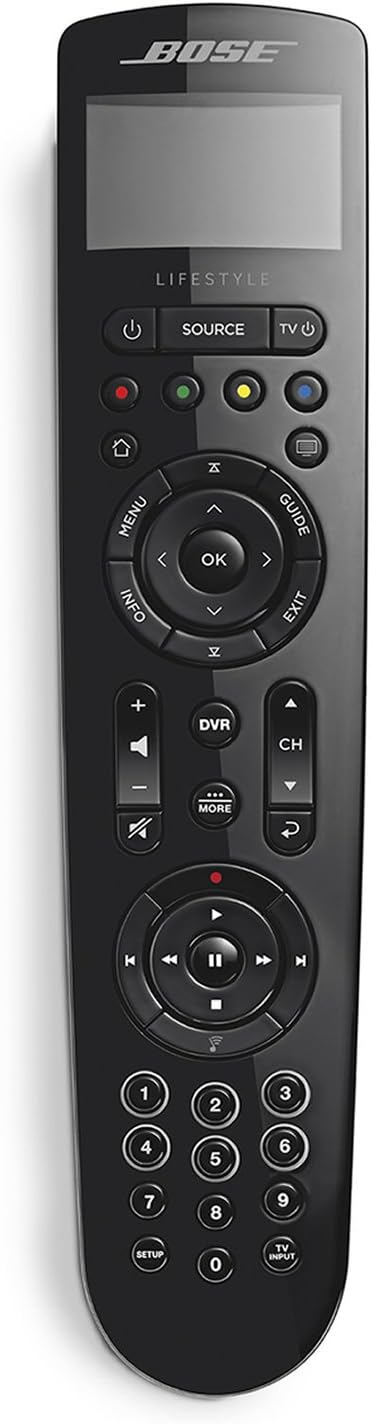
Figure 6: Universal remote control.

Figure 7: Using the universal remote control.
2. Voice Control with Amazon Alexa
The system works with Amazon Alexa-enabled devices, allowing for hands-free voice control of your music. Enable the Bose skill in the Alexa app to set up any SoundTouch speaker and control playback with voice commands.
Video 1: Demonstrates how to control Bose SoundTouch speakers using Amazon Alexa voice commands, including playing music, checking what's playing, and playing music everywhere.
3. SoundTouch App
Utilize the SoundTouch app on your smartphone or tablet for additional control over your music services and system settings. This app allows you to manage your favorite music, explore new content, and control multiple SoundTouch speakers throughout your home.
Maintenance
To ensure the longevity and optimal performance of your Bose Lifestyle 600 system, follow these general maintenance guidelines:
- Keep the system components clean by wiping them with a soft, dry cloth. Avoid using liquid cleaners or solvents.
- Ensure proper ventilation around the console and bass module to prevent overheating.
- Protect the speakers and console from direct sunlight, excessive heat, and moisture.
- Regularly check cable connections to ensure they are secure.
Troubleshooting
If you encounter issues with your Lifestyle 600 system, consider the following common troubleshooting steps:
- No Power: Verify that all power cables are securely connected to the console, bass module, and power outlets.
- No Sound: Check all audio connections between the console and your TV/source devices. Ensure the correct input is selected on the console and TV. Confirm speaker cables are properly connected.
- Remote Not Responding: Replace the batteries in the universal remote. Ensure there are no obstructions between the remote and the console.
- Wireless Connection Issues: Ensure the wireless bass module and surround speaker receivers are powered on and within range of the console. Re-pair them if necessary according to the system's onscreen instructions.
- Distorted Audio: Check audio source quality. Ensure speaker wires are not frayed or shorting. Adjust volume levels.
For more detailed troubleshooting, refer to the official user manual PDF or contact Bose customer support.
Specifications
| Feature | Detail |
|---|---|
| Model Name | Lifestyle 600 |
| Speaker Type | Satellite |
| Special Feature | Bass Boost, Wireless |
| Recommended Uses For Product | For Surround Sound Systems, For Televisions |
| Compatible Devices | Television, Laptop |
| Subwoofer Diameter | 0.25 Meters |
| Unit Count | 1.0 Count |
| Controller Type | Amazon Alexa, vera |
| Surround Sound Channel Configuration | 5.1 |
| Color | Black |
| Included Components | Acoustimass wireless bass module, Jewel Cube speakers(4), center channel speaker, console, necessary cables, power supply, universal remote, wireless surround speaker receivers |
| Product Dimensions | 10.16"D x 15.98"W x 2.56"H |
| Item Weight | 64 Pounds |
| Is Waterproof | FALSE |
| Number of Items | 1 |
| Control Method | Voice |
| Wireless Communication Technology | Bluetooth, NFC |
| Power Source | Corded Electric |
| Water Resistance Level | Not Water Resistant |
| Customer Package Type | Standard Packaging |
| Number of Microphones | 4 |
| Subwoofer Connectivity Technology | Wireless |
| Connectivity Protocol | Bluetooth, Wi-Fi |
| Includes MP3 player? | No |
| Number Of Circuits | 4 |
| Number of Power Levels | 1 |
| Processor Count | 1 |
| UPC | 017817741224 |
| Style | Lifestyle 600 |
| Global Trade Identification Number | 00017817741224 |
| Manufacturer | Bose Corporation |
| Item model number | 761682-1110 |
| Date First Available | September 14, 2016 |
| Brand | Bose |
| Speaker Maximum Output Power | 12 Watts |
| Audio Output Mode | Surround |
| Mounting Type | Tabletop Mount |

Figure 8: Console dimensions.
Warranty and Support
Bose products are designed for durability and performance. For specific warranty information, please refer to the documentation included with your purchase or visit the official Bose website.
For further assistance, technical support, or service inquiries, you can contact Bose Customer Support. Additionally, a comprehensive user manual in PDF format is available for download:
Related documents761682-1110


Ask a question about this manual
Ask about setup, troubleshooting, compatibility, parts, safety, or missing instructions. Manuals+ will review the question and use this page’s manual context to help answer it.