
1. Introduction
Thank you for choosing the Strong SRT 2221 IPTV DVB-T2 Set-Top Box. This manual provides essential information for the safe and efficient use of your device. Please read these instructions carefully before installation and operation, and retain them for future reference.
The Strong SRT 2221 is a versatile set-top box designed to deliver high-definition television via both IPTV and DVB-T2 (Digital Video Broadcasting – Second Generation Terrestrial) standards. It features advanced connectivity options, including Wi-Fi, Bluetooth, and multiple USB ports, enhancing your entertainment experience.
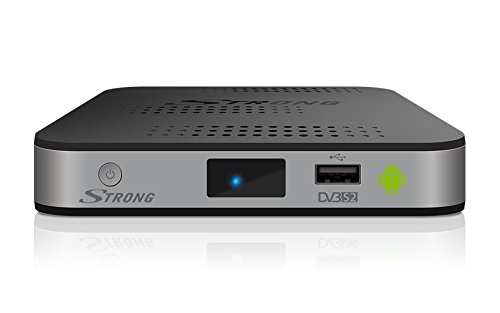
Image 1.1: Front view of the Strong SRT 2221 Set-Top Box. This image shows the compact design of the device.
2. Setup
2.1 Unpacking
Carefully remove all items from the packaging. Ensure the following components are present:
- Strong SRT 2221 Set-Top Box
- Remote Control
- Power Adapter
- User Manual (this document)
2.2 Connecting to Your TV
- Ensure your TV and the SRT 2221 are both powered off.
- Connect one end of an HDMI cable (not included) to the HDMI OUT port on the SRT 2221.
- Connect the other end of the HDMI cable to an available HDMI IN port on your TV. Note the HDMI input number (e.g., HDMI 1, HDMI 2) for later selection.
2.3 Connecting to Antenna (DVB-T2)
If you intend to receive DVB-T2 terrestrial broadcasts:
- Connect your terrestrial antenna cable to the ANT IN port on the rear of the SRT 2221.
2.4 Connecting to Network (IPTV & Internet)
The SRT 2221 supports both wired and wireless network connections.
- Wired Connection: Connect an Ethernet cable from your router to the LAN port on the SRT 2221.
- Wireless Connection: The device supports 802.11b/g/n Wi-Fi. During the initial setup or via the network settings menu, you can connect to your home Wi-Fi network.
2.5 Connecting to Power
- Connect the power adapter to the DC IN port on the SRT 2221.
- Plug the power adapter into a suitable electrical outlet.
2.6 First-Time Setup Wizard
Upon first power-on, the device will guide you through an initial setup wizard. Follow the on-screen instructions to:
- Select your preferred language.
- Configure network settings (Wi-Fi or Ethernet).
- Scan for DVB-T2 channels (if an antenna is connected).
- Set time zone and other basic preferences.
3. Operating
3.1 Remote Control Overview
The included remote control allows you to navigate menus, change channels, adjust volume, and access various functions. Familiarize yourself with the button layout.
Image 3.1: Example of a remote control for the Strong SRT 2221. This image illustrates the typical button layout for navigation and function control.
3.2 Basic Navigation
- Use the directional arrow buttons (Up, Down, Left, Right) to move through menus and lists.
- Press the OK button to confirm a selection.
- Press the BACK or EXIT button to return to the previous screen or exit a menu.
- The HOME button typically takes you to the main menu interface.
3.3 Channel Management (DVB-T2)
After completing the channel scan during setup, you can:
- Change Channels: Use the CH+/CH- buttons or enter the channel number directly.
- Access Channel List: Press the LIST or OK button while watching TV to view the channel list.
- Electronic Program Guide (EPG): Press the EPG button to view program schedules.
3.4 IPTV Features
The SRT 2221 supports IPTV services. Access these features through the main menu. Specific functionality will depend on the IPTV provider and applications installed.
3.5 Media Playback
The device is equipped with 4 USB ports, allowing you to connect external storage devices (USB drives, external hard drives) for media playback.
- Insert your USB storage device into one of the available USB ports.
- Navigate to the Media Player application from the main menu.
- Browse and select your desired media files (videos, music, photos) for playback.
3.6 Bluetooth Connectivity
The SRT 2221 supports Bluetooth, enabling connection to compatible devices such as wireless headphones or speakers.
- Go to the Settings menu and select Bluetooth.
- Enable Bluetooth and search for available devices.
- Select your desired device from the list and pair it.
4. Maintenance
4.1 Cleaning
- Always disconnect the device from the power outlet before cleaning.
- Use a soft, dry cloth to wipe the exterior of the set-top box.
- Do not use liquid cleaners, aerosols, or abrasive materials, as these can damage the device.
4.2 Software Updates
Periodically check for software updates to ensure optimal performance and access to the latest features. Updates can typically be found in the Settings menu under 'System' or 'About'. Follow the on-screen instructions to download and install any available updates.
4.3 Safety Precautions
- Do not block ventilation openings. Ensure adequate airflow around the device.
- Keep the device away from direct sunlight, heat sources, and moisture.
- Do not attempt to open or repair the device yourself. Refer all servicing to qualified personnel.
5. Troubleshooting
If you encounter issues with your Strong SRT 2221, please refer to the following common problems and solutions:
| Problem | Possible Cause / Solution |
|---|---|
| No Power | Check if the power adapter is securely connected to the device and the electrical outlet. Ensure the outlet is functional. |
| No Picture / No Signal | Verify HDMI cable connection. Ensure your TV is set to the correct HDMI input. For DVB-T2, check antenna connection and perform a channel scan. |
| Remote Control Not Working | Check batteries and replace if necessary. Ensure there are no obstructions between the remote and the device. |
| Network Connection Issues | For Wi-Fi, re-enter password or restart your router. For wired, check Ethernet cable connection. Ensure your internet service is active. |
| Device Freezes / Unresponsive | Disconnect the power adapter, wait 10 seconds, then reconnect it to restart the device. |
6. Specifications
Below are the technical specifications for the Strong SRT 2221 Set-Top Box:
- Brand: Strong
- Model: SRT 2221 (8717185449556)
- Model Year: 2016
- Dimensions (W x D x H): 13 x 13 x 2.79 cm
- Weight: 258.55 g
- RAM Capacity: 1024 MB DDR3 SDRAM
- Scanner Resolution: 1080p
- Aspect Ratio: 16:9
- Power Consumption: 7.3 watts
- Wireless Connectivity: 802.11b, 802.11g, 802.11n
- USB Ports: 4
- Mounting Compatibility: Wall mount, Table stand
- Remote Control: Included
- Bluetooth: Yes
- Special Feature: Flat design
7. Warranty and Support
7.1 Warranty Information
Your Strong SRT 2221 Set-Top Box comes with a manufacturer's warranty. Please refer to the warranty card included in your product packaging for specific terms, conditions, and duration. Keep your proof of purchase for warranty claims.
7.2 Technical Support
For technical assistance, troubleshooting beyond this manual, or service inquiries, please contact Strong customer support. You can find contact information and additional resources by visiting the official Strong website or the brand store:
When contacting support, please have your product model (SRT 2221) and serial number (if applicable) ready.


