
Tendak 5582721349
Tendak 1X2 HDMI Splitter 4K@30Hz with Audio Extractor User Manual
Model: 5582721349
Introduction
This user manual provides detailed instructions for the installation, operation, and troubleshooting of your Tendak 1X2 HDMI Splitter with Audio Extractor. Please read this manual thoroughly before using the product to ensure proper functionality and to prevent damage.
The Tendak 1X2 HDMI Splitter distributes one HDMI input signal to two HDMI output displays simultaneously. It also features an audio extractor, allowing you to separate audio from the HDMI signal via SPDIF (Optical) or L/R Stereo outputs.

Image: Front view of the Tendak 1X2 HDMI Splitter, showcasing its compact black design with input and output ports clearly visible.
Features
- HDMI Splitter 1 in 2 out: Distributes one HDMI input signal to two HDMI output displays (HDTV, plasma, LCD, projector, etc.), transmitting video and audio simultaneously. Both displays can operate concurrently.
- HDMI Audio Extractor: Equipped with SPDIF (Optical) Coaxial digital audio output (supports 2CH/5.1CH modes) and L/R Stereo audio output (2CH mode). Extracts audio from the HDMI input source to a soundbar or speaker.
- Ultra HD Resolution: Supports 4K x 2K@30Hz (3840 x 2160 resolution) and is backward compatible with 480i/576i/480p/576p/720p/1080i/1080p and 3D formats.
- Multiple Audio Formats: Supports 2 reading modes of audio EDID, including Dolby True-HD, DTS-HD, AC3, DTS, LPCM, and DSD audio formats. Note: The device does not decode these audio formats. If your amplifier or soundbar does not support these formats, set the audio format on the HDMI source to PCM/LPCM.
- Wide Compatibility: Plug-and-play operation, no driver installation required. Compatible with HDTVs, projectors, PS4, PCs, Blu-ray players, DVD players, set-top boxes, and other HDMI-enabled devices.
Package Contents
- Tendak 1X2 HDMI Splitter with Audio Extractor
- 5V DC Power Adapter
- User Manual

Image: The Tendak HDMI Splitter shown alongside its 5V DC power adapter and the included user manual.
Product Diagram

Image: A detailed diagram illustrating the various ports and indicators on the Tendak HDMI Splitter, including DC 5V power input, Optical Toslink Output, HDMI Input, Power indicator, 2CH/5.1CH Switch, L/R Output, and HDMI Output indicators.
- DC 5V: Power Input Port
- Optical: Optical Toslink Audio Output
- IN: HDMI Input Port
- Power: Power Indicator LED
- 2CH/5.1CH: Audio EDID Switch (2-channel or 5.1-channel mode)
- R/L: Analog Stereo Audio Output (Red for Right, White for Left)
- OUT1/OUT2: HDMI Output Ports
- HDMI Output Indicator: LEDs for HDMI Output 1 and 2
Setup and Connection
Follow these steps to connect your Tendak HDMI Splitter:
- Connect an HDMI cable from your source device (e.g., PS4, Blu-ray player, PC) to the HDMI IN port on the splitter.
- Connect HDMI cables from the HDMI OUT1 and HDMI OUT2 ports on the splitter to your display devices (e.g., HDTV, projector).
- For audio extraction, connect an optical cable from the Optical port to your soundbar or amplifier, or connect RCA cables from the R/L ports to your stereo system.
- Connect the provided 5V DC power adapter to the DC 5V port on the splitter and then plug it into a power outlet. The Power indicator LED will illuminate.
- Ensure all connections are secure before powering on your devices.

Image: A visual guide demonstrating how to connect various devices such as a PS4, laptop, DVD player, Apple TV, VCR, HD camera, and Blu-ray player to the HDMI input, and how to connect the HDMI outputs to an HD-TV and projector, with audio output to an amplifier or speakers.
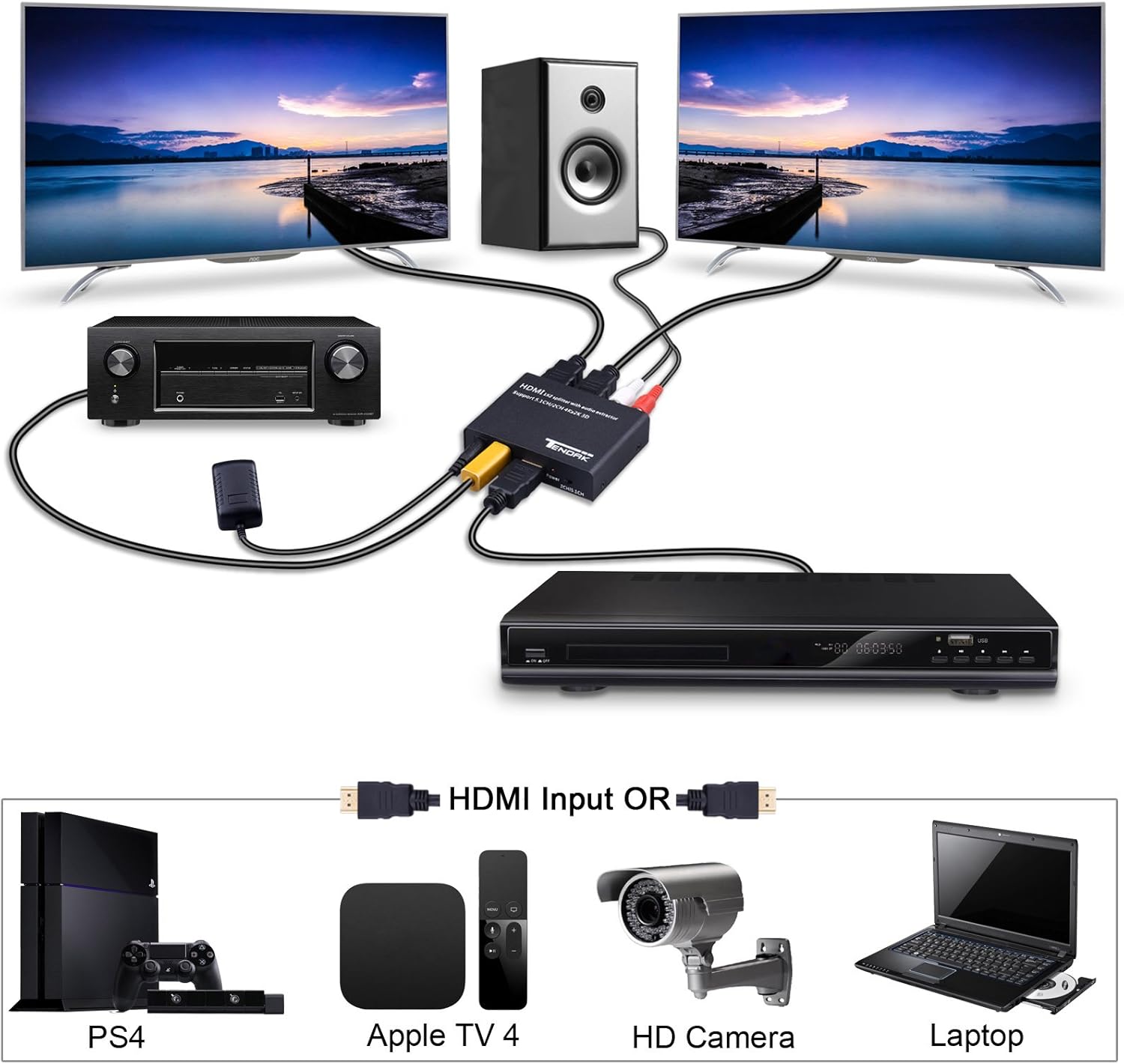
Image: An illustrative setup showing the Tendak HDMI Splitter connecting a source device (e.g., PS4, Apple TV) to two displays and an audio system, highlighting its role in a home entertainment setup.
Operating Instructions
Once connected, the Tendak HDMI Splitter operates automatically. Here are some key operational notes:
- Power On: The device powers on automatically when connected to the 5V DC power adapter. The Power LED will light up.
- Signal Distribution: The splitter will automatically detect the HDMI input signal and distribute it to both HDMI output ports. Both connected displays will show the same content.
- Audio EDID Switch (2CH/5.1CH):
- Set the switch to 2CH for stereo audio output via the L/R RCA ports and for compatible optical audio output.
- Set the switch to 5.1CH for 5.1 channel audio output via the Optical port. Ensure your audio receiver or soundbar supports 5.1 channel audio formats (e.g., Dolby Digital, DTS).
- Audio Compatibility: If you experience no audio from your soundbar or amplifier, ensure the audio output setting on your HDMI source device (e.g., Blu-ray player, game console) is set to PCM/LPCM, especially if your audio receiver does not support advanced audio formats like Dolby True-HD or DTS-HD.
Troubleshooting
If you encounter issues with your Tendak HDMI Splitter, please refer to the following troubleshooting steps:
| Problem | Possible Cause | Solution |
|---|---|---|
| No video output on displays. |
|
|
| No audio output from optical or L/R ports. |
|
|
| Intermittent video/audio. |
|
|
If the problem persists after trying these solutions, please contact Tendak customer support for further assistance.
Specifications
| Feature | Detail |
|---|---|
| Model Number | 5582721349 |
| HDMI Version | Compatible with HDMI 1.4b and HDCP 1.4 |
| Max Resolution | 4K x 2K@30Hz (3840 x 2160) |
| Supported Resolutions | 480i/576i/480p/576p/720p/1080i/1080p/3D |
| Audio Output | SPDIF (Optical), L/R Stereo RCA |
| Supported Audio Formats | Dolby True-HD, DTS-HD, AC3, DTS, LPCM, DSD |
| Power Supply | DC 5V |
| Product Dimensions (L x W x H) | 3.35 x 2.68 x 0.79 inches (85 x 68 x 20 mm) |
| Item Weight | 4.4 ounces (125g) |
| Operating Temperature | 0°C to +70°C |
| Operating Humidity | 10% to 85% RH (non-condensing) |

Image: A diagram illustrating the physical dimensions of the Tendak HDMI Splitter, showing its length (85.00mm), width (68.00mm), and height (20.00mm).
Maintenance
To ensure the longevity and optimal performance of your Tendak HDMI Splitter, follow these maintenance guidelines:
- Cleaning: Use a soft, dry cloth to clean the exterior of the device. Do not use liquid cleaners or aerosols.
- Environment: Keep the device in a cool, dry place, away from direct sunlight, heat sources, and excessive humidity.
- Handling: Avoid dropping or subjecting the device to strong impacts.
- Ventilation: Ensure proper airflow around the device to prevent overheating. Do not block ventilation openings.
- Power: Disconnect the power adapter when the device is not in use for extended periods.
Warranty and Support
Tendak products are designed for reliability and performance. For warranty information and technical support, please refer to the contact details provided with your purchase or visit the official Tendak website.
For common issues, please consult the troubleshooting section of this manual. If you require further assistance, please have your product model number (5582721349) and purchase details ready when contacting support.
Ask a question about this manual
Ask about setup, troubleshooting, compatibility, parts, safety, or missing instructions. Manuals+ will review the question and use this page’s manual context to help answer it.