
1. Product Overview
The Zizo Bolt Series Case is engineered to provide robust protection for your iPhone 7 or iPhone 8. This comprehensive protection solution includes a durable case, a built-in kickstand, a holster belt clip, and a tempered glass screen protector. Designed to meet 12-foot military-grade drop test standards (MIL-STD 810.1-G Certification), the Bolt Series ensures your device is safeguarded against impacts and daily wear.

Image 1.1: Overview of the Zizo Bolt Series Case with its components.
The case features a dual-layer design combining Tetrapoly Urethane and Poly-Carbonate materials for optimal shock absorption and durability. Its integrated kickstand allows for hands-free viewing, while the included belt clip provides convenient portability.
2. Package Contents
Upon opening your Zizo Bolt Series Case package, verify that all the following items are included:
- Zizo Bolt Series Case (Blue & Black)
- Holster Belt Clip
- Integrated Kickstand (part of the case)
- Zizo Lightning Shield Tempered Glass Screen Protector

Image 2.1: Contents as typically packaged, including the case, belt clip, and screen protector.
3. Setup and Installation
Follow these steps to properly install your Zizo Bolt Series Case and Tempered Glass Screen Protector on your iPhone 7 or iPhone 8.
- Prepare Your Device: Ensure your iPhone screen is clean and free of dust, smudges, or debris. Use a microfiber cloth for best results.
- Install Screen Protector:
- Carefully align the Zizo Lightning Shield Tempered Glass Screen Protector with your iPhone's screen. Ensure the cutouts for the speaker and home button (if applicable) match perfectly.
- Gently lower the screen protector onto the screen. It will adhere automatically.
- If any air bubbles are present, gently push them towards the edges using a soft cloth or a credit card wrapped in cloth.
- Disassemble the Case: The Zizo Bolt Series case consists of multiple layers. Carefully separate the outer hard shell from the inner soft TPU layer. The belt clip is a separate accessory.
- Insert Phone into Inner Layer: Place your iPhone into the soft, flexible inner TPU layer of the case. Ensure all buttons and ports align correctly with the case's openings.
- Attach Outer Hard Shell: Once the phone is securely in the inner layer, snap the rigid outer polycarbonate shell over it. Ensure all edges are fully seated and the case is flush around your device.
- Attach Belt Clip (Optional): If desired, slide the assembled case into the holster belt clip until it clicks securely into place. The belt clip allows for 360-degree rotation.

Image 3.1: Exploded view showing the layers of the Zizo Bolt Series Case.
4. Operating Instructions
The Zizo Bolt Series Case is designed for ease of use and enhanced functionality.
4.1 Using the Built-in Kickstand
The integrated kickstand allows you to prop your phone up for hands-free viewing of videos, video calls, or presentations. To deploy the kickstand:
- Locate the kickstand on the back of the case.
- Gently pull the kickstand outwards until it locks into an open position.
- Place your phone on a flat surface in either portrait or landscape orientation.
- To retract, push the kickstand back into its recess until it lies flat against the case.

Image 4.1: The kickstand extended for hands-free viewing.

Image 4.2: Phone propped up using the kickstand for media consumption.
4.2 Using the Holster Belt Clip
The detachable holster belt clip provides a secure and convenient way to carry your phone.
- Ensure your phone is securely installed in the Zizo Bolt Series Case.
- Slide the cased phone into the holster until it clicks into place.
- Attach the clip to your belt, waistband, or bag strap.
- To remove, press the release tab on the holster and slide the phone out.

Image 4.3: The Zizo Bolt Series Case with its accompanying belt clip holster.
5. Maintenance and Care
To ensure the longevity and effectiveness of your Zizo Bolt Series Case and Screen Protector, follow these simple maintenance guidelines:
- Cleaning the Case: Use a soft, damp cloth to wipe down the case. For stubborn dirt, a mild soap solution can be used. Avoid harsh chemicals or abrasive cleaners, as they may damage the material.
- Cleaning the Screen Protector: Use a microfiber cloth to gently wipe the screen protector. For smudges, a screen cleaner spray designed for electronics can be applied to the cloth (not directly to the screen).
- Inspection: Periodically inspect the case for any signs of wear, cracks, or damage, especially after significant drops. While the case is designed for protection, extreme impacts can compromise its integrity.
- Storage: When not in use, store the case and screen protector in a clean, dry environment away from direct sunlight and extreme temperatures.
6. Troubleshooting
If you encounter any issues with your Zizo Bolt Series Case, refer to the following common troubleshooting tips:
6.1 Case Not Fitting Properly
- Check Model Compatibility: Ensure your phone is an iPhone 7 or iPhone 8. This case is specifically designed for these models.
- Re-installation: Remove the phone from the case and re-install it carefully, ensuring the inner soft layer is correctly seated before attaching the outer hard shell. Verify all edges are flush.
6.2 Screen Protector Bubbles
- Dust Particles: Most bubbles are caused by dust. Carefully lift a corner of the screen protector (if possible without damaging it), use a dust absorber sticker to remove any dust, and re-apply.
- Re-application: If bubbles persist, it may be necessary to gently peel off the screen protector, clean the screen thoroughly again, and re-apply it, ensuring proper alignment from one edge to the other.
6.3 Kickstand or Belt Clip Malfunction
- Obstruction: Check for any debris or foreign objects obstructing the kickstand mechanism or the belt clip's latch.
- Proper Engagement: Ensure the kickstand is fully extended until it locks, and the phone is fully inserted into the belt clip holster until it clicks.
7. Specifications
Detailed specifications for the Zizo Bolt Series Case:
| Feature | Detail |
|---|---|
| Product Dimensions | 2.64 x 0.28 x 5.44 inches |
| Item Weight | 0.01 ounces |
| ASIN | B01KWWLMZW |
| Item Model Number | FBA_BOLT-IPH7-BLBK |
| Color | Blue & Black |
| Material | Tetrapoly Urethane and Poly-Carbonate |
| Form Factor | Bumper |
| Compatible Phone Models | iPhone 7, iPhone 8 |
| Drop Test Certification | 12 Feet Military Grade Drop Test 810.1-G |
| Included Accessories | Belt Clip, Kickstand, Tempered Glass Screen Protector |
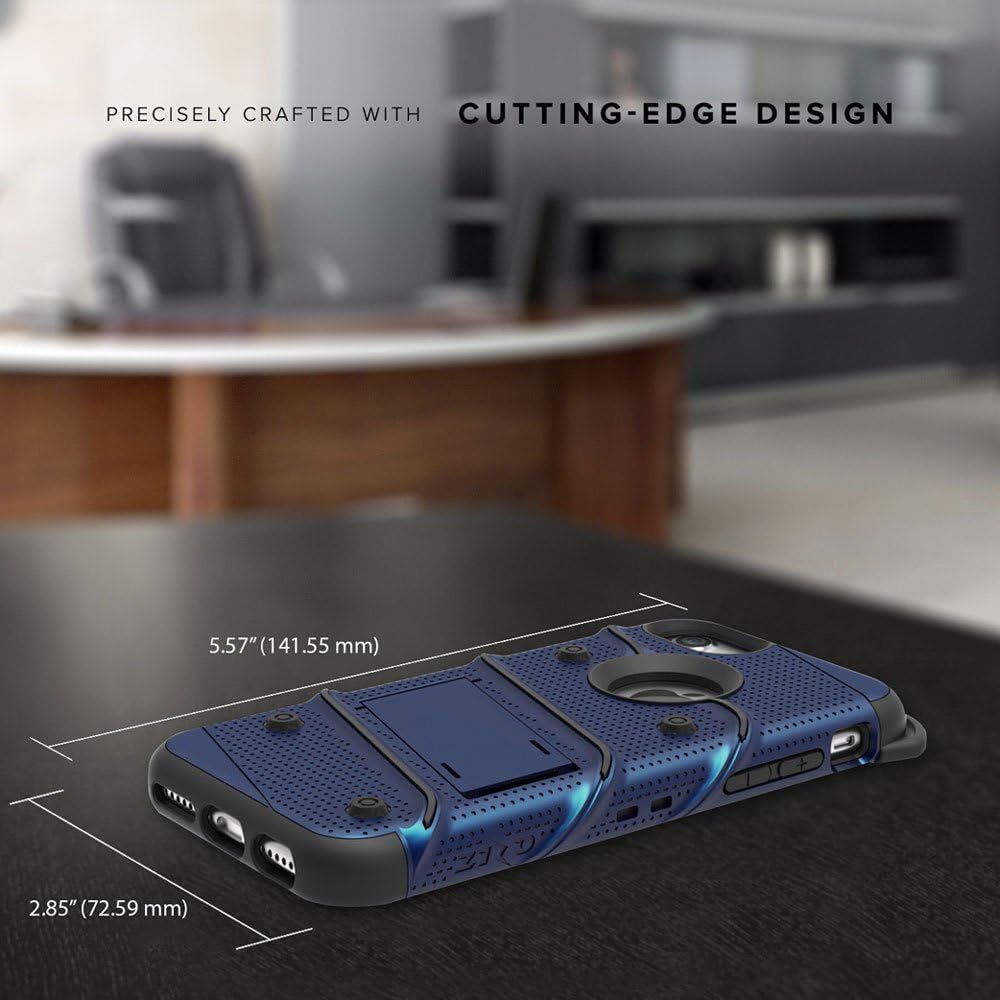
Image 7.1: Dimensional specifications of the Zizo Bolt Series Case.
8. Warranty and Support
Zizo products are designed for durability and performance. For specific warranty information and customer support, please refer to the official Zizo website or contact their customer service directly.
You can also visit the Zizo Store on Amazon for additional product information and support resources.
When contacting support, please have your product model number (FBA_BOLT-IPH7-BLBK) and purchase details readily available.