
Product Overview
The ZIZO Bolt Series case is engineered to provide robust protection for your iPhone SE (3rd and 2nd gen), iPhone 8, and iPhone 7. It features a dual-layer construction designed for impact dispersion, an integrated kickstand, a rotating holster belt clip, and includes a tempered glass screen protector and lanyard for enhanced usability and security.

Figure 1: ZIZO Bolt Series case, screen protector, and holster components.

Figure 2: Exploded view illustrating the dual-layer construction of the ZIZO Bolt Series case.
Setup and Installation
1. Installing the Tempered Glass Screen Protector
- Clean your phone screen thoroughly with the provided cleaning kit (if included). Ensure no dust, smudges, or fingerprints remain.
- Carefully align the tempered glass screen protector with your phone's screen, paying close attention to the cutouts for the speaker and home button.
- Gently lower the screen protector onto the screen. It will adhere automatically. If bubbles appear, gently push them towards the edges with a soft cloth.
2. Installing the ZIZO Bolt Series Case
- Separate the two layers of the ZIZO Bolt case: the inner soft Tetra Polyurethane (TPU) layer and the outer hard Polycarbonate (PC) shell.
- First, place your iPhone into the soft TPU inner layer, ensuring all buttons and ports align correctly within their respective openings.
- Next, snap the hard PC outer shell over the TPU layer. Ensure all edges are securely fastened and the case fits snugly around your device.
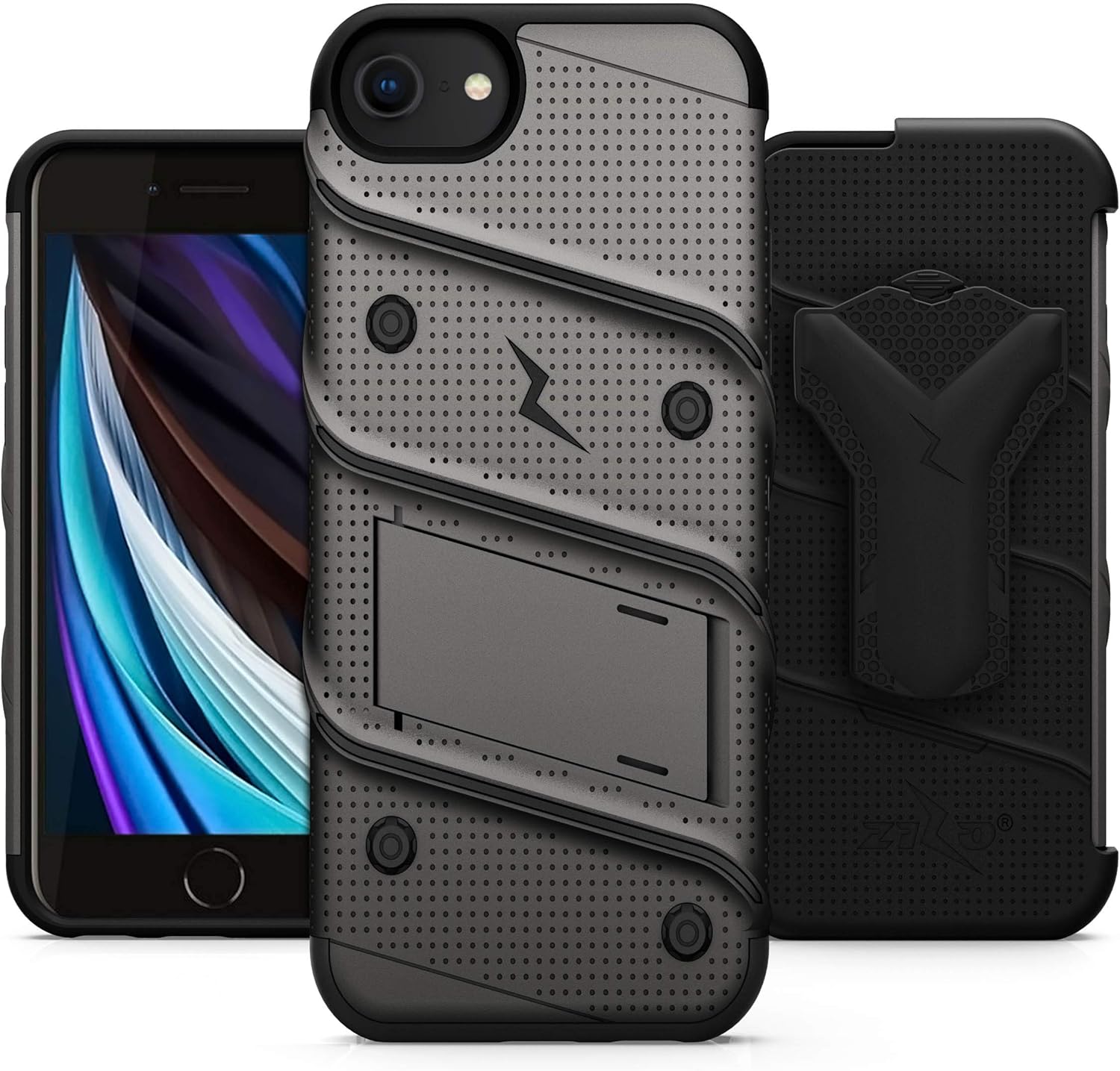
Figure 3: Phone installed in the ZIZO Bolt Series case.
Operating Instructions
Using the Integrated Kickstand
The ZIZO Bolt Series case features a built-in kickstand for convenient hands-free viewing of media. To deploy, locate the small tab on the back of the case and pull it outwards until the kickstand locks into its open position. To retract, push the kickstand back into its recess until it sits flush with the case's surface.

Figure 4: Case with kickstand deployed for media viewing.

Figure 5: Hands-free media consumption using the integrated kickstand.
Using the Holster Belt Clip
The included holster provides a secure carrying solution with a 360-degree rotating belt clip. Insert your phone (with the case installed) into the holster until it clicks securely into place. The phone can be inserted face-in for maximum screen protection or face-out for quick access to the display. The holster clip also features an integrated kickstand function for additional viewing angles.

Figure 6: Holster with integrated kickstand functionality.
Using the Lanyard
Attach the provided lanyard to the designated loop on the case or holster for added security and convenience. This helps prevent accidental drops and keeps your device easily accessible.
Maintenance
To maintain the appearance and functionality of your ZIZO Bolt Series case, follow these guidelines:
- Regularly wipe the case with a soft, slightly damp cloth to remove dust, dirt, and fingerprints.
- Avoid using harsh chemicals, abrasive cleaners, or solvents, as these can damage the material and finish of the case.
- Ensure the integrated kickstand and holster clip mechanisms are kept free of debris to ensure smooth and reliable operation.
Troubleshooting
Case is difficult to install or remove:
The ZIZO Bolt case is designed for a snug and secure fit to maximize protection. Ensure you separate the two layers (TPU and PC) before attempting to install or remove your phone. Apply gentle, even pressure during installation and removal.
Buttons are stiff or unresponsive:
Verify that the phone is correctly seated within the case and that the case's button covers align perfectly with your phone's physical buttons. Over time, the button covers may soften slightly with regular use, improving responsiveness.
Screen protector bubbles:
Small bubbles can often be pushed out towards the edges of the screen protector using a soft cloth or a credit card wrapped in a soft cloth. For persistent bubbles, ensure the screen was thoroughly cleaned and free of dust particles before the screen protector was applied.
Specifications
| Feature | Detail |
|---|---|
| Model Number | BOLT-IPH7-BKBK |
| Compatible Phone Models | iPhone SE (3rd and 2nd gen), iPhone 8, iPhone 7 |
| Material | Polycarbonate (PC) and Tetra Polyurethane (TPU) |
| Color | Gun Metal Gray/Black |
| Product Dimensions | 2.64 x 0.28 x 5.44 inches |
| Item Weight | 5.6 ounces |
| Special Features | Kickstand, Heavy Duty Protection, Wireless Charging Compatible, Belt Clip, Wrist Strap |
| Drop Protection | Military Grade 810.1-G Certified (12 feet) |
| Included Accessories | Tempered Glass Screen Protector, Holster Belt Clip, Lanyard |
Warranty Information
The ZIZO Bolt Series case is backed by a Lifetime Warranty. For detailed information regarding warranty claims, terms, and conditions, please refer to the official ZIZO website or contact ZIZO customer support directly.

Figure 7: Product packaging indicating Lifetime Warranty.
Customer Support
For further assistance, technical support, or warranty inquiries, please visit the official ZIZO website or contact their customer service department. You can typically find comprehensive contact information on the ZIZO website or within the product packaging.
ZIZO Official Store: Visit ZIZO Store on Amazon