
1. Introduction
Thank you for purchasing the Yard Force Branch Shredder YF5458. This manual provides essential information for the safe and efficient operation, maintenance, and troubleshooting of your new branch shredder. Please read this manual thoroughly before initial use and keep it for future reference. Adhering to these instructions will ensure optimal performance and extend the lifespan of your product.
Important Safety Notice
Always prioritize safety. This machine is powerful and can cause serious injury if not operated correctly. Wear appropriate personal protective equipment (PPE) including eye protection, hearing protection, and heavy-duty gloves. Keep bystanders, especially children and pets, away from the operating area.
2. Package Contents
Please check that all items are present and undamaged upon unpacking:
- Main Shredder Unit
- Push Stick
- Collection Box
- Instruction Manual (this document)
3. Setup and Assembly
The Yard Force Branch Shredder YF5458 is partially assembled. Follow these steps to complete the setup:
- Attach Wheels: Securely attach the wheels to the main unit as shown in the diagram. Ensure they are firmly in place for stable movement.
- Install Collection Box: Slide the collection box into its designated position beneath the shredder chute. Ensure it is properly seated to collect shredded material.
- Position the Unit: Place the shredder on a firm, level surface in a clear outdoor area, away from obstacles and flammable materials.
- Power Connection: Connect the power cord to a suitable 100V AC outlet. Ensure the power switch is in the "OFF" position before plugging in.

Figure 3.1: The shredder unit with wheels for easy mobility and the push stick for safe feeding. Note the maximum branch diameter of 4.5 cm.
4. Operating Instructions
4.1 Before Operation
- Ensure the collection box is correctly installed and empty.
- Verify that the power cord is securely connected to a 100V AC outlet.
- Wear all recommended personal protective equipment (PPE).
- Clear the work area of any debris or obstructions.
4.2 Starting the Shredder
- Press the power button to turn on the shredder. The motor will start.
- Allow the motor to reach full speed before feeding material.
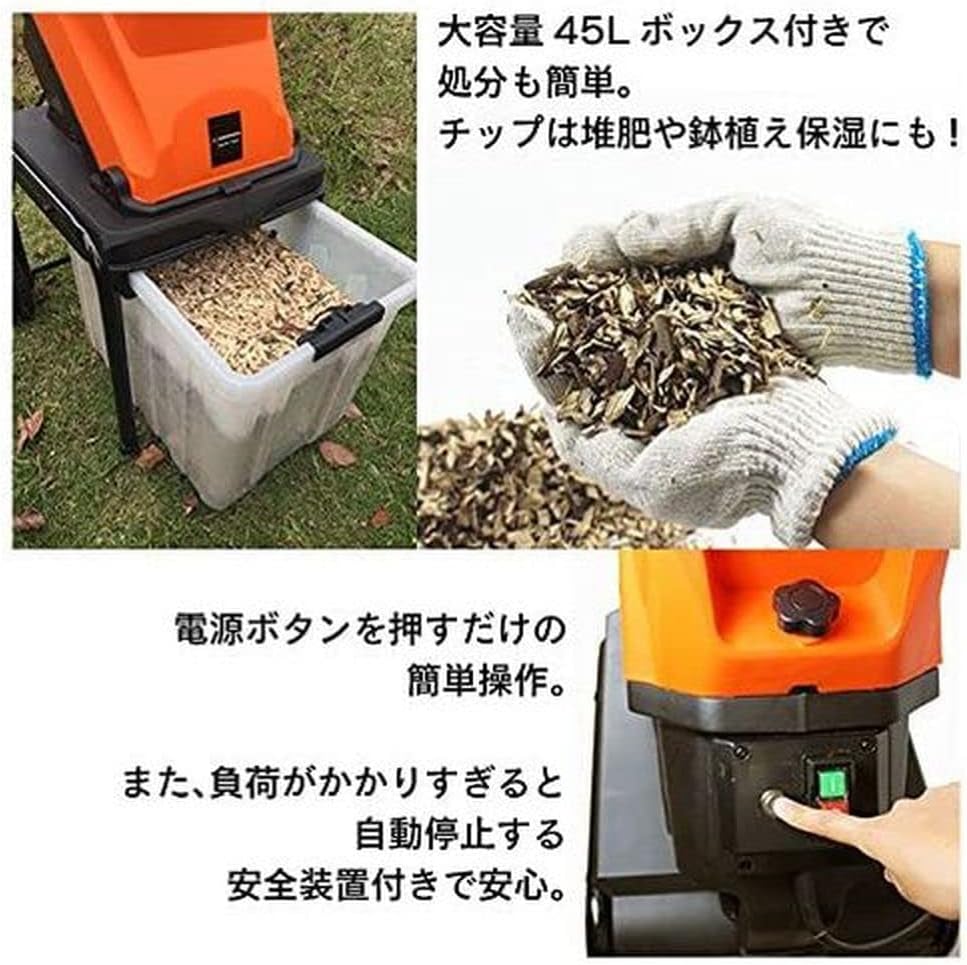
Figure 4.1: Easy operation with a single power button. The large 45L collection box simplifies disposal of shredded material.
4.3 Feeding Material
- Only feed branches and woody material. Do not attempt to shred metal, plastic, stones, or other non-organic materials.
- The maximum recommended branch diameter is 4.5 cm. Attempting to shred larger branches may cause jamming or damage to the machine.
- Feed branches one at a time, slowly and steadily, into the feeding chute.
- Use the provided push stick to guide shorter branches or to clear the chute if material gets stuck. Never use your hands or feet to push material into the chute.
- Avoid feeding wet or excessively leafy material, as this can lead to clogging.
- The shredder has a rated usage time of approximately 15 minutes. Allow the machine to cool down after continuous operation to prevent overheating.
- The machine is equipped with an automatic stop safety device that activates if overloaded. If this occurs, turn off the power, unplug the unit, and clear any jammed material before restarting.

Figure 4.2: The shredder efficiently processes branches up to 4.5 cm in diameter into fine chips.

Figure 4.3: Demonstrating the shredder's ability to reduce a large volume of branches into a compact, manageable pile using its 1450W motor.
4.4 Stopping the Shredder
To stop the shredder, press the power button to the "OFF" position. Always unplug the unit from the power outlet after use and before performing any maintenance or cleaning.
5. Maintenance
Regular maintenance ensures the longevity and safe operation of your shredder. Always unplug the unit from the power source before performing any maintenance.
5.1 Cleaning
- After each use, empty the collection box.
- Clean the feeding chute and discharge area of any accumulated debris or wood chips. Use the push stick or a non-metallic tool to clear blockages.
- Wipe down the exterior of the machine with a damp cloth. Do not use harsh chemicals or abrasive cleaners.
- Ensure all ventilation openings are clear of debris to prevent overheating.
5.2 Blade Inspection and Replacement
- Periodically inspect the carbon steel blades for sharpness and damage. Dull or damaged blades can reduce shredding efficiency and put strain on the motor.
- Refer to the detailed instructions in the full product manual (if available) for blade replacement procedures. If you are unsure, contact qualified service personnel.
- Always wear heavy-duty gloves when handling blades.
5.3 Storage
Store the shredder in a dry, secure location, out of reach of children and pets. Ensure the power cord is neatly coiled and stored to prevent damage.
6. Troubleshooting
This section addresses common issues you might encounter with your branch shredder. For problems not listed here, please contact customer support.
| Problem | Possible Cause | Solution |
|---|---|---|
| Shredder does not start. |
|
|
| Shredder stops during operation. |
|
|
| Poor shredding performance. |
|
|
| Excessive noise or vibration. |
|
|
7. Specifications
| Feature | Detail |
|---|---|
| Brand | Yard Force |
| Model Number | YF5458 |
| Product Dimensions (L x W x H) | 53 x 47 x 88 cm (approx.) |
| Item Weight | 12.5 kg |
| Material | ABS, Carbon Steel |
| Power Source | AC (Corded Electric) |
| Voltage | 100 Volts |
| Wattage | 1450 W |
| Max Branch Diameter | 4.5 cm |
| Rated Usage Time | Approx. 15 minutes |
| Accessories Included | Push Stick |
| Batteries Included | No |
8. General Safety Information
Operating power tools requires caution. Always follow these general safety guidelines to prevent injury and damage:
- Read the Manual: Understand all instructions and warnings before use.
- Personal Protective Equipment (PPE): Always wear safety glasses, hearing protection, and heavy-duty gloves. Long pants and closed-toe shoes are also recommended.
- Clear Work Area: Keep the area around the shredder clear of debris, children, and pets. Maintain a safe distance from the machine during operation.
- Stable Surface: Operate the shredder on a firm, level surface to prevent tipping.
- Electrical Safety: Ensure the power cord is in good condition and connected to a suitable grounded outlet. Do not operate in wet conditions.
- Avoid Overloading: Do not force material into the shredder. Allow the machine to work at its own pace.
- Clear Jams Safely: If a jam occurs, immediately turn off the power and unplug the unit before attempting to clear the blockage with the push stick. Never use your hands.
- Maintenance: Always unplug the shredder before performing any cleaning, maintenance, or blade inspection.
- Storage: Store the machine in a dry, secure place, inaccessible to unauthorized users.
9. Warranty and Customer Support
Yard Force products are manufactured to high-quality standards. For information regarding warranty coverage, please refer to the warranty card included with your purchase or visit the official Yard Force website. If you require technical assistance, replacement parts, or have any questions not covered in this manual, please contact Yard Force customer support.
For further assistance, please visit the Yard Force Official Store on Amazon.