
Introduction
The Callaway Golf 300 Pro Laser Rangefinder is designed to provide accurate distance measurements for golfers. This device incorporates advanced features such as precise slope measurement, pin-locking technology, and pulse confirmation to enhance your game. It is built to be durable and resistant to water and fog, ensuring reliable performance in various conditions.
What's in the Box

Image: All items included in the Callaway 300 Pro Laser Rangefinder package.
- Callaway 300 Pro Laser Rangefinder
- Premium Molded Hard Case
- CR2 Battery (Note: While product specifications may state 'batteries not included', a CR2 battery is typically supplied with the unit.)
- Quick Start Guide
- Lens Cleaning Cloth
Setup
1. Battery Installation
- Locate the battery compartment on the device.
- Open the compartment cover.
- Insert the provided CR2 battery, ensuring correct polarity (+/-).
- Close the battery compartment cover securely.
2. Adjusting Focus
To ensure a clear view, rotate the eyepiece until the display and target appear sharp.
3. Changing Measurement Units (Yards/Meters)
The device can display distances in either yards or meters. Refer to the Quick Start Guide for specific instructions on how to toggle between these units, typically involving a short press of the 'Mode' button.
Operating Instructions

Image: Proper technique for holding and aiming the rangefinder.
1. Power On/Off
Press the Power button (usually marked with a power symbol) once to turn the device on. The device will automatically power off after a period of inactivity to conserve battery life.
2. Basic Distance Measurement
- Look through the eyepiece and aim the reticle (crosshairs) at your desired target.
- Press the Power button again to activate the laser and display the distance.
- The device offers 6x magnification for clear targeting up to 1000 yards with +/- 1 yard accuracy.
3. Pin-Locking Technology (P.A.T.) & Pulse Confirmation

Image: Display showing Pin-Locking Technology with Pulse Confirmation.
- When targeting a flagstick, the P.A.T. feature allows the device to lock onto the pin up to 300 yards away, even with background objects.
- Upon successful pin lock, the device will emit a short vibrating "burst" (Pulse Confirmation) to confirm the accurate distance to the flag.
4. Precise Slope Measurement

Image: Rangefinder display illustrating slope-adjusted distance calculation.
- The 300 Pro accounts for changes in elevation (incline/decline) and calculates a slope-adjusted distance.
- This adjusted distance is displayed alongside the actual distance, providing a more accurate representation of the playing yardage.
- The slope function can be easily turned off with the click of a button, making the device legal for tournament play.
5. MagnaHold Technology

Image: The rangefinder utilizing MagnaHold to attach to a golf cart.
The integrated MagnaHold feature allows the rangefinder to securely attach to metal surfaces, such as a golf cart frame or club, for quick access and convenient storage during your round.
Maintenance
- Cleaning: Use the provided lens cleaning cloth to gently wipe the lenses. Do not use abrasive materials or harsh chemicals.
- Battery Replacement: Replace the CR2 battery when the low battery indicator appears in the display.
- Water & Fog Resistance: The device is IPX4 rated for water resistance, meaning it can withstand splashes and light rain. It is also fog resistant. Avoid submerging the device in water.
Troubleshooting
- No Display/Power: Ensure the CR2 battery is correctly installed and has sufficient charge. Replace if necessary.
- Inaccurate Readings: Ensure the lens is clean and free from smudges. Confirm you are targeting the correct object. If using P.A.T., ensure the device vibrates to confirm pin lock.
- Foggy View: The device is fog resistant, but extreme conditions may still affect visibility. Allow the device to acclimate to ambient temperature.
Specifications
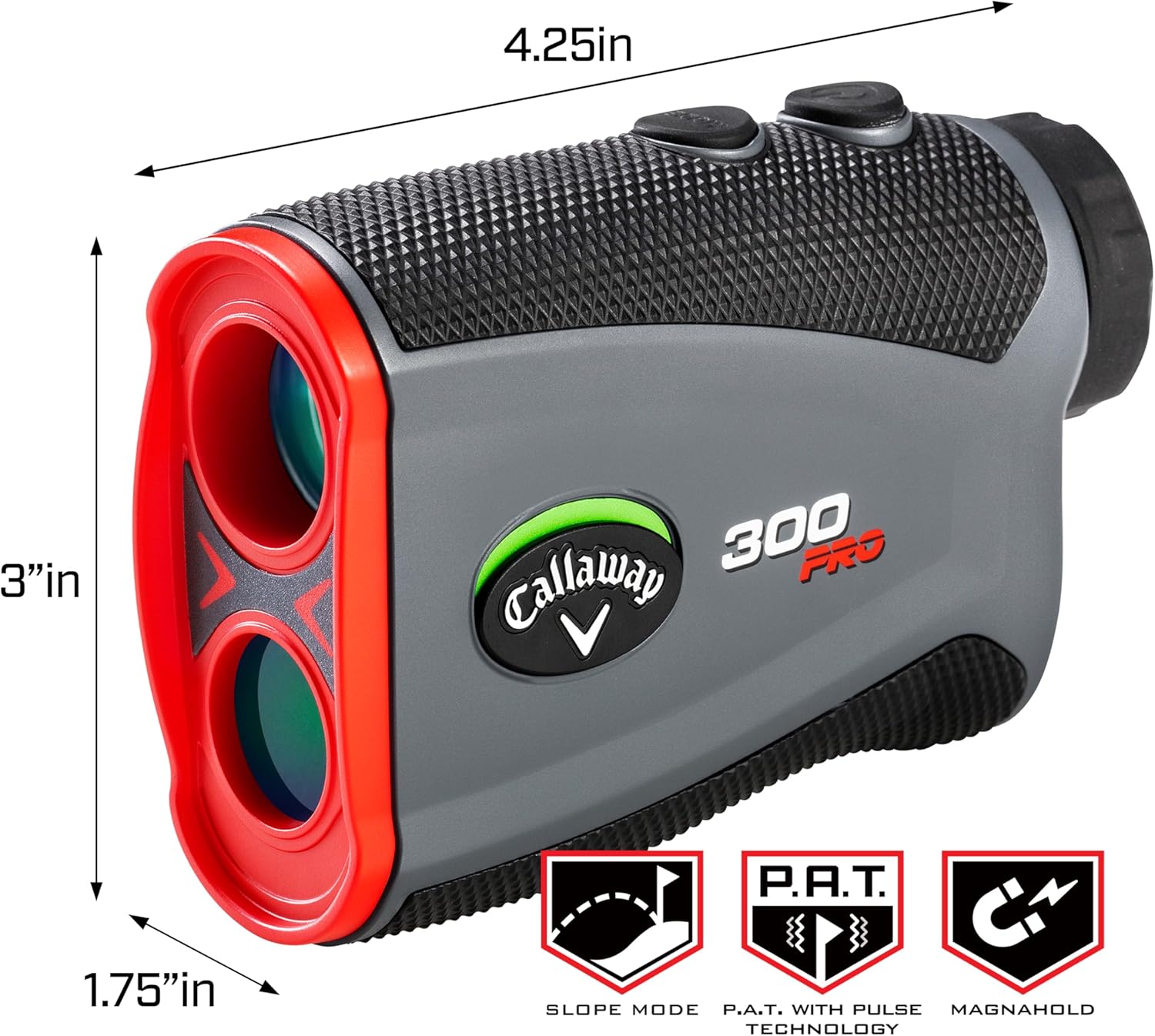
Image: Callaway 300 Pro Rangefinder with key dimensions.
| Feature | Detail |
|---|---|
| Brand | Callaway |
| Model Name | 300 Pro Laser Rangefinder, Slope Measurement |
| Color | Red |
| Material | Plastic |
| Sport | Golf |
| Item Weight | 8 ounces |
| Product Dimensions | 4"L x 2.7"W x 1.4"H |
| Battery Type | CR2 Lithium |
| Water Resistance Level | IPX4 (Waterproof) |
| Magnification | 6x |
| Measuring Range | 5 - 1000 yards |
| Accuracy | +/- 1 yard |
| Pin Acquisition Technology (P.A.T.) | Locks onto pin up to 300 yards |
| Pulse Confirmation | Vibrating 'burst' upon pin lock |
Warranty & Support
For detailed warranty information and customer support, please visit the manufacturer's official website. The Quick Start Guide included with your device also contains contact information for support.


