
Introduction
The Actiontec SBWD100A is a Wireless HD Video Receiver designed to receive high-definition video and audio signals wirelessly from a compatible transmitter (sold separately) and output them to a display device. This device allows for flexible placement of your display without the need for long HDMI cables.
1. Setup
1.1 Package Contents
- Actiontec SBWD100A Wireless HD Video Receiver
- Power Adapter
- HDMI Cable
- User Manual (this document)
1.2 Connecting the Receiver
- Connect to Display: Use the provided HDMI cable to connect the HDMI OUT port on the SBWD100A receiver to an available HDMI input port on your television or monitor.
- Connect Power: Plug the power adapter into the DC IN port on the SBWD100A receiver, then plug the other end into a standard electrical outlet. The receiver will power on automatically.
- Power On Display: Turn on your television or monitor and select the correct HDMI input source that the receiver is connected to.
- Pairing (Automatic): The SBWD100A receiver is designed to automatically detect and pair with a compatible Actiontec wireless HD video transmitter (sold separately) when both devices are powered on and within range. Look for a 'Waiting for Connection' or similar message on your display.
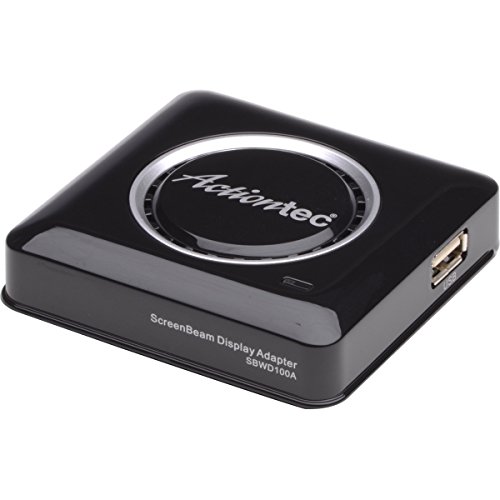
Figure 1: Front view of the Actiontec SBWD100A Wireless HD Video Receiver, showing its compact design and connection ports.
2. Operating Instructions
2.1 Powering On/Off
- Power On: The receiver powers on automatically when connected to a power source.
- Power Off: Disconnect the power adapter from the electrical outlet to power off the receiver.
2.2 Receiving Video Signal
Once the receiver is powered on and connected to your display, and a compatible Actiontec wireless HD video transmitter (sold separately) is also powered on and transmitting, the receiver will automatically detect and display the video signal. The LED indicator on the receiver will typically change to a solid color (e.g., blue or green) to indicate a successful connection and active signal reception.
Ensure your display is set to the correct HDMI input where the SBWD100A is connected.
3. Maintenance
3.1 Cleaning
To clean the receiver, gently wipe the exterior with a soft, dry cloth. Do not use liquid cleaners, aerosols, or solvents, as these may damage the device. Ensure the device is powered off and unplugged before cleaning.
3.2 Storage
When not in use for extended periods, store the receiver in a cool, dry place away from direct sunlight and extreme temperatures. Disconnect all cables before storing.
4. Troubleshooting
| Problem | Possible Cause | Solution |
|---|---|---|
| No picture on display |
|
|
| Poor picture quality or flickering |
|
|
| No audio |
|
|
5. Specifications
| Feature | Detail |
|---|---|
| Model Number | SBWD100A |
| ASIN | B01KLQVZJC |
| Item Weight | 7.3 ounces |
| Package Dimensions | 6.1 x 6.1 x 2.36 inches |
| Manufacturer | ACTIONTEC |
| Date First Available | October 6, 2013 |
6. Warranty Information
Actiontec products are covered by a limited warranty. For specific warranty terms and conditions, please refer to the warranty card included with your product or visit the official Actiontec website. Keep your purchase receipt as proof of purchase for warranty claims.
7. Customer Support
If you encounter any issues not covered in this manual or require further assistance, please contact Actiontec customer support. Visit the official Actiontec website for contact information, FAQs, and additional resources.


