
1. Introduction
Thank you for choosing the Senso ActivBuds S-230 Wireless Bluetooth Noise Cancelling Headphones. These headphones are designed to provide high-fidelity audio and a secure, comfortable fit for an active lifestyle. This manual provides essential information on how to set up, operate, maintain, and troubleshoot your device.

Image 1.1: Senso ActivBuds S-230 Wireless Bluetooth Noise Cancelling Headphones.
2. What's in the Box
Please check the package contents to ensure all items are present:
- Senso ActivBuds S-230 Bluetooth Headphones
- Carrying Case
- Short Micro USB Charging Cable
- 3 Sets of Ear Tips (Small, Medium, Large)
- Cable Management Clip
- User Manual
- Dual Port USB Car Charger (Bonus Item)
- 3ft Charging Cable for Apple (Lightning connector) and Android (Micro USB connector) Devices (Bonus Item)
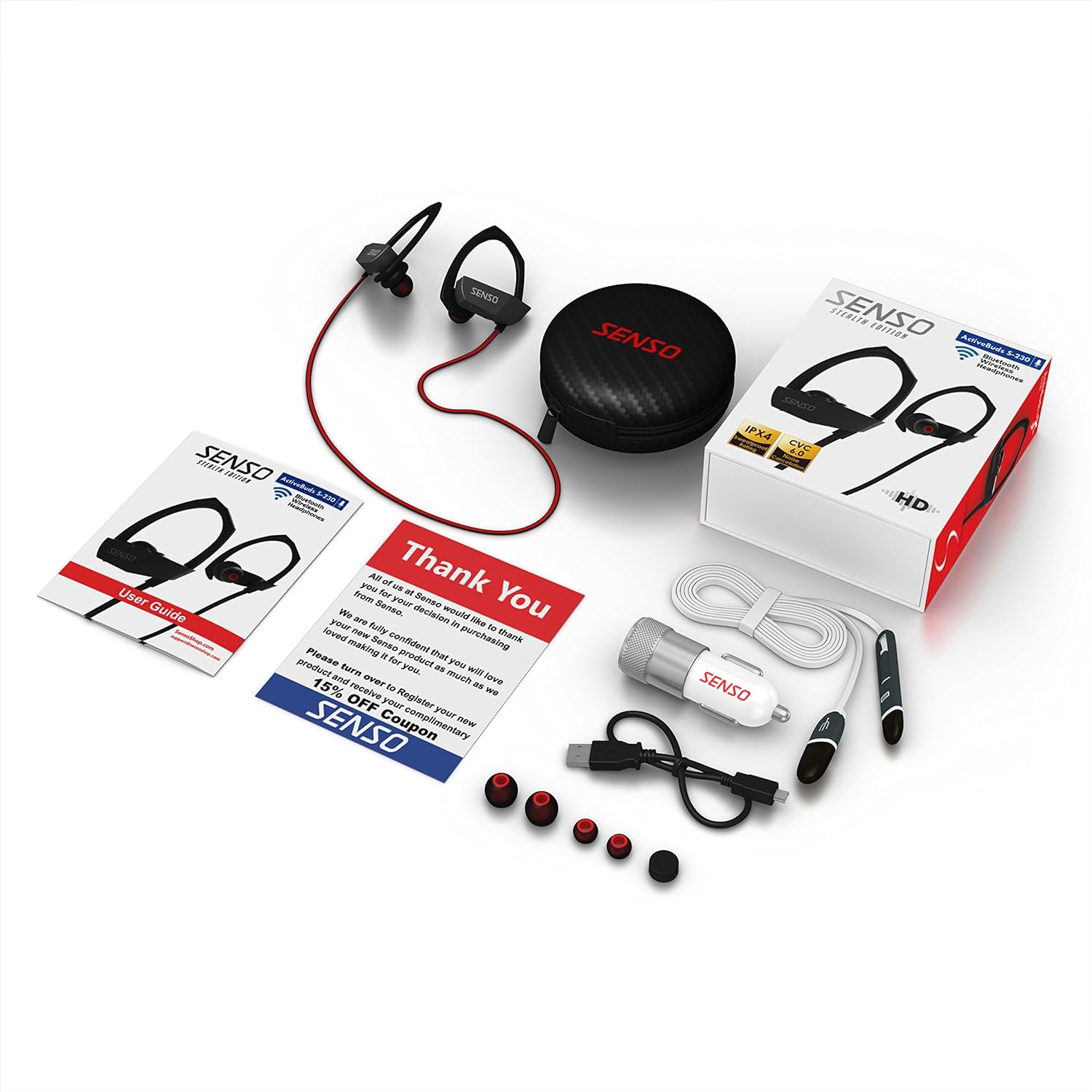
Image 2.1: All items included in the Senso ActivBuds S-230 package.
3. Setup
3.1 Charging the Headphones
- Connect the short Micro USB charging cable to the charging port on the headphones.
- Connect the other end of the cable to a USB power source (e.g., computer USB port, wall adapter, or the included car charger).
- The LED indicator on the headphones will illuminate during charging.
- Charging typically takes approximately 1.5 hours. The LED indicator will change or turn off once charging is complete.
Ensure the headphones are fully charged before first use for optimal battery life.
3.2 Pairing with a Bluetooth Device
- Ensure the headphones are turned off.
- Press and hold the Multi-function button (usually the center button on the control panel) for approximately 5-7 seconds until the LED indicator flashes red and blue alternately. This indicates pairing mode.
- On your Bluetooth-enabled device (smartphone, tablet, computer), go to the Bluetooth settings and enable Bluetooth.
- Search for available devices. You should see "Senso ActivBuds S-230" or a similar name appear in the list.
- Select the headphones from the list to connect. If prompted for a password, enter "0000".
- Once successfully paired, the LED indicator on the headphones will flash blue slowly, and you may hear an audible confirmation.
The headphones will automatically attempt to reconnect to the last paired device when turned on.
3.3 Adjusting for a Secure Fit
The ActivBuds S-230 feature an in-ear design with secure over-ear hooks for stability during activity. Experiment with the three included sizes of ear tips (Small, Medium, Large) to find the most comfortable and secure fit that also provides optimal sound isolation.
- Gently insert the earbud into your ear canal.
- Position the over-ear hook comfortably around the back of your ear.
- Adjust the cable management clip to secure the cable behind your neck, preventing it from bouncing during movement.

Image 3.1: Proper fit and use of the cable management clip.
4. Operating Instructions
4.1 Power On/Off
- Power On: Press and hold the Multi-function button for approximately 3 seconds until the LED flashes blue and you hear an audible prompt.
- Power Off: Press and hold the Multi-function button for approximately 3 seconds until the LED flashes red and you hear an audible prompt.
4.2 Music Playback Control

Image 4.1: Control panel on the Senso ActivBuds S-230.
- Play/Pause: Press the Multi-function button once.
- Next Track: Press and hold the Volume Up (+) button.
- Previous Track: Press and hold the Volume Down (-) button.
- Volume Up: Press the Volume Up (+) button briefly.
- Volume Down: Press the Volume Down (-) button briefly.
4.3 Call Management
- Answer/End Call: Press the Multi-function button once.
- Reject Call: Press and hold the Multi-function button for approximately 2 seconds.
- Redial Last Number: Double-press the Multi-function button.
4.4 Connecting to Two Devices Simultaneously
The ActivBuds S-230 support connecting to two Bluetooth devices at once. Follow these steps:
- Pair the headphones with the first device as described in Section 3.2.
- Turn off the Bluetooth function on the first device.
- Put the headphones back into pairing mode (red and blue flashing LED).
- Pair the headphones with the second device.
- Once the second device is paired, re-enable Bluetooth on the first device. The headphones should automatically connect to both devices.
5. Maintenance
5.1 Cleaning
- Regularly clean the ear tips with a soft, dry cloth. For deeper cleaning, remove the ear tips and wash them with mild soap and water, ensuring they are completely dry before reattaching.
- Wipe the headphone body and cable with a soft, slightly damp cloth. Avoid using harsh chemicals or abrasive materials.
- Ensure the charging port is free of dust and debris.
5.2 Storage
- When not in use, store the headphones in the provided carrying case to protect them from dust, moisture, and physical damage.
- Store in a cool, dry place, away from extreme temperatures.
5.3 Battery Care
- Avoid fully discharging the battery frequently. Charge the headphones when the low battery indicator appears.
- If storing for an extended period, charge the headphones to about 50% every few months to preserve battery health.
6. Troubleshooting
If you encounter issues with your Senso ActivBuds S-230, please refer to the following common problems and solutions:
| Problem | Possible Solution |
|---|---|
| Headphones do not power on. | Ensure the headphones are fully charged. Connect to a power source and try again. |
| Cannot pair with a Bluetooth device. |
|
| No sound or low sound. |
|
| Intermittent connection or static. |
|
| Microphone not working. |
|
7. Specifications
Technical specifications for the Senso ActivBuds S-230:
| Feature | Specification |
|---|---|
| Model Name | ActivBuds S-230 |
| Bluetooth Specification | 4.1+EDR |
| Wireless Range | Up to 30 feet (10 meters) |
| Water Resistance Rating | IPX4 (Sweatproof) |
| Noise Reduction | CVC6.0 |
| Battery Type | Lithium-ion Polymer 85mAh |
| Charging Port | Micro USB |
| Charging Time | Approximately 1.5 hours |
| Playback Time | Up to 8 hours |
| Standby Time | Up to 240 hours |
| Frequency Response | 20 - 22kHz |
| Item Weight | Approximately 0.001 ounces (0.02 grams) |
| Product Dimensions | 1.93 x 0.51 x 1.85 inches |
| Special Features | Integrated Microphone, Noise Cancellation |
8. Warranty and Support
8.1 Warranty Information
The Senso ActivBuds S-230 headphones come with a 1-year limited warranty from the date of purchase. This warranty covers manufacturing defects. Additionally, a 30-day hassle-free return policy is offered. Please retain your proof of purchase for warranty claims.
8.2 Customer Support
For any questions, technical assistance, or warranty claims, please contact Senso customer support. Refer to the contact information provided on the product packaging or the official Senso website for the most up-to-date support channels.

