
1. Introduction
This manual provides essential instructions for the safe and effective use of your Nikon D3400 Digital SLR camera. The Nikon D3400 is a compact and versatile camera featuring a DX-format 24.2 megapixel CMOS sensor and EXPEED 4 image processor. It is designed for high-resolution imaging, notable low-light sensitivity, continuous shooting, and full HD 1080p video recording. The camera's sensor design omits the optical low-pass filter for enhanced sharpness and resolution. It also includes SnapBridge Bluetooth connectivity for wireless image sharing.
Included with your D3400 camera body is the AF-P DX NIKKOR 18-55mm f/3.5-5.6 VR lens, a standard zoom lens with a 35mm-equivalent focal length range of 27-82.5mm. This lens features a pulse stepping motor for smooth, fast, and quiet autofocus, and a robust VR (Vibration Reduction) image stabilization system to minimize camera shake.
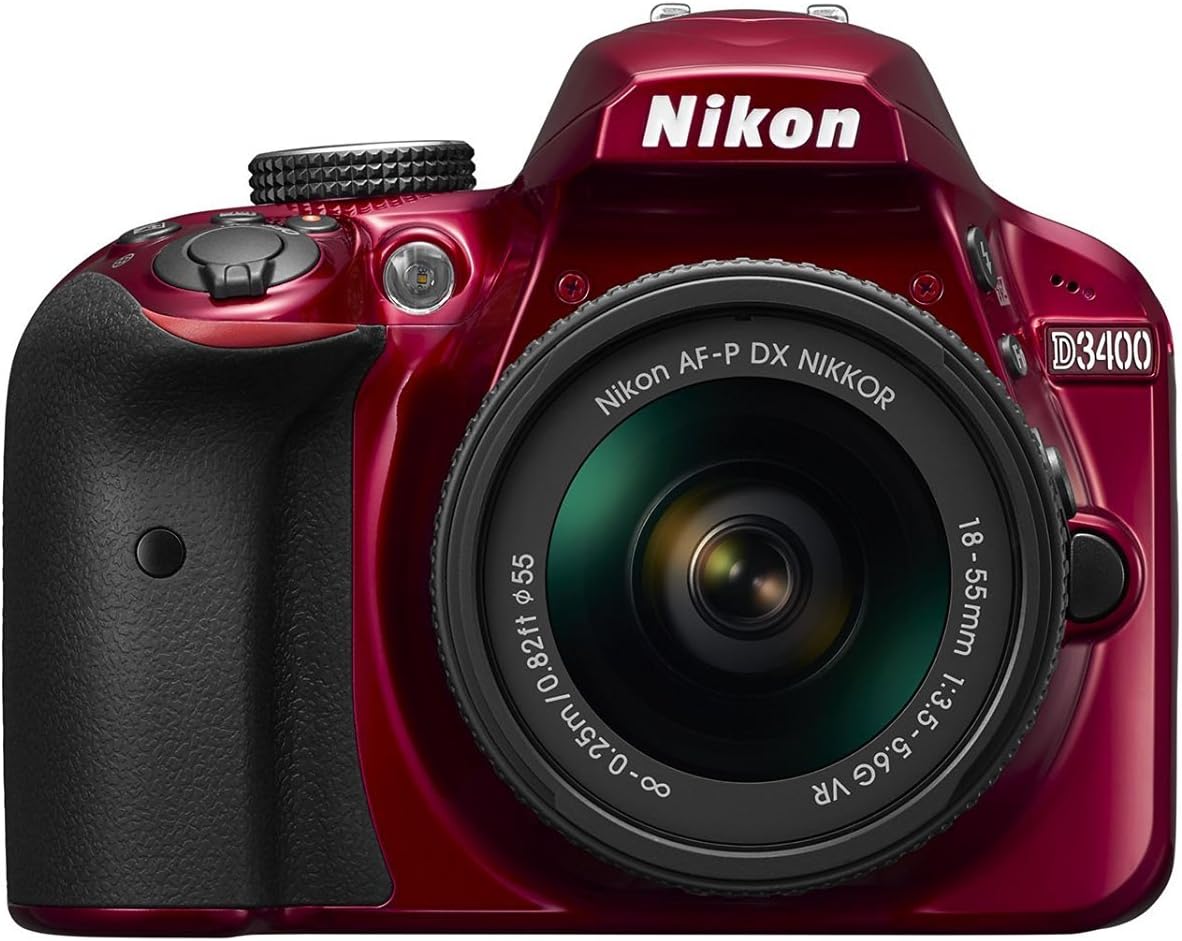
Figure 1: Nikon D3400 Camera with 18-55mm VR Lens
2. Setup
2.1. Attaching the Lens
- Remove the body cap from the camera and the rear lens cap from the lens.
- Align the mounting mark on the lens with the mounting mark on the camera body.
- Rotate the lens counter-clockwise until it clicks into place.

Figure 2: Angled view of Nikon D3400
2.2. Inserting the Battery and Memory Card
- Open the battery chamber cover on the bottom of the camera.
- Insert the battery with the correct orientation until it locks into place.
- Open the memory card slot cover on the side of the camera.
- Insert a Secure Digital (SD) memory card into the slot until it clicks. Ensure the card is facing the correct direction.
- Close both covers securely.
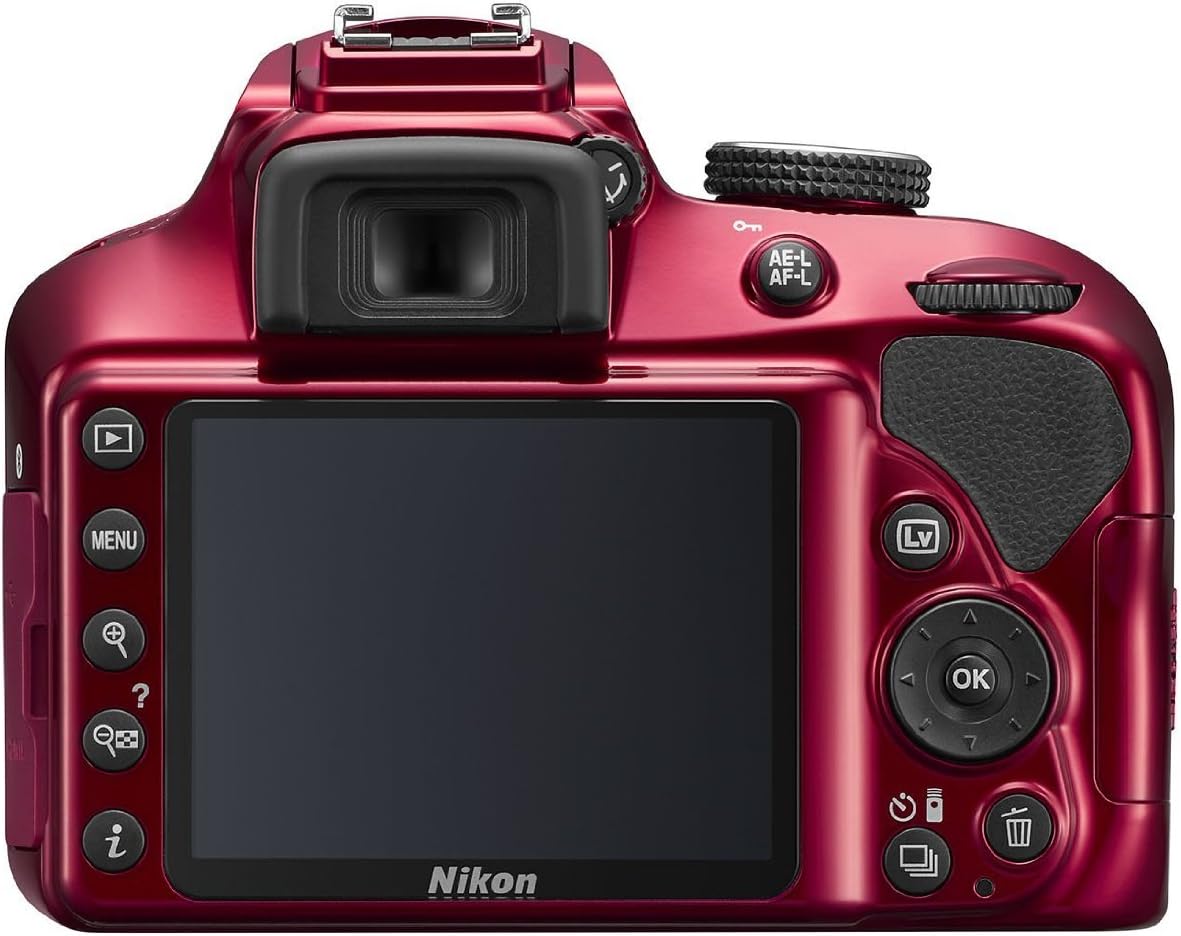
Figure 3: Rear view of Nikon D3400
3. Operating the Camera
3.1. Power On/Off
Rotate the power switch located around the shutter-release button to the 'ON' position to turn on the camera. Rotate it to 'OFF' to power down.
3.2. Basic Photography
- Set the mode dial (located on the top of the camera) to 'AUTO' for automatic settings, or choose a scene mode (e.g., Portrait, Landscape, Child, Sports, Close-up, Night Portrait) or special effects mode (e.g., Super Vivid, Pop, Photo Illustration, Toy Camera Effect, Miniature Effect, Selective Color, Silhouette, High Key, Low Key).
- Look through the viewfinder or use the Live View mode (press the 'Lv' button on the back) to compose your shot.
- Press the shutter-release button halfway down to focus.
- Press the shutter-release button all the way down to take the picture.
3.3. Video Recording
The Nikon D3400 supports Full HD 1080p video recording. To record video:
- Switch to Live View mode by pressing the 'Lv' button.
- Press the red movie-record button (located near the power switch) to start recording.
- Press the movie-record button again to stop recording.
4. Connectivity
4.1. SnapBridge (Bluetooth)
The D3400 features SnapBridge Bluetooth connectivity, allowing wireless transfer of images to a compatible smart device. Download the SnapBridge app to your smartphone or tablet and follow the in-app instructions to pair your camera. Once paired, images can be automatically uploaded to your mobile device.
4.2. USB and HDMI
The camera is equipped with a Hi-Speed USB port for direct connection to a computer for image transfer. It also has a Type C mini-pin HDMI connector for video output to an external display.
5. Maintenance
5.1. Cleaning
- Camera Body: Use a soft, dry cloth to wipe the camera body. For stubborn dirt, use a cloth lightly dampened with water.
- Lens: Use a lens brush to remove dust, then gently wipe with a microfiber lens cloth. For smudges, use a lens cleaning solution specifically designed for optical lenses.
- Sensor: Sensor cleaning should ideally be performed by authorized service personnel to avoid damage.
5.2. Storage
When not in use, store the camera in a cool, dry place away from direct sunlight and moisture. Remove the battery if storing for extended periods.
6. Troubleshooting
- Camera does not power on: Ensure the battery is fully charged and correctly inserted. Check if the power switch is in the 'ON' position.
- Images are blurry: Check if the lens is properly attached and extended. Ensure autofocus is engaged or focus manually. Verify sufficient lighting conditions.
- SnapBridge connection issues: Ensure Bluetooth is enabled on both the camera and smart device. Restart both devices and try pairing again. Refer to the SnapBridge app for specific troubleshooting steps.
- Memory card error: Ensure the memory card is correctly inserted and not locked. Try formatting the card (this will erase all data). If the issue persists, try a different memory card.
7. Specifications
| Feature | Specification |
|---|---|
| Model Name | Nikon D3400 |
| Model Number | 1572 |
| Photo Sensor Resolution | 24.2 MP |
| Photo Sensor Size | APS-C |
| Photo Sensor Technology | CMOS |
| Image Stabilization | Optical, VR |
| Expanded ISO Range | 100-25600 |
| Continuous Shooting | 5 FPS |
| Video Resolution | FHD 1080p |
| Screen Size | 3 Inches |
| Display Type | LCD |
| Connectivity | Bluetooth, HDMI, USB |
| Autofocus Points | 11 |
| Lens Mount | Nikon F |
| Included Lens | AF-P DX NIKKOR 18-55mm f/3.5-5.6G VR |
8. Warranty and Support
The Nikon D3400 comes with a 1-year Manufacturer supplied Full USA Warranty. For warranty claims, technical support, or service, please contact Nikon customer service or visit their official website. Keep your proof of purchase for warranty validation.
9. Official Product Video
Video: Getting Started with the Nikon D3400. This video provides a quick overview of the camera's basic functions and setup.


