
Introduction and Overview
The Como Audio Duetto is a sophisticated wireless music system designed to deliver high-fidelity audio with extensive connectivity options. It features a multi-room music system with one-touch streaming, internet radio, Bluetooth, and Wi-Fi capabilities. The unit is housed in hand-crafted, furniture-grade real wood veneer cabinets, ensuring both aesthetic appeal and superior acoustic performance. With its custom digital signal processor and powerful 30 watts per channel RMS digital amplifier, the Duetto provides a rich and immersive listening experience.
Most functions can be accessed directly from the unit without the need for a separate device or app, offering intuitive control. For advanced features and multi-room synchronization, a dedicated mobile application is available.
Setup
1. Unpacking and Placement
Carefully remove the Duetto from its packaging. Place the unit on a stable, flat surface. For optimal sound performance, ensure the unit is not surrounded by objects and is at least 3.5 inches from a rear wall to allow for proper bass reflection.
2. Power Connection
Connect the provided power adapter to the '20V DC' input on the rear panel of the Duetto. Plug the other end into a suitable wall outlet (100-240V AC, 50-60Hz).
3. Antenna Connection
Extend the telescoping FM antenna located on the rear panel for optimal FM radio reception.
4. Initial Wi-Fi Setup
Upon first power-up, the Duetto will enter setup mode. Follow the on-screen prompts to connect to your Wi-Fi network. You will need to select your network from the list and enter your password using the unit's controls.
5. Auxiliary Inputs
The Duetto features multiple auxiliary inputs on the rear panel:
- Line Out: For connecting to external amplifiers or powered speakers.
- AUX In 1 & AUX In 2: High-resolution auxiliary inputs for connecting external audio devices (e.g., Amazon Echo Dot, MP3 players).
- Optical In: For connecting digital audio sources like TVs or game consoles.
- USB: For playing music files from a USB drive.
Operating the Duetto
1. Power On/Off
Press the 'O/VOLUME' knob to power the unit on or off.
2. Volume Control
Rotate the 'O/VOLUME' knob to adjust the volume. You can also use the included remote control or the Como Audio app.
3. Source Selection
Press the 'SOURCE /<' knob to cycle through available audio sources, including FM radio, Internet radio, Bluetooth, and auxiliary inputs. The current source will be displayed on the color screen.
4. Presets
The Duetto features six preset buttons (1-6) at the top of the faceplate. To save a current station or source as a preset, press and hold one of the numbered buttons until the display confirms it has been saved. To recall a preset, simply press the corresponding numbered button.
5. Menu Navigation
Use the 'MENU /↓' knob to access the system menu. Rotate the knob to navigate through options and press to select. Press the 'SOURCE /<' knob to go back to the previous menu or exit the menu.
6. Bluetooth Pairing
Select Bluetooth as the source. The unit will automatically enter pairing mode. On your mobile device, search for 'Como Audio Duetto' in your Bluetooth settings and select it to pair.
7. Multi-room Functionality
If you have multiple Como Audio units, you can group them together using the Como Audio app for synchronized multi-room audio. This allows you to play the same music across different rooms seamlessly.
8. Using the Como Audio App
The Como Audio app (available for iOS and Android) provides comprehensive control over your Duetto. It allows you to select sources, manage presets, adjust volume, and configure multi-room groups. While the Duetto is designed for standalone operation, the app enhances convenience and control, especially for managing multiple units.
9. Remote Control
The included remote control provides convenient access to basic functions such as power, volume, source selection, and presets from a distance.
Features
Audio Performance
- Custom digital signal processor (DSP) for optimized sound.
- 30 watts per channel RMS digital amplifier.
- High-quality speaker components: 4-layer voice coil woofer and dome tweeter for clear and powerful sound.
- Robust wooden cabinet construction to minimize resonance and enhance audio fidelity.
Connectivity
- Wi-Fi: Seamless streaming and internet radio access.
- Bluetooth: Wireless audio streaming from compatible devices.
- FM Radio: Traditional radio reception.
- Internet Radio: Access to thousands of stations worldwide.
- Auxiliary Inputs: Two 3.5mm auxiliary inputs and one optical input for versatile wired connections.
- USB: Playback of digital audio files from USB storage.
Design and Usability
- Hand-crafted furniture-grade real wood veneer cabinets.
- Intuitive color display for easy navigation and information.
- Physical controls (knobs and preset buttons) for direct interaction.
Maintenance
Cleaning
To clean the unit, use a soft, dry cloth. Do not use abrasive cleaners, waxes, or solvents, as these may damage the finish. Avoid spraying liquids directly onto the unit.
Placement
Avoid placing the Duetto in areas with extreme temperatures, high humidity, or direct sunlight. Ensure adequate ventilation around the unit to prevent overheating.
Troubleshooting
- No Power: Ensure the power adapter is securely connected to both the unit and a working electrical outlet.
- No Sound: Check the volume level on the Duetto and any connected external devices. Verify that the correct audio source is selected. Ensure speaker connections (if external speakers are used) are secure.
- Wi-Fi Connection Issues: Confirm your Wi-Fi network is active and within range. Re-enter your Wi-Fi password if necessary. Restart your Wi-Fi router and the Duetto unit.
- Bluetooth Pairing Failure: Ensure the Duetto is in Bluetooth mode and discoverable. Make sure your mobile device's Bluetooth is enabled and it is within range of the Duetto. Try unpairing and re-pairing the device.
- Poor Radio Reception: Adjust the position of the FM antenna. If using Internet radio, ensure a strong Wi-Fi signal.
- Controls Unresponsive: Try restarting the unit by unplugging it from the power outlet for a few seconds and then plugging it back in.
Specifications
| Product Dimensions | 5.5 x 5.3 x 14.6 inches |
| Item Weight | 6.6 pounds |
| Manufacturer | Como Audio |
| Item Model Number | Duetto Walnut/Black |
| Batteries (for remote) | 2 AAA batteries required |
| Connectivity Technology | Bluetooth, Wi-Fi |
| Color | Walnut (Global Edition) |
| Amplifier Output | 30 watts per channel RMS |
| Speaker Configuration | 4-layer voice coil woofer, dome tweeter |
Warranty and Support
For warranty information and technical support, please refer to the official Como Audio website or contact their customer service directly. Keep your proof of purchase for warranty claims.
Product Visuals and Demonstrations

Front view of the Como Audio Duetto Wireless Speaker in Walnut/Black finish.

The Duetto's display showing music playback from Spotify, highlighting the intuitive interface.

Rear panel of the Duetto, showcasing various input and output ports including auxiliary and optical connections.
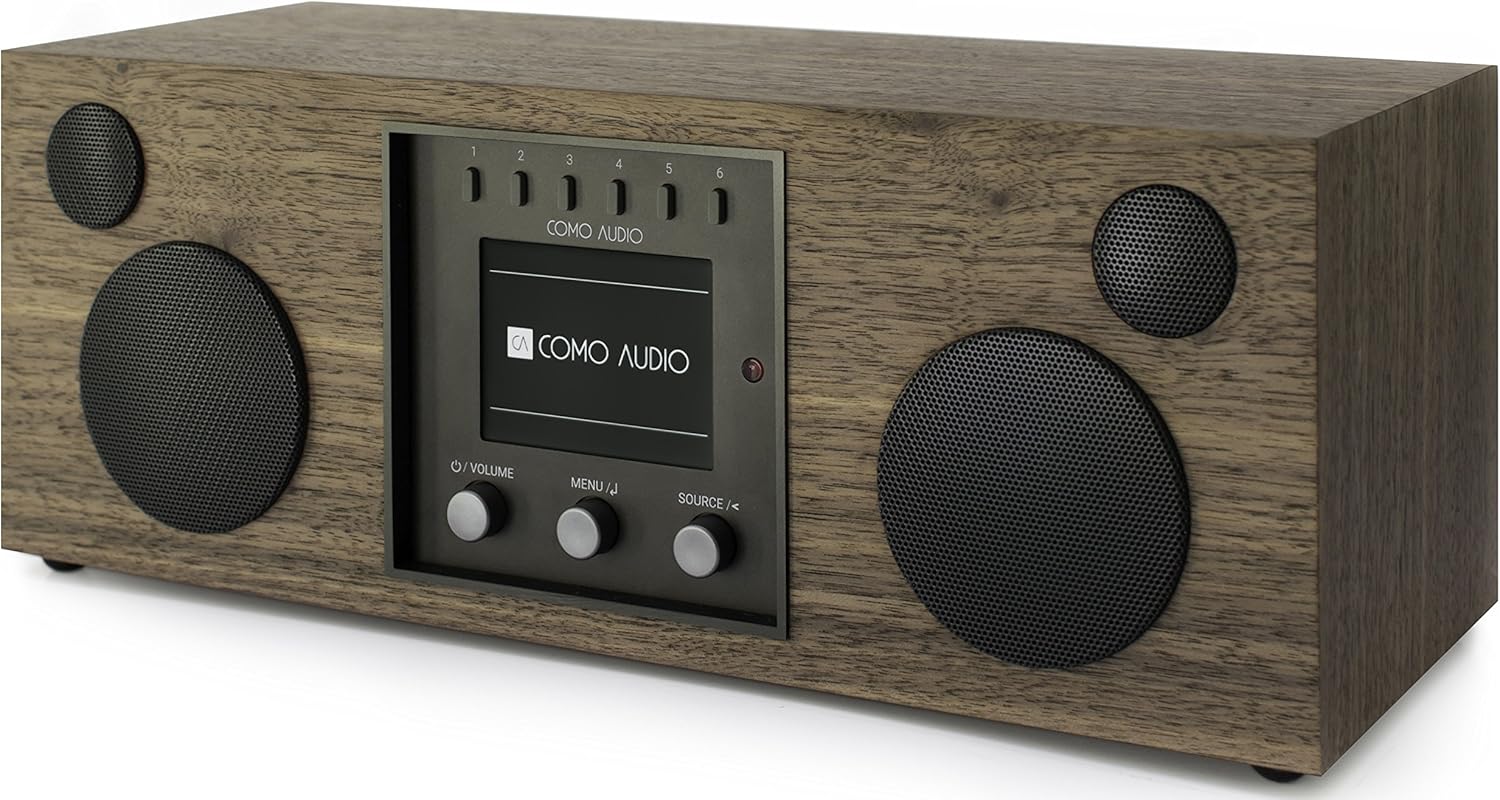
Angled view of the Como Audio Duetto, emphasizing its compact and elegant design.

The Duetto seamlessly integrated into a modern living room environment.

Detailed dimensions of the Como Audio Duetto for placement planning.
Official Product Video
This video provides an overview of the Como Audio Duetto Wireless Music System, highlighting its design, features, and ease of use. It demonstrates various functionalities including one-touch access to different music sources, multi-room audio capabilities, and the quality of its sound components. The video also features the founder, Thomas DeVesto, discussing the product's philosophy.
