
1. Introduction
The Dracast Camlux Mini LED Phone Light is designed to enhance the quality of photos and videos captured with mobile devices in low-light conditions. This compact and portable light features 16 LEDs, offering a high Color Rendering Index (CRI) and adjustable color temperatures. It includes a built-in rechargeable battery for convenience.
2. Package Contents
Please verify that all the following items are included in your package:
- Dracast CamLux Mini Bi-Color On-Camera LED Light
- Hot Shoe Mount
- D-Tap Cable (Note: A USB cable for charging is also included, as specified in product features.)
3. Product Features
- 16 LED bulbs with a High Color Rendering Index (CRI) of 96+ out of 100 for accurate color reproduction.
- Bi-Color 3200-5600K Color Temperatures, allowing adjustment from warm to cool lighting.
- Integrated 3.5mm headphone jack for direct connection to compatible mobile devices.
- Built-in USB port and included USB cable for convenient charging of the rechargeable battery.
- Brightness switch with low, medium, and high power settings.
4. Setup
To set up your Dracast Camlux Mini LED Phone Light:
- Charge the Device: Before first use, fully charge the light using the provided USB cable. Refer to the 'Charging' section for details.
- Connect to Mobile Device: Insert the 3.5mm jack of the Camlux Mini LED Phone Light into the headphone jack of your mobile device. Ensure a secure connection.
- Alternative Mounting (Optional): If using with a camera or other equipment, attach the Hot Shoe Mount to the light and then to your camera's hot shoe.
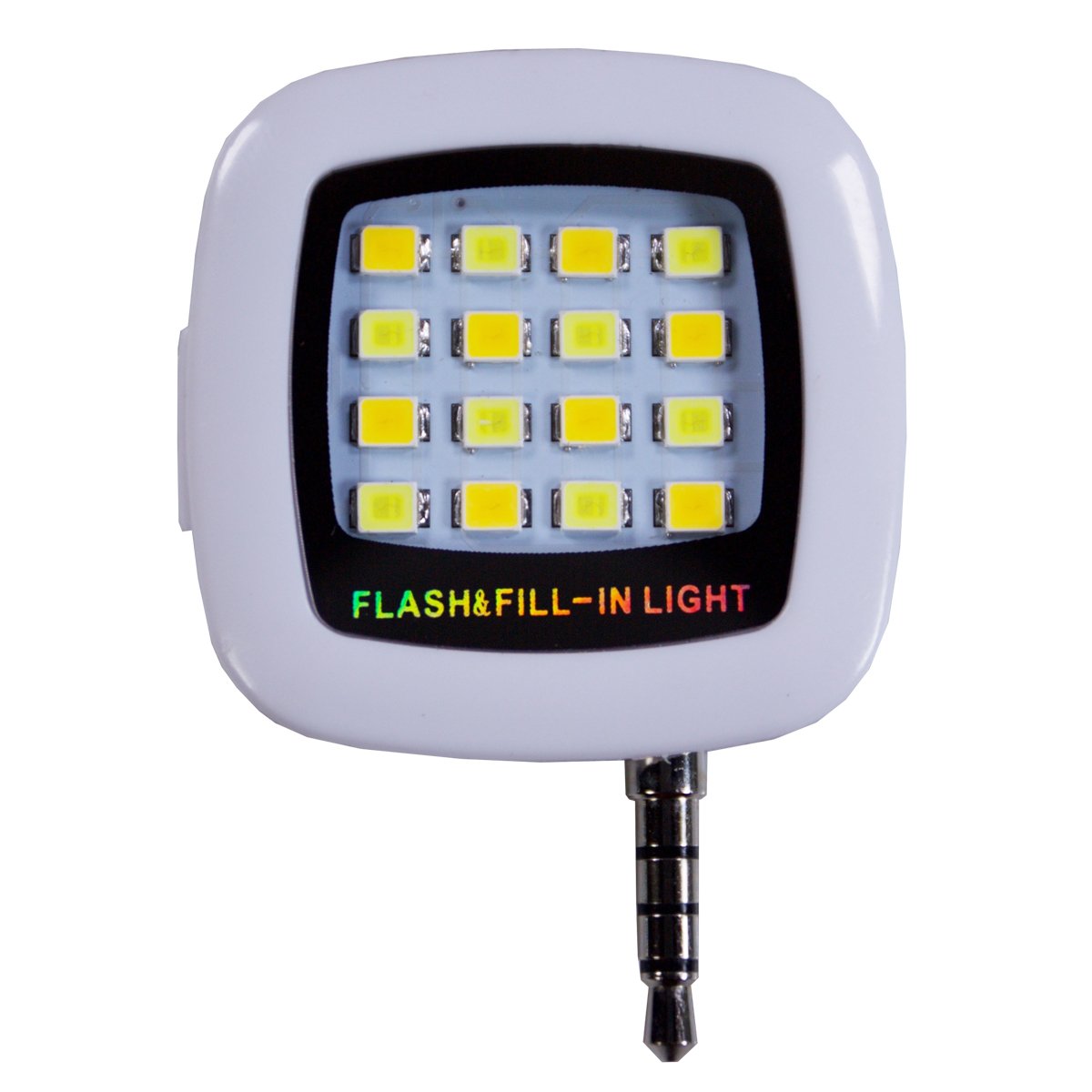
Image showing the Dracast Camlux Mini LED Phone Light, highlighting its compact design and the 3.5mm audio jack for connecting to a mobile device.
5. Operation
Operating the Camlux Mini LED Phone Light is straightforward:
- Power On/Off: Locate the power button or switch on the device. Press or slide it to turn the light on or off.
- Adjust Brightness: Use the brightness switch to cycle through low, medium, and high power settings. Select the desired intensity for your lighting needs.
- Adjust Color Temperature: The light features bi-color LEDs. Refer to the device's controls (usually a separate switch or dial) to adjust the color temperature between 3200K (warm) and 5600K (cool).
6. Charging
The Camlux Mini LED Phone Light includes a built-in rechargeable battery. To charge the device:
- Connect the small end of the provided USB cable to the USB port on the light.
- Connect the larger end of the USB cable to a standard USB power source (e.g., computer USB port, USB wall adapter, power bank).
- The charging indicator light (if present) will illuminate to show that the device is charging. It will typically change color or turn off when fully charged.
- Charging time may vary depending on the power source and battery level.
7. Maintenance
Proper maintenance ensures the longevity and optimal performance of your LED phone light:
- Cleaning: Use a soft, dry cloth to wipe the exterior of the light. Do not use harsh chemicals or abrasive cleaners.
- Storage: Store the light in a cool, dry place away from direct sunlight and extreme temperatures.
- Battery Care: For best battery life, avoid fully discharging the battery frequently. Charge the device regularly, even if not in use for extended periods.
- Avoid Moisture: Do not expose the light to water or high humidity.
8. Troubleshooting
If you encounter issues with your Dracast Camlux Mini LED Phone Light, refer to the following common solutions:
| Problem | Possible Cause | Solution |
|---|---|---|
| Light does not turn on | Battery is depleted | Charge the device using the USB cable. |
| Light flickers or is dim | Low battery or faulty connection | Recharge the battery. Ensure the 3.5mm jack is fully inserted into the phone. |
| Cannot adjust brightness/color temperature | Controls are not functioning or device is locked | Ensure the device is powered on. Check if there's a lock function. If issues persist, contact support. |
| Device not recognized by phone | Improper connection or phone compatibility | Ensure the 3.5mm jack is fully inserted. Check your phone's settings for external audio/accessory recognition. |
9. Specifications
| Feature | Detail |
|---|---|
| Brand | Dracast |
| Model Name | CamLux Mini |
| Model Number | DRCAMLMINIB |
| Connectivity Technology | USB (for charging) |
| Hardware Interface | USB, 3.5mm Audio Jack |
| LED Count | 16 |
| Color Rendering Index (CRI) | 96+ |
| Color Temperature | 3200-5600K (Bi-Color) |
| Power Source | Built-in Rechargeable Battery |
| UPC / GTIN | 602401681729 |
| Manufacturer | Draco Broadcast, INC |
10. Warranty Information
The Dracast Camlux Mini LED Phone Light is covered by a 1-year limited warranty from the date of purchase. This warranty covers manufacturing defects and workmanship under normal use. It does not cover damage caused by misuse, accidents, unauthorized modifications, or natural disasters. Please retain your proof of purchase for warranty claims.
11. Support
For further assistance, technical support, or warranty inquiries, please contact Dracast customer service. Refer to the official Dracast website or your product packaging for the most current contact information.