
1. Introduction
Thank you for purchasing the Metronic Gulli 477148 CD-MP3 Player with USB Port. This portable audio device is designed for ease of use, allowing you to enjoy your favorite music from various sources including CDs, CD-R/RW, MP3 discs, and USB flash drives. This manual provides detailed instructions to help you set up, operate, and maintain your device for optimal performance.

Figure 1: Front view of the Metronic Gulli 477148 CD-MP3 Player.
2. Safety Information
Please read all safety instructions carefully before using this product. Keep this manual for future reference.
- Power Source: Use only the specified power adapter or batteries. Ensure the voltage matches the requirements of the device.
- Water and Moisture: Do not expose the device to rain, moisture, or immerse it in water.
- Heat: Keep the device away from heat sources such as radiators, heat registers, stoves, or other apparatus (including amplifiers) that produce heat.
- Ventilation: Do not block any ventilation openings. Install in accordance with the manufacturer's instructions.
- Cleaning: Clean only with a dry cloth.
- Servicing: Do not attempt to service this product yourself. Refer all servicing to qualified service personnel.
- Headphones: Avoid listening at high volume levels for extended periods to prevent hearing damage.
3. Product Overview
Familiarize yourself with the various parts and controls of your CD-MP3 player.
3.1 Front Panel Controls and Ports

Figure 2: Front panel with controls and ports.
- Volume Up/Down Buttons (V+/V-): Adjust the playback volume.
- LCD Display: Shows track number, time, mode, and ID3 tag information.
- Mode Button: Switches between CD, USB, and other available modes.
- Play/Pause Button: Starts or pauses playback.
- Stop Button: Stops playback.
- Previous/Rewind Button: Skips to the previous track or rewinds the current track.
- Next/Fast Forward Button: Skips to the next track or fast forwards the current track.
- Headphone Jack (3.5mm): Connect headphones for private listening.
- AUX Input: Connect external audio devices.
- USB Port: Connect a USB flash drive for MP3 playback.
3.2 Rear Panel

Figure 3: Rear panel with power input.
- AC Power Input: Connect the provided AC power adapter.
- Battery Compartment: (Located on the bottom, not visible in this image) Insert batteries for portable use.
4. Setup
4.1 Powering the Device
The Metronic Gulli 477148 can be powered by either an AC adapter or batteries.
- AC Power: Connect the supplied AC power adapter to the AC power input on the rear of the unit and plug the other end into a standard wall outlet.
- Battery Power: Open the battery compartment (usually on the bottom of the unit). Insert 6 x 1.5V C-type batteries (not included), ensuring correct polarity (+/-). Close the battery compartment securely.
4.2 Initial Power On
Press the Power On/Off button (if available, otherwise the Mode button usually powers it on) to turn on the device. The LCD display will illuminate.
5. Operating Instructions
5.1 Playing CDs
- Open the CD compartment lid.
- Place a CD (CD, CD-R/RW, or MP3 CD) onto the spindle with the label side facing up.
- Close the CD compartment lid securely.
- Press the Mode button to select CD mode.
- Press the Play/Pause button to start playback.
- Use the Previous/Rewind and Next/Fast Forward buttons to navigate tracks.
- Adjust volume using the V+/V- buttons.
5.2 Using the USB Port
- Insert a USB flash drive containing MP3 files into the USB port.
- Press the Mode button to select USB mode. The device will automatically scan and begin playing MP3 files.
- Use the Previous/Rewind and Next/Fast Forward buttons to navigate tracks.
- Adjust volume using the V+/V- buttons.
5.3 Headphone Usage
Connect any standard 3.5mm headphones to the headphone jack for private listening. When headphones are connected, sound will typically be muted from the built-in speakers.
5.4 AUX Input
Connect an external audio device (e.g., smartphone, tablet) to the AUX input using a 3.5mm audio cable (not included). Press the Mode button to select AUX mode. Audio from the external device will play through the CD-MP3 player's speakers.
5.5 Special Playback Functions
- ID3 Function: When playing MP3 files from a CD or USB, the LCD display will show information such as album name, artist, and track title.
- Repeat Function: Press the Repeat button (if available, often combined with Mode or a dedicated button) to repeat the current track or all tracks.
- Program Function: Allows you to program a specific order of tracks for playback. Refer to the device's specific button for programming.
- Random Function: Plays tracks in a random order.
- Intro Function: Plays the first 10 seconds of each track on a CD or USB, allowing for quick song preview.
6. Maintenance
6.1 Cleaning
- Wipe the exterior of the unit with a soft, dry cloth.
- Do not use abrasive cleaners, waxes, or solvents as they may damage the finish.
- For the CD lens, use a specialized CD lens cleaner disc.
6.2 Storage
When not in use for extended periods, store the device in a cool, dry place. Remove batteries if storing for a long time to prevent leakage.
7. Troubleshooting
| Problem | Possible Cause | Solution |
|---|---|---|
| No power | AC adapter not connected properly; Batteries depleted or incorrectly inserted. | Check AC adapter connection; Replace batteries or ensure correct polarity. |
| No sound | Volume too low; Headphones connected; Incorrect mode selected. | Increase volume; Disconnect headphones; Select correct mode (CD, USB, AUX). |
| CD not playing | CD inserted incorrectly; CD dirty or scratched; CD compartment not closed; Incorrect mode. | Insert CD with label side up; Clean or replace CD; Close lid firmly; Select CD mode. |
| USB not playing | USB drive not inserted correctly; USB drive not formatted correctly; No MP3 files on USB; Incorrect mode. | Reinsert USB drive; Ensure USB is FAT32 formatted; Transfer MP3 files to USB; Select USB mode. |
| Display not working | Device off; Faulty unit. | Turn on device; If problem persists, contact support. |
8. Specifications
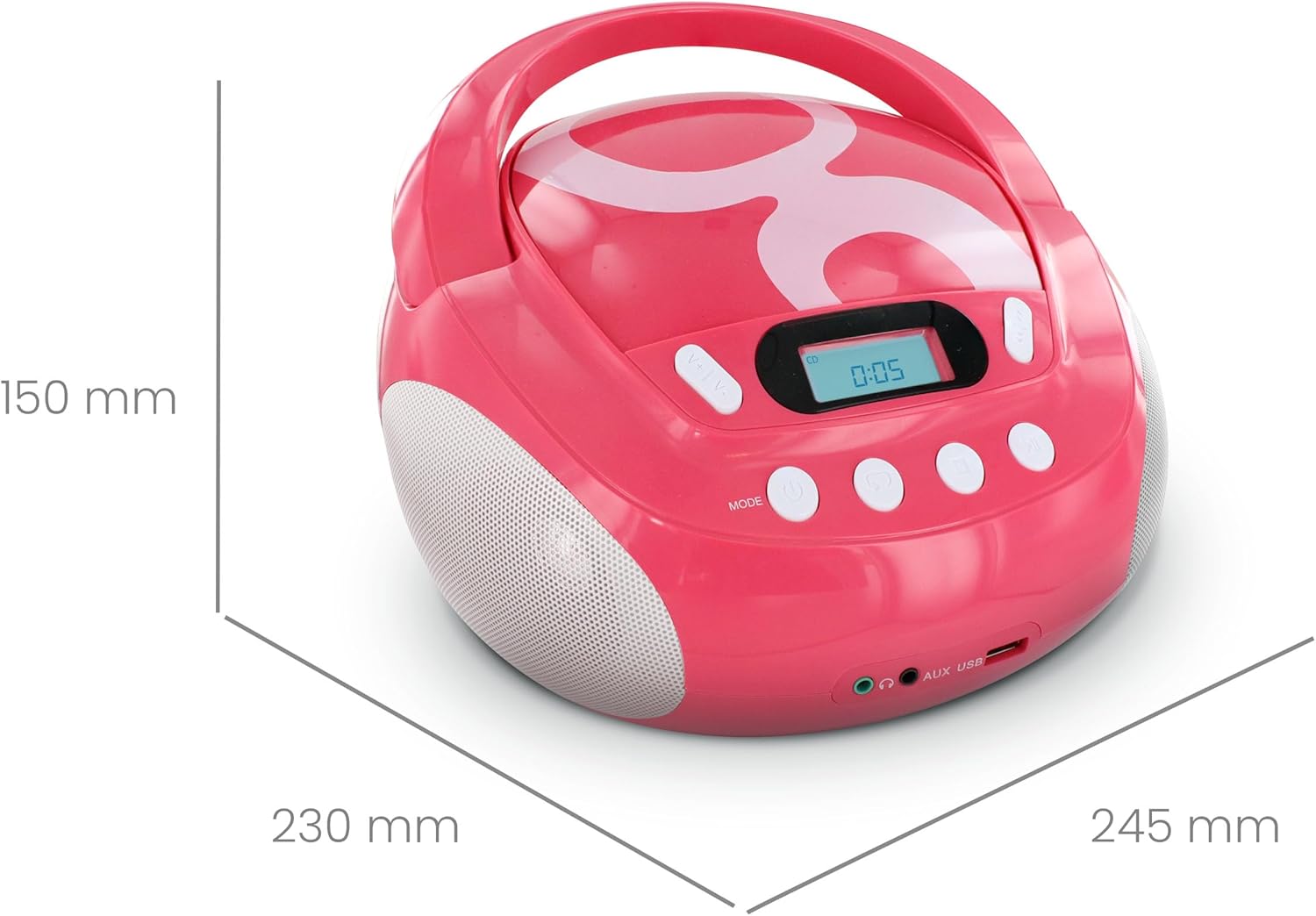
Figure 4: Product dimensions.
| Brand | Metronic |
| Model Number | 477148 |
| Color | Gulli Rose |
| Compatible Media | CD, CD-R/RW, MP3-CD, USB (MP3 files) |
| Connectivity Technology | Auxiliary, USB |
| Headphone Jack | 3.5 mm |
| Speaker Type | Stereo |
| Output Power | 2 Watts |
| Power Source | AC Powered, Battery Powered (6 x 1.5V C-type batteries) |
| Dimensions (L x W x H) | 28 x 24 x 16 cm (approximately 11 x 9.4 x 6.3 inches) |
| Item Weight | 1900 Grams (1.9 kg / 4.19 lbs) |
| Display | LCD with backlight |
9. Warranty and Support
9.1 Manufacturer's Warranty
This product comes with a 2-year manufacturer's warranty from the date of purchase. Please retain your proof of purchase for warranty claims. The warranty covers defects in materials and workmanship under normal use.
9.2 Customer Support
For assistance with installation or use of this product, please contact the manufacturer's support line:
Telephone: 0892 350 315
(Note: This number may incur charges depending on your service provider and location.)

