
GreenForest ARLETTE
GreenForest L Shaped Gaming Desk User Manual
Model: ARLETTE
1. Product Overview
The GreenForest L Shaped Gaming Desk is designed to optimize space in your home office, bedroom, or gaming setup. Its versatile L-shape fits snugly into corners, providing ample surface area for multiple monitors, laptops, and other equipment. Constructed with high-quality, eco-friendly P2 particle board and a robust metal frame, this desk offers durability and stability for various activities including gaming, studying, and general office work.
Key features include a reversible design allowing for flexible configuration, a spacious desktop, and a moisture-proof, scratch-resistant surface that is easy to clean.
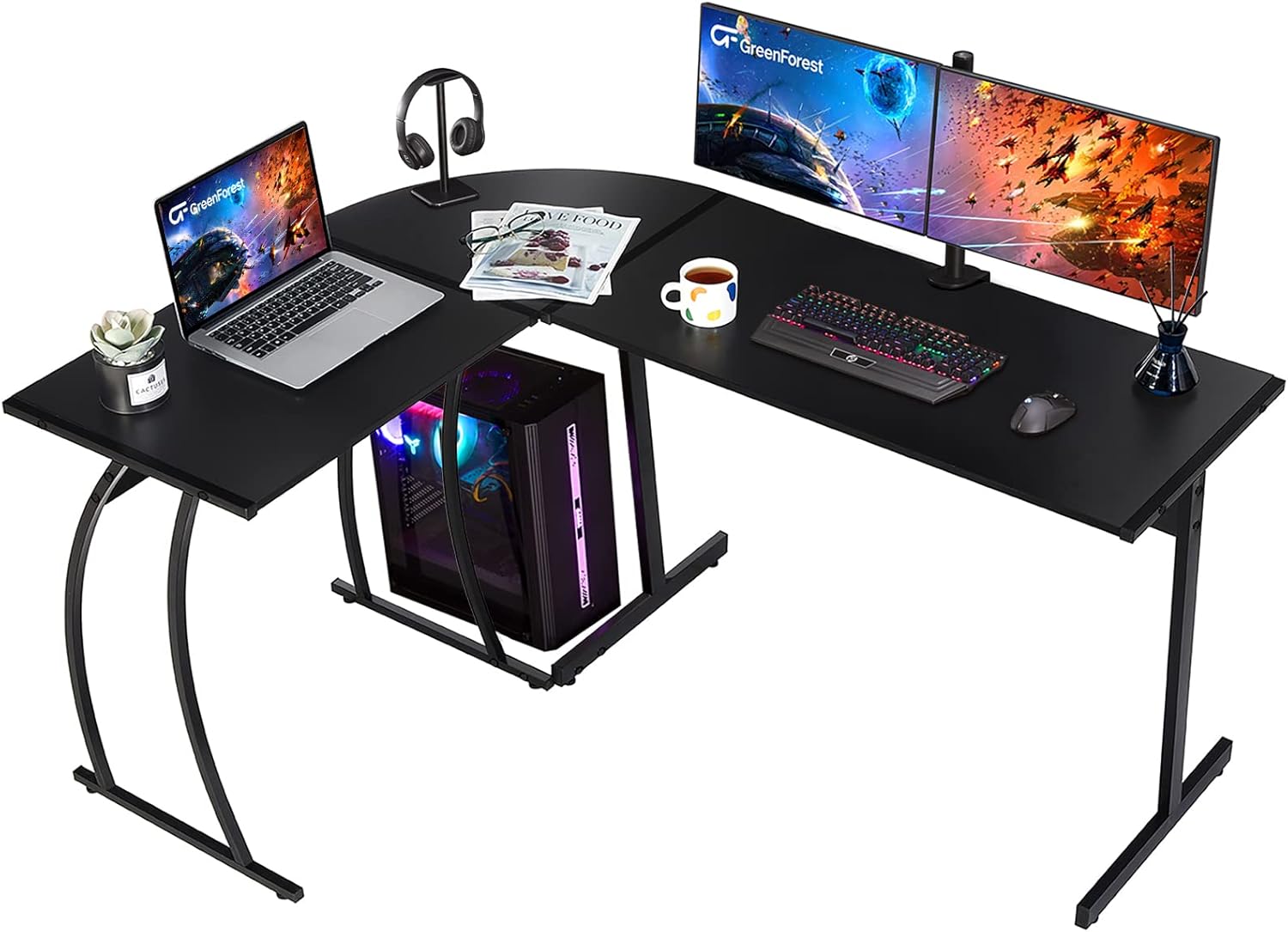
Image 1.1: Overview of the GreenForest L Shaped Gaming Desk in a typical setup.
2. Setup and Assembly
Assembly of your GreenForest L Shaped Gaming Desk requires careful attention to the instructions provided. It is recommended to have assistance during certain steps to ensure stability and ease of construction.
2.1. Before You Begin
- Verify all components are present according to the packing list.
- Clear a spacious area for assembly.
- Have a Phillips head screwdriver readily available.
- Refer to the official Installation Manual (PDF) for detailed step-by-step instructions and diagrams.
2.2. Assembly Steps
- Begin by identifying the two different length boards: 39x18.9 inches and 25.2x18.9 inches.
- Attach the metal frame components to the desk panels. Ensure that the plastic screw-in inserts (often part 6) are correctly oriented with the cross facing upwards before inserting screws.
- Do not fully tighten all screws until the entire desk structure is assembled. This allows for minor adjustments to align components properly.
- The desk features a reversible design. You can install the longer board on either the left or right side to suit your space and preference. Refer to the diagram below for visual guidance.
- Once all components are in place and aligned, securely tighten all screws.
- Attach the leveling studs to the bottom of the legs to ensure stability on uneven surfaces.

Image 2.1: Key dimensions of the desk components for assembly planning.

Image 2.2: Illustration of the reversible L-shape configuration options.
3. Operating Instructions
The GreenForest L Shaped Gaming Desk provides a versatile and spacious workstation for various uses.
3.1. Workspace Utilization
- The 58.1-inch length of the desk can comfortably accommodate at least two monitors, laptops, or computers, making it ideal for multi-tasking or extensive gaming setups.
- The L-shape design allows for efficient use of corner spaces, maximizing your room's potential.
- The 29.1-inch height provides ample legroom, ensuring comfort during extended periods of use.

Image 3.1: The desk configured for a gaming setup, showcasing ample space for multiple screens.

Image 3.2: The desk used in a home office environment, demonstrating its suitability for work and study.
3.2. Expanding Your Workspace
For even larger workspace requirements, two GreenForest L-shaped desks can be combined to form a 'U' shaped workstation, providing an expansive surface for complex setups or collaborative work.

Image 3.3: Two L-shaped desks configured together to create a larger U-shaped workstation.
4. Maintenance and Care
To ensure the longevity and appearance of your GreenForest L Shaped Gaming Desk, follow these simple maintenance guidelines:
- Cleaning: The desk surface is moisture-proof and scratch-resistant. Wipe clean with a soft, damp cloth. Avoid abrasive cleaners or harsh chemicals that could damage the finish.
- Spills: Promptly wipe up any spills to prevent liquid from seeping into the material, although the surface is designed to resist moisture.
- Protection: Use coasters for drinks and protective pads under hot items or sharp objects to prevent marks and scratches.
- Stability Check: Periodically check and tighten all screws and connections to maintain the desk's stability.
5. Troubleshooting
If you encounter any issues with your GreenForest L Shaped Gaming Desk, consider the following common solutions:
5.1. Desk Instability or Wobbling
- Loose Screws: Ensure all assembly screws are fully tightened. A common cause of instability is screws not being adequately secured during initial assembly.
- Uneven Floor: Adjust the leveling studs at the bottom of the desk legs to compensate for uneven flooring.
- Incorrect Assembly: Double-check that all parts, especially the plastic screw-in inserts and the orientation of the panels, were assembled according to the manual.
5.2. Space Constraints / Monitor Placement
- Monitor Depth: If your monitor feels too close due to the 18.9-inch depth, consider using a VESA arm mount. Ensure the desk's engineered wood tabletop (approximately 0.75 inches thick) can support the clamp, or use a reinforcing piece of wood if necessary.
- PC Tower Placement: For larger PC towers, the space underneath the desk may be limited. Consider placing the tower beside the desk or utilizing a dedicated CPU stand.
5.3. Damaged Components Upon Arrival
- If any components are damaged upon unboxing, contact GreenForest customer support immediately for assistance with replacements. Do not attempt to assemble the desk with damaged parts.
6. Specifications
| Feature | Detail |
|---|---|
| Brand | GreenForest |
| Model Number | ARLETTE |
| Product Dimensions (D x W x H) | 58.1" x 44.3" x 29" |
| Color | Black |
| Style | Contemporary |
| Base Material | Metal |
| Top Material Type | Engineered Wood (P2 Particle Board) |
| Finish Type | Laminated |
| Special Feature | Adjustable Height (Leveling Studs) |
| Item Weight | 37.2 Pounds |
| Required Assembly | Yes |
7. Warranty Information
The GreenForest L Shaped Gaming Desk comes with a Limited Warranty. For specific details regarding the terms and conditions of your warranty, please refer to the documentation included with your product packaging or contact GreenForest customer support.
8. Customer Support
For further assistance, questions, or to report any issues with your GreenForest L Shaped Gaming Desk, please contact GreenForest customer support. You can also visit the official GreenForest Store on Amazon for more product information and resources.
Your satisfaction is our ultimate goal.
Related documentsARLETTE


Ask a question about this manual
Ask about setup, troubleshooting, compatibility, parts, safety, or missing instructions. Manuals+ will review the question and use this page’s manual context to help answer it.