
Introduction
Thank you for choosing the ReTrak 2000 mAh Retractable Power Bank. This device is designed to provide portable power for your USB-compatible devices, ensuring you stay connected on the go. Please read this manual carefully before using the product to ensure proper operation and to maximize its lifespan.
Important Safety Information
- Do not expose the power bank to extreme temperatures, direct sunlight, or fire.
- Do not immerse the power bank in water or other liquids.
- Do not disassemble, modify, or attempt to repair the device yourself. Contact qualified service personnel.
- Keep out of reach of children.
- Use only compatible charging cables and adapters.
- Avoid dropping or subjecting the power bank to strong impacts.
- Dispose of the power bank responsibly according to local regulations for lithium-ion batteries.
Package Contents
Please check the package for the following items:
- ReTrak 2000 mAh Retractable Power Bank (Model: ETESPB2)
- User Manual (this document)
Product Overview
The ReTrak Power Bank features a compact design with an integrated retractable micro USB cable for convenience. It also includes a standard USB output port for charging other devices.
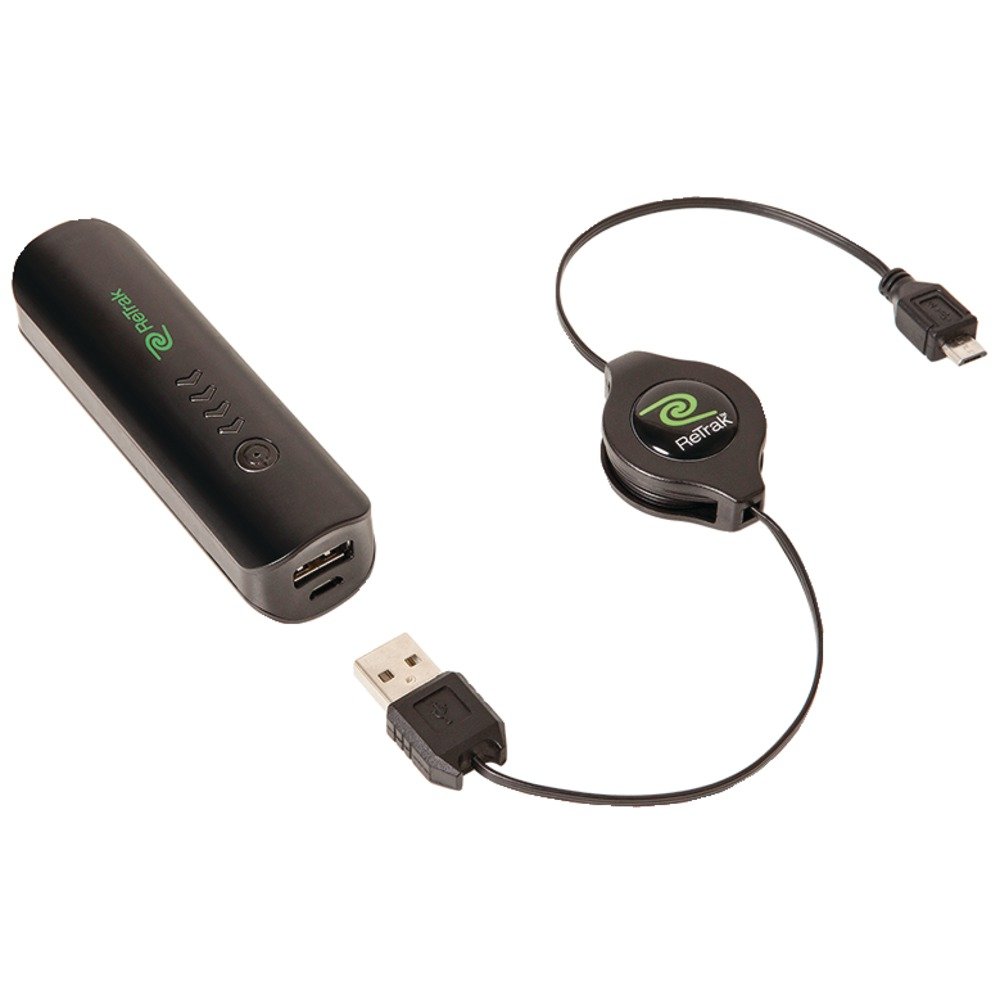
Image 1: ReTrak 2000 mAh Retractable Power Bank. This image displays the power bank's compact design, highlighting the integrated retractable micro USB cable and the overall sleek appearance.
Key Features:
- 2000 mAh Lithium-Ion Battery
- Integrated Retractable Micro USB Cable
- Standard USB Output Port
- LED Charge Indicator
- Built-in Overcurrent and Short-circuit Protection
- Automatic On/Off Function
Setup: Charging the Power Bank
Before first use, fully charge your ReTrak Power Bank.
- Locate the micro USB input port on the power bank.
- Connect the integrated retractable micro USB cable to a USB power source (e.g., wall adapter, computer USB port).
- The LED indicator will illuminate to show charging status. It will typically change color or turn off when fully charged. Refer to the LED indicator section for specific details.
- Once fully charged, disconnect the power bank from the power source.
Retracting the Cable:
To retract the integrated micro USB cable, gently pull both ends of the cable simultaneously until it locks into place, then release to allow it to retract smoothly. Avoid pulling only one side, as this can damage the retraction mechanism.
Operating: Charging Your Devices
The ReTrak Power Bank can charge devices using its integrated micro USB cable or its standard USB output port.
Using the Integrated Micro USB Cable:
- Extend the retractable micro USB cable by gently pulling both ends until it reaches the desired length.
- Connect the micro USB end to your compatible device (e.g., smartphone, tablet).
- The power bank will automatically begin charging your device. The LED indicator may show charging status.
- Once your device is charged, disconnect it from the power bank. The power bank will automatically turn off.
Using the Standard USB Output Port:
- Obtain a USB charging cable compatible with your device (not included).
- Plug the standard USB-A end of your device's charging cable into the USB output port on the power bank.
- Connect the other end of your device's charging cable to your device.
- The power bank will automatically begin charging your device. The LED indicator may show charging status.
- Once your device is charged, disconnect it from the power bank. The power bank will automatically turn off.
LED Indicator:
The LED indicator provides information about the power bank's status:
- Solid Red/Blue/Green (example): Power bank is charging.
- Off: Power bank is fully charged or not in use.
- Flashing: Low battery or error condition.
Note: Specific LED colors and patterns may vary. Refer to the product packaging or ReTrak's official website for precise details if available.
Maintenance
- Clean the power bank with a soft, dry cloth. Do not use abrasive cleaners or solvents.
- Store the power bank in a cool, dry place away from direct sunlight and extreme temperatures.
- To maintain battery health, fully charge the power bank at least once every three months if not in regular use.
- Ensure the retractable cable mechanism is kept free of dust and debris to ensure smooth operation.
Troubleshooting
| Problem | Possible Cause | Solution |
|---|---|---|
| Power bank not charging. | Cable not connected properly; faulty cable/adapter; power source issue. | Ensure all connections are secure. Try a different charging cable or USB power adapter. Try a different USB port or wall outlet. |
| Device not charging from power bank. | Power bank battery is depleted; device cable not connected properly; incompatible device. | Charge the power bank fully. Ensure the device's charging cable is securely connected to both the power bank and the device. Verify your device is USB-compatible. |
| Retractable cable not retracting smoothly. | Debris in mechanism; improper retraction technique. | Gently pull both ends of the cable simultaneously to initiate retraction. Ensure no foreign objects are obstructing the mechanism. |
| LED indicator not working. | Power bank is off; internal fault. | Connect the power bank to a power source or a device to see if the LED illuminates. If not, the unit may be faulty. |
Specifications
- Model: ETESPB2
- Brand: ReTrak
- Battery Capacity: 2000 mAh
- Battery Type: Lithium-Ion
- Input Connector: Micro USB (integrated retractable cable)
- Output Connector: USB Type-A
- Voltage: 5 Volts
- Power Source: Electric with cable
- Compatible Devices: Smartphone, other USB-powered devices
- Dimensions: 18.3 x 8.6 x 2 centimeters (approx. 7.2 x 3.4 x 0.8 inches)
- Weight: 62 Grams (approx. 2.2 ounces)
- GTIN/UPC: 816983016385