Introduction
This manual provides instructions for the HCDZ Replacement Remote Control, model HCDZ-X19781. It is designed for use with various Energy Knight Heat Controller and Mini-Split Systems, including models AHMC24AS, HMC09AS, REG123A, REG71A, MSS-009B/A, and MSS-012B/A. This guide covers essential information for setup, operation, maintenance, and troubleshooting to ensure proper functionality of your remote control.
Setup
Battery Installation
The remote control requires two AAA batteries (not included). Follow these steps to install them:
- Locate the battery compartment cover on the back of the remote control.
- Slide the cover downwards or press the latch to open it.
- Insert two new AAA batteries, ensuring the positive (+) and negative (-) terminals align correctly with the markings inside the compartment.
- Replace the battery compartment cover, sliding it back into place until it clicks securely.

Image: Back of the remote control with the battery compartment open, illustrating battery insertion.
First Use
This HCDZ replacement remote control is designed to work immediately upon battery installation. No programming or pairing is required. Once batteries are correctly inserted, the remote is ready for use with your compatible Energy Knight Heat Controller or Mini-Split System.
Operating Instructions
The remote control provides various functions for your Energy Knight system. Refer to the image below for button identification.
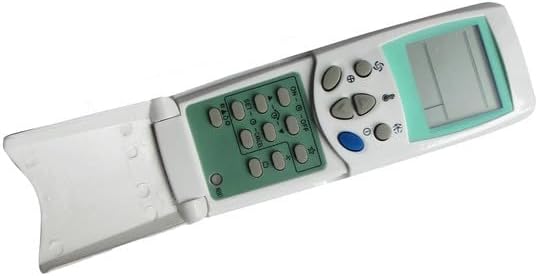
Image: Front view of the remote control with its display and buttons.
- ON/OFF Button: Press to power the connected device on or off.
- Temperature Adjustment Buttons (▲/▼): Use these buttons to increase or decrease the desired temperature setting.
- MODE Button: Cycle through available operating modes such as Cool, Heat, Fan, Dry, or Auto.
- FAN Button: Adjust the fan speed (e.g., Low, Medium, High, Auto).
- SET Button: Typically used to confirm settings or enter specific programming modes (refer to your main unit's manual for advanced settings).
- CLOCK Button: Used to set the current time on the remote's display.
- SWING Button: Controls the louver swing function for air distribution.
Maintenance
Battery Replacement
Replace the batteries when the remote's performance diminishes, the display becomes dim, or the remote stops responding. Always replace both batteries with new AAA batteries of the same type. Do not mix old and new batteries, or different types of batteries, as this can cause leakage or malfunction.
Storage
If the remote control will not be used for an extended period, remove the batteries to prevent potential damage from battery leakage and corrosion. Store the remote in a cool, dry place away from direct sunlight and extreme temperatures.
Cleaning
To clean the remote control, wipe it gently with a soft, dry cloth. Do not use liquid cleaners, abrasive materials, or chemical solvents, as these can damage the remote's surface or internal components.
Troubleshooting
If you experience issues with your remote control, refer to the following common troubleshooting steps:
- Remote Not Responding:
- Replace the batteries with fresh AAA batteries.
- Check the battery terminals inside the compartment to ensure they are clean and making proper contact.
- Limited Range or Intermittent Functionality:
- Ensure you are within the effective operating range of your Energy Knight system.
- Remove any physical obstructions (e.g., furniture, walls) between the remote control and the infrared (IR) sensor on your device.
- Avoid exposing the remote's sensor to direct sunlight or strong lighting apparatuses, as this can interfere with its signal.
- Device Not Powering On:
- Verify that your Energy Knight Heat Controller or Mini-Split System is properly plugged into a power outlet and is turned on at the main unit.
Specifications
| Model Number | HCDZ-X19781 |
| Battery Type | 2 x AAA batteries (not included) |
| Compatible Devices | Energy Knight Heat Controller AHMC24AS, HMC09AS, REG123A, REG71A, MSS-009B/A, MSS-012B/A Wall Mounted Mini-Split Systems |
| Special Feature | No programming needed; works out of the package. |
Support
For any further assistance, technical support, or inquiries regarding your HCDZ Replacement Remote Control, please contact HCDZ customer support through their official channels. Refer to your product packaging or the HCDZ brand store for contact information.