
Daewoo DFP-415M
Daewoo DFP-415M Mini Food Chopper User Manual
Model: DFP-415M
1. Introduction
Thank you for purchasing the Daewoo DFP-415M Mini Food Chopper. This manual provides essential information for the safe and efficient operation, maintenance, and care of your appliance. Please read these instructions thoroughly before first use and retain them for future reference.
Important Safety Information
- This appliance is designed for household use only.
- Ensure the voltage rating on the appliance matches your local power supply (220-240 Volts). This appliance is not designed for use in the USA or regions with 110-120V power supply.
- Always unplug the chopper from the power outlet before assembling, disassembling, or cleaning.
- Keep hands and utensils away from the moving blade during operation to prevent injury.
- Do not immerse the motor unit in water or any other liquid.
- Supervise children when the appliance is in use.
- Do not operate the appliance with a damaged cord or plug, or if it has been dropped or damaged in any way.
2. Product Overview
The Daewoo DFP-415M is a compact and efficient mini food chopper designed for quick chopping, mincing, and dicing of various ingredients. It features a 700ml (3 cups) capacity bowl and two pulse speeds for versatile food preparation.

Figure 2.1: Assembled Daewoo DFP-415M Mini Food Chopper. This image shows the complete unit with the motor base, chopping bowl, blade assembly, and lid.
Components:
- Motor Unit (Power Base)
- Chopping Blade Assembly
- 700ml (3-cup) Chopping Bowl
- Lid with Pulse Buttons
3. Setup
3.1 Unpacking
Carefully remove all components from the packaging. Dispose of all packaging materials responsibly. Before first use, wash the chopping bowl, lid, and blade assembly in warm, soapy water. Rinse thoroughly and dry completely.
3.2 Assembly
- Place the motor unit on a stable, flat, and dry surface.
- Position the chopping bowl onto the motor unit, ensuring it is securely seated.
- Carefully place the chopping blade assembly onto the central shaft within the bowl. Handle the blade with extreme care as it is very sharp.
- Add your ingredients to the chopping bowl. Do not exceed the MAX fill line or 700ml (3 cups) capacity.
- Place the lid onto the chopping bowl, aligning it correctly and twisting gently until it locks into place. The appliance will not operate unless the lid is properly secured.
3.3 Power Connection
Plug the power cord into a 220-240 Volt AC power outlet. Ensure the outlet is compatible with the appliance's voltage requirements.
4. Operating Instructions
The Daewoo DFP-415M Mini Food Chopper features two pulse speeds for precise control over chopping consistency.
- Ensure the chopper is correctly assembled and plugged into a suitable power outlet.
- Add your desired ingredients to the chopping bowl. For best results, cut larger ingredients into smaller, uniform pieces before placing them in the bowl.
- Secure the lid.
- Press and hold one of the pulse buttons on the lid to start chopping.
- Use the lower speed for coarser chopping or softer ingredients.
- Use the higher speed for finer chopping or harder ingredients.
- Release the button to stop the operation. Use short pulses for better control and to achieve desired consistency.
- Once chopping is complete, unplug the appliance.
- Carefully remove the lid, then carefully remove the blade assembly by holding the plastic hub.
- Empty the chopped ingredients from the bowl.
Tips for Best Results:
- Do not overload the bowl. Process ingredients in batches if necessary.
- For even chopping, use the pulse function rather than continuous operation.
- Hard ingredients like nuts or ice should be processed in small quantities and with short pulses.
- Allow the motor to cool down if operating for extended periods.
5. Maintenance and Cleaning
Regular cleaning ensures the longevity and hygienic operation of your food chopper. The Daewoo DFP-415M is designed for easy cleaning.
- Always unplug the appliance before cleaning.
- Disassemble the chopper: remove the lid, then carefully remove the blade assembly, and finally the chopping bowl from the motor unit.
- Chopping Bowl, Lid, and Blade Assembly: These parts are suitable for hand washing. Wash them in warm, soapy water. Rinse thoroughly and dry immediately. Exercise extreme caution when handling the sharp blade.
- Motor Unit: Wipe the motor unit with a damp cloth. Do not immerse the motor unit in water or any other liquid. Do not use abrasive cleaners or scouring pads, as they may damage the surface.
- Ensure all parts are completely dry before reassembling or storing the appliance.
Storage:
Store the assembled or disassembled chopper in a clean, dry place, out of reach of children.
6. Troubleshooting
If you encounter issues with your Daewoo DFP-415M Mini Food Chopper, please refer to the following common problems and solutions:
| Problem | Possible Cause | Solution |
|---|---|---|
| Appliance does not turn on. |
|
|
| Ingredients are not chopping evenly. |
|
|
| Motor sounds strained or stops. |
|
|
If the problem persists after trying these solutions, please contact customer support.
7. Specifications
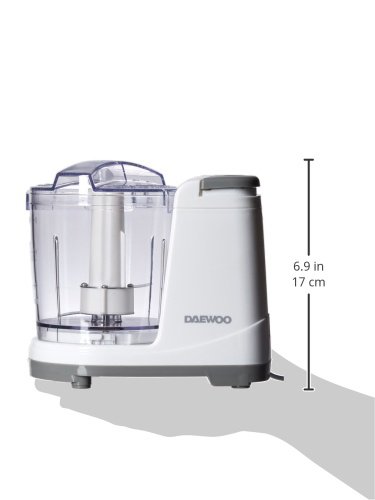
Figure 7.1: Side view of the Daewoo DFP-415M Mini Food Chopper illustrating its approximate dimensions (6.9 inches / 17 cm height).
| Feature | Detail |
|---|---|
| Model Number | DFP-415M |
| Brand | Daewoo |
| Power | 135 Watts |
| Voltage | 220-240 Volts (Not for USA) |
| Capacity | 700ml (3 cups) |
| Number of Speeds | 2 (Pulse) |
| Product Dimensions (LxWxH) | 19.1 x 15.2 x 10.2 Centimeters (approx.) |
| Item Weight | 794 grams (approx.) |
| Special Feature | Built-in Grinder |
| Care Instructions | Hand Wash (removable parts) |
8. Warranty and Support
For information regarding warranty coverage, please refer to the warranty card included with your purchase or contact your local Daewoo distributor. Keep your proof of purchase for warranty claims.
For technical support, spare parts, or service inquiries, please contact Daewoo customer service through their official website or the contact information provided in your product documentation.
Related documentsDFP-415M


Ask a question about this manual
Ask about setup, troubleshooting, compatibility, parts, safety, or missing instructions. Manuals+ will review the question and use this page’s manual context to help answer it.