
Zmodo ZM-SHRZ03W
Zmodo Beam WiFi Range Extender and Smart Hub User Manual
Model: ZM-SHRZ03W
Introduction
The Zmodo Beam is an innovative all-in-one device that functions as both a WiFi range extender and a smart home hub. Designed for ease of use, it plugs directly into a standard wall socket and is configured through the Zmodo mobile application. This device significantly extends your WiFi coverage up to 200 meters (656 feet) with speeds up to 300Mbps, ensuring comprehensive home network coverage. Beyond network extension, the Beam integrates as a central hub for Zmodo smart home accessories, such as door and window sensors, providing real-time alerts directly to your smartphone when triggered. It simplifies the connection of other Zmodo devices with a one-click pairing process.
What's in the Box
- (1) Zmodo Beam Device
- (1) Quick Guide
Setup Guide
Setting up your Zmodo Beam is a straightforward process designed for quick integration into your home network and smart home ecosystem.
- Power On: Plug the Zmodo Beam into a standard 3-prong wall socket (90-240VAC) in a central location within your home, ideally between your router and the areas needing extended WiFi coverage.

Image: The Zmodo Beam device shown plugged into a standard wall outlet.
- Download Zmodo App: Download the official Zmodo app from your smartphone's app store (available for iOS and Android).
- Initial Setup: Open the Zmodo app and follow the on-screen instructions to add your new Zmodo Beam device. During the setup process, the Beam will create a temporary setup network. You will be prompted by the Zmodo app to connect your smartphone to this temporary network to facilitate the exchange of your home WiFi network's SSID and password.

Image: The Zmodo Beam device positioned next to a smartphone displaying the Zmodo application interface, illustrating the mobile setup process.
- Connect to Existing Network: Once connected to the Beam's setup network, the app will guide you to select your existing home WiFi network and enter its password. The Beam will then connect to your home network and begin extending its range.
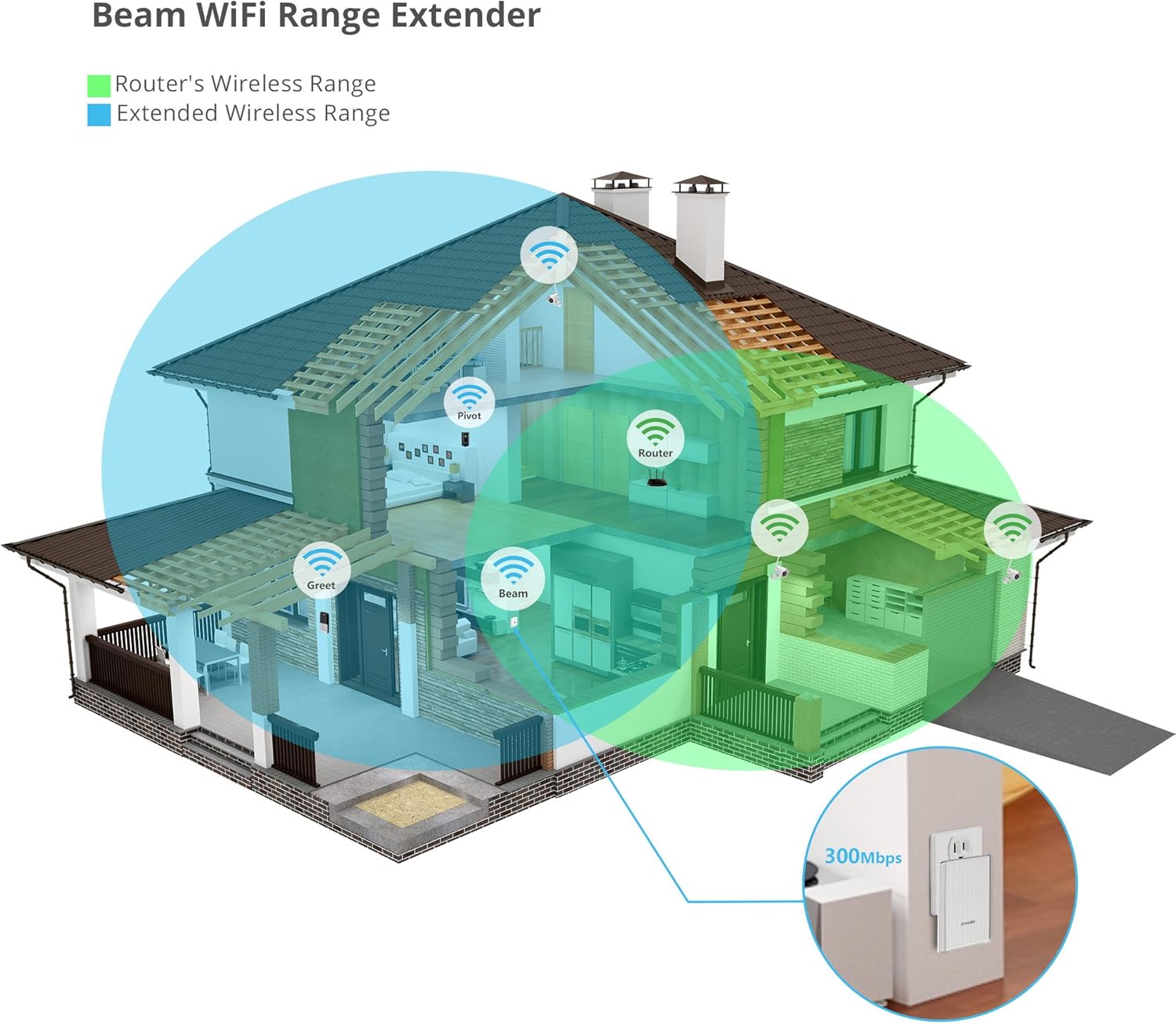
Image: A diagram showing a house with a router's wireless range (green) and the extended wireless range (blue) provided by the Zmodo Beam, demonstrating improved coverage.
Operating Instructions
WiFi Range Extension
The primary function of the Zmodo Beam is to boost your existing WiFi signal, eliminating dead spots and expanding coverage throughout your home. Once set up, the Beam automatically extends your network, allowing devices further from your main router to maintain a strong and stable connection.
Smart Home Hub Functionality
The Zmodo Beam acts as a central hub for various Zmodo smart home accessories. This allows you to integrate and manage devices like door and window sensors directly through the Beam.
- Connecting Zmodo Devices: You can easily add other Zmodo devices to your smart home system via the Beam with a simple one-click process within the Zmodo app.

Image: The Zmodo Beam shown as a central hub, wirelessly connecting to other Zmodo devices such as cameras and sensors, with a smartphone displaying the device connection interface.
- Receiving Alerts: When connected to compatible Zmodo sensors (e.g., door/window sensors), the Beam will send alerts directly to your smartphone whenever a sensor is triggered. These alerts can be scheduled and reviewed within the Zmodo app.
Motion Detection
The Zmodo Beam features built-in motion detection capabilities. When motion is sensed, the device can alert you on your phone, providing an additional layer of security or awareness. Alerts can be customized and reviewed within the Zmodo app.
LED Nightlight
The Zmodo Beam includes an integrated LED nightlight with multiple color options. This feature can provide subtle illumination in hallways or rooms, enhancing safety and convenience.
Video: An official Zmodo video demonstrating the features of the Zmodo Beam, including its WiFi range extension, smart home hub capabilities, and nightlight function. It shows how the device can alert users to events, such as a door opening, and highlights its ease of setup and integration with other Zmodo products.
Maintenance
The Zmodo Beam is designed for low maintenance. To ensure optimal performance:
- Keep the device clean and free from dust. Use a soft, dry cloth for cleaning.
- Ensure proper ventilation around the device. Do not cover the Beam or place it in enclosed spaces.
- Regularly check the Zmodo app for firmware updates to ensure your device has the latest features and security enhancements.
Troubleshooting
If you encounter issues with your Zmodo Beam, consider the following common solutions:
- No WiFi Extension:
- Ensure the Beam is plugged in and its indicator light is on.
- Verify that the Beam is within range of your main WiFi router. While it extends range, it still needs a stable initial connection.
- Re-run the setup process in the Zmodo app to ensure it's correctly connected to your home network.
- Cannot Connect Zmodo Accessories:
- Ensure the Zmodo Beam is online and functioning as a hub.
- Follow the specific pairing instructions for each Zmodo accessory within the Zmodo app.
- Check if the accessory's battery is low or needs replacement.
- App Connectivity Issues:
- Ensure your smartphone has a stable internet connection (WiFi or cellular data).
- Close and reopen the Zmodo app.
- Restart the Zmodo Beam by unplugging it from the wall socket for 10 seconds and then plugging it back in.
- Check for Zmodo app updates in your app store.
- Motion Detection Not Working:
- Verify that motion detection is enabled in the Zmodo app settings for the Beam.
- Adjust the sensitivity settings if necessary.
- Ensure the Beam's sensor is not obstructed.
For further assistance, please refer to the support section or contact Zmodo customer service.
Specifications
| Feature | Detail |
|---|---|
| Model Number | ZM-SHRZ03W |
| Product Dimensions | 3.7 x 2.4 x 1.2 inches |
| Item Weight | 4.8 ounces |
| WiFi Range Extension | Up to 200m (656ft) |
| WiFi Speed | Up to 300Mbps |
| Power Input | 90-240VAC |
| Manufacturer | Zmodo Technology Corporation Limited |
| Date First Available | June 22, 2016 |
Warranty and Support
For information regarding product warranty, returns, or technical support, please visit the official Zmodo website or contact their customer service directly. Details can typically be found in the Quick Guide included with your product or on the Zmodo support pages online.
You can also visit the Zmodo Store on Amazon for more product information and support resources.
Related documentsZM-SHRZ03W


Ask a question about this manual
Ask about setup, troubleshooting, compatibility, parts, safety, or missing instructions. Manuals+ will review the question and use this page’s manual context to help answer it.