
1. Introduction
The TechniSat DIGITRADIO 300 BR Home Edition is a versatile digital radio designed for high-quality audio reception. It supports both DAB+ and FM radio bands, offering a wide range of stations. This manual provides essential information for the safe and efficient operation of your device, covering setup, features, and troubleshooting.
2. Safety Information
Please read these safety instructions carefully before using the device. Keep this manual for future reference.
- Power Supply: Use only the provided internal power supply. Ensure the voltage matches the requirements specified on the device.
- Ventilation: Do not block any ventilation openings. Allow adequate space around the device for proper airflow.
- Water and Moisture: Do not expose the device to rain, moisture, or dripping/splashing liquids. Do not place objects filled with liquids, such as vases, on the device.
- Heat: Keep the device away from heat sources such as radiators, heat registers, stoves, or other apparatus (including amplifiers) that produce heat.
- Cleaning: Unplug the device from the power outlet before cleaning. Use a soft, dry cloth only. Do not use liquid cleaners or aerosol cleaners.
- Servicing: Do not attempt to service this product yourself. Refer all servicing to qualified service personnel.
3. Package Contents
Verify that all items are present in the package:
- TechniSat DIGITRADIO 300 BR Home Edition (White)
- DAB+/FM Telescopic Antenna
- Internal Power Supply
- User Manual
4. Product Overview
The DIGITRADIO 300 BR Home Edition features a user-friendly design with essential controls and connectivity options.
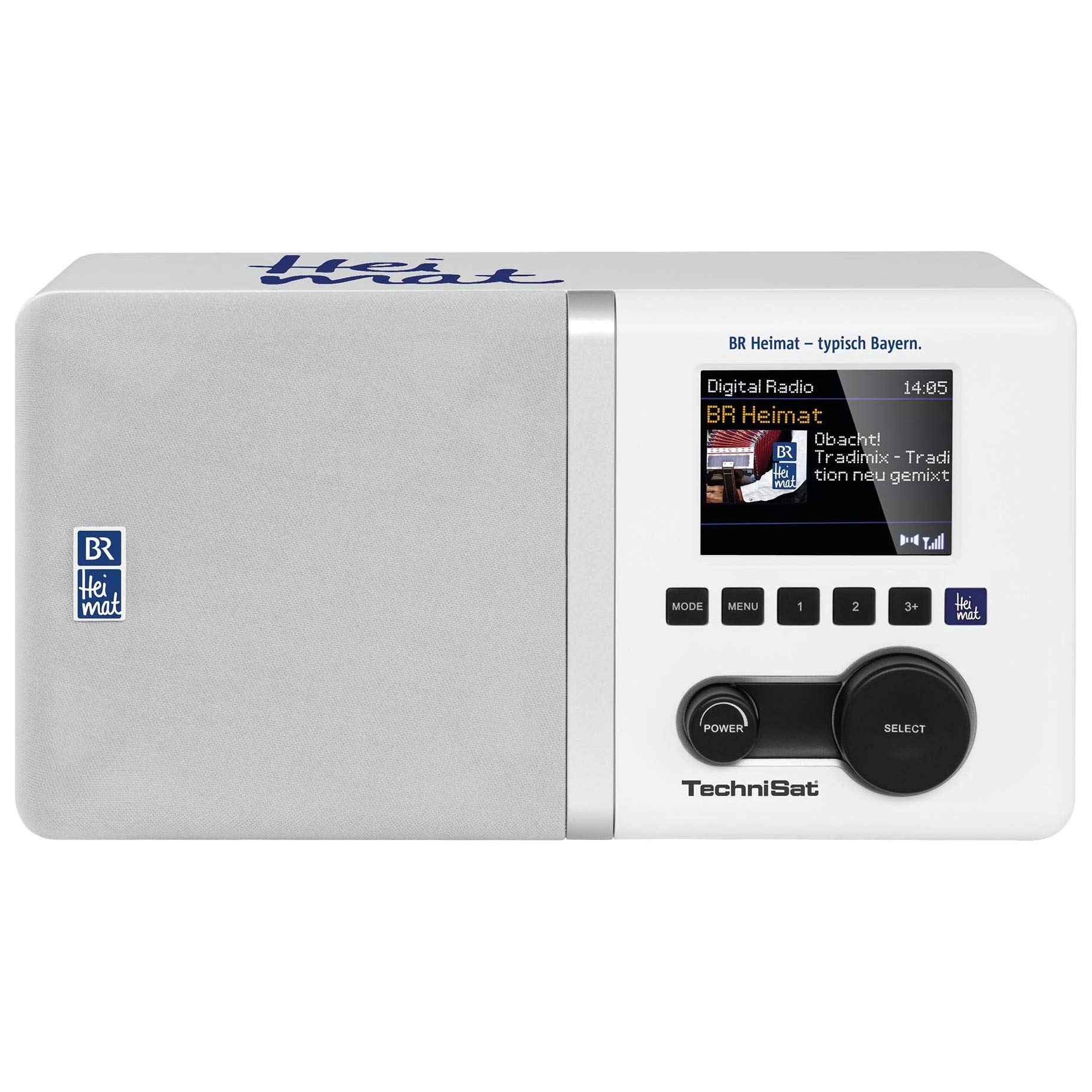
Image 1: Front view of the TechniSat DIGITRADIO 300 BR Home Edition, showing the display, control buttons, and speaker grille.
Key Features:
- DAB+ and FM Radio Reception (with RDS and PLL)
- Direct Selection Button for BR Heimat (DAB+)
- 2.8-inch Dimmable Color TFT Display with Slideshow Function
- Integrated Equalizer for Treble and Bass Adjustment
- Bass-Reflex Tube for Enhanced Audio
- 5W Mono Speaker
- Alarm Clock with Two Adjustable Alarm Times, Snooze, and Sleep Timer
- Favorite Memory (10 for DAB+, 10 for FM)
- Time and Date Display
- Connections: AUX (auxiliary) input, Audio Output (Cinch, L/R), 3.5 mm Headphone Jack
5. Setup
5.1 Power Connection
- Ensure the radio is placed on a stable, flat surface.
- Connect the power cable to the radio's power input.
- Plug the power adapter into a suitable wall outlet. The radio will power on or enter standby mode.
5.2 Antenna Setup
Extend the telescopic antenna fully for optimal DAB+ and FM reception. Adjust its position to achieve the best signal quality.
5.3 Initial Scan (DAB+)
Upon first power-on, the radio may automatically perform a scan for available DAB+ stations. If not, navigate to the DAB+ menu and select the 'Full Scan' option to find and store all available digital radio stations.
6. Operating Instructions
6.1 Power On/Off
Press the Power button to turn the radio on or off (standby mode).
6.2 Mode Selection (DAB+/FM/AUX)
Use the Mode button to switch between DAB+ radio, FM radio, and AUX input modes.
6.3 DAB+ Radio Operation
- In DAB+ mode, use the Tune/Select knob to browse through available stations.
- Press the Tune/Select knob to confirm your selection.
- Press the dedicated BR Heimat button for direct access to the BR Heimat DAB+ station, if available in your reception area.
- To perform a full scan for new stations, navigate to the DAB+ menu and select 'Full Scan'.
6.4 FM Radio Operation
- In FM mode, use the Tune/Select knob to manually tune to a frequency.
- Press and hold the Tune/Select knob to automatically scan for the next available station.
- The radio supports RDS (Radio Data System) for displaying station information where available.
6.5 Setting Favorites
To save a station as a favorite (10 for DAB+, 10 for FM):
- Tune to the desired station.
- Press and hold the Preset button.
- Use the Tune/Select knob to choose a preset number (1-10).
- Press the Tune/Select knob to confirm and save.
To recall a favorite station, briefly press the Preset button and use the Tune/Select knob to select the desired preset.
6.6 Alarm Clock Function
The radio features two independent alarm times. To set an alarm:
- Access the alarm settings through the menu.
- Select Alarm 1 or Alarm 2.
- Set the desired alarm time, source (buzzer, DAB+, or FM), and volume.
- Enable the alarm.
When the alarm sounds, press the Snooze button to temporarily silence it. Press the Power button to turn off the alarm.
6.7 Sleep Timer
The sleep timer allows the radio to turn off automatically after a set period. Access the sleep timer function in the menu and select the desired duration (e.g., 15, 30, 60 minutes).
6.8 Equalizer Adjustment
Access the equalizer settings through the menu to adjust treble and bass levels according to your preference. This allows for personalized sound output.
6.9 AUX Input
Connect an external audio device (e.g., smartphone, MP3 player) to the AUX In port using a 3.5 mm audio cable. Switch the radio to AUX mode to play audio from the connected device.
6.10 Headphone Output
Connect headphones to the 3.5 mm headphone jack for private listening. The internal speaker will be muted automatically.
7. Maintenance
7.1 Cleaning
To clean the radio, unplug it from the power source. Use a soft, dry, lint-free cloth to wipe the surfaces. Do not use abrasive cleaners, waxes, or solvents as they may damage the finish.
7.2 Storage
If the device will not be used for an extended period, unplug it from the power outlet and store it in a cool, dry place.
8. Troubleshooting
If you encounter issues with your DIGITRADIO 300 BR Home Edition, refer to the following common problems and solutions:
| Problem | Possible Cause | Solution |
|---|---|---|
| No power | Power cable not connected or power outlet faulty. | Ensure the power cable is securely connected to the radio and the wall outlet. Test the outlet with another device. |
| No DAB+ or FM reception / Poor signal | Antenna not extended or poor signal area. | Fully extend the telescopic antenna. Reposition the radio to a location with better reception. Perform a full scan for DAB+ stations. |
| No sound | Volume too low, mute activated, or incorrect input mode. | Increase the volume. Check if headphones are connected. Ensure the correct input mode (DAB+, FM, AUX) is selected. |
| Alarm not sounding | Alarm not set or disabled. | Verify that the alarm time is correctly set and the alarm is enabled in the settings. |
9. Specifications
- Brand: TechniSat
- Model Number: 0001/4993
- Color: White
- Screen Size: 2.8 Inches
- Connectivity Technology: Auxiliary
- Special Features: DAB+ digital radio, FM radio (with RDS and PLL), 10 DAB+ and 10 FM favorite memories, 2.8" TFT color display, BR Heimat direct selection button, time and date display, two radio timers, sleep function, equalizer function.
- Compatible Devices: Headphones
- Rechargeable Battery: No
- Product Dimensions (L x W x H): 25 cm x 13 cm x 13.5 cm
- Tuning Technology: DAB+/DAB, FM
- Supported Radio Bands: DAB+/FM
- Power Source: Internal Power Supply
10. Warranty and Support
Warranty information for the TechniSat DIGITRADIO 300 BR Home Edition is typically provided with the product at the time of purchase or can be found on the official TechniSat website. For technical support, service, or inquiries regarding spare parts, please refer to the contact information provided in your product packaging or visit the manufacturer's official support channels.


