1. Introduction
The Cobra RAD 350 is designed to keep drivers aware of their surroundings and protect against various radar and laser guns. It incorporates advanced circuitry to reduce false alerts, ensuring that only relevant warnings are provided. The device features a 7-Segment Color Display for clear band identification and signal strength indication.
Key features include:
- Fewer False Alerts: The IVT Filter™ system minimizes false alerts from collision avoidance systems and traffic flow monitoring devices.
- Front & Rear Detection: Advanced laser eye sensor detects radar signals (X, K, and Ka bands) and laser signals from both front and rear.
- Audible Signal Strength: Unique tones indicate signal strength and band type, allowing drivers to keep their focus on the road.
- 7-Segment Color Display: High-quality display with band identification icons and a numeric signal strength meter.
- Instant-On Ready: Quickly detects radar guns for immediate speed monitoring.
- Detection Only: Exclusively designed for radar and laser signal detection to inform drivers.
2. What's in the Box
Upon opening your Cobra RAD 350 package, you should find the following items:
- Cobra RAD 350 Radar/Laser Detector
- Windshield Mount (with suction cups)
- Dashboard Adhesive Mount
- 12V Vehicle Power Adapter
- Instruction Manual (this document)
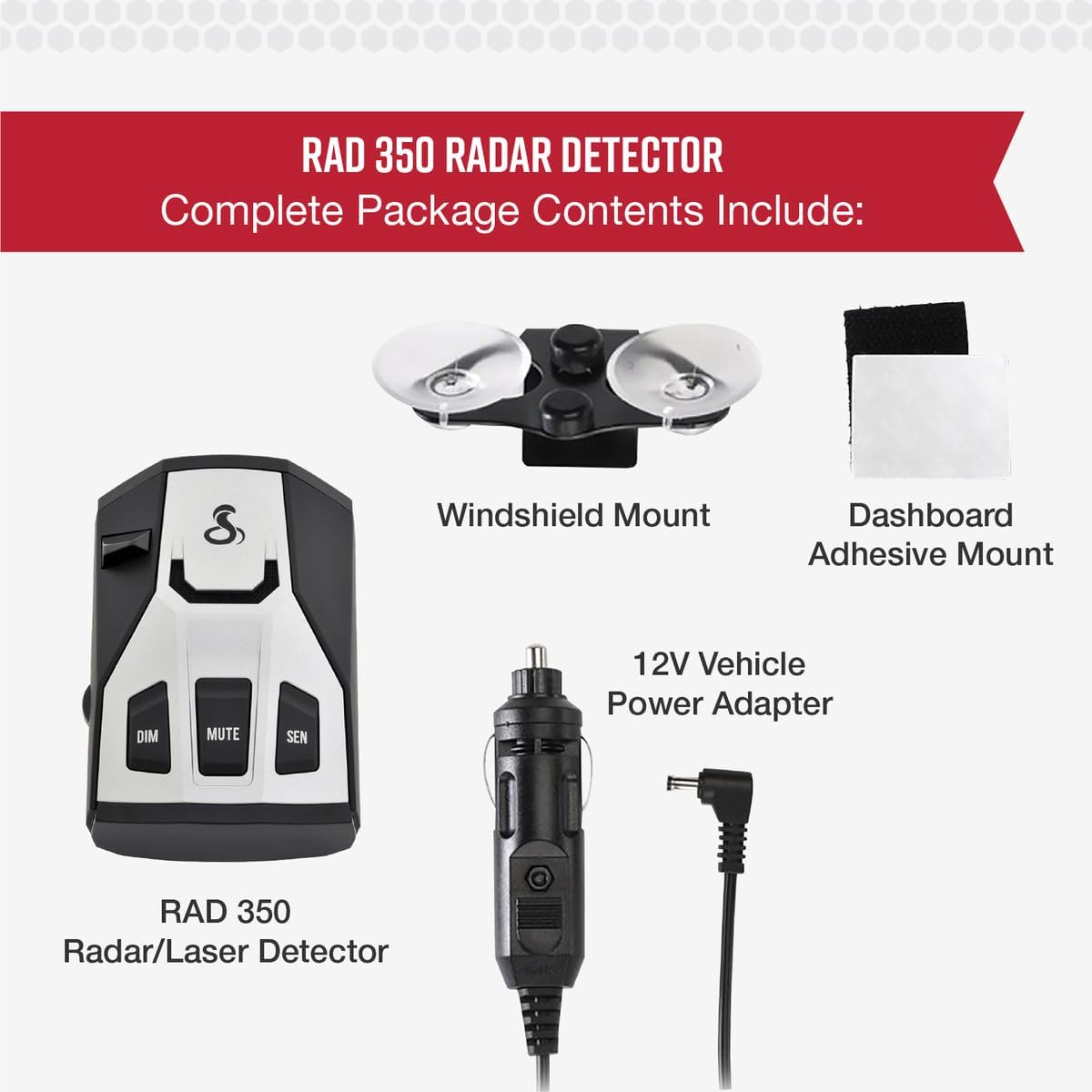
Figure 1: Package contents of the Cobra RAD 350, showing the detector unit, windshield mount, dashboard adhesive, and 12V power adapter.
3. Setup and Installation
Proper installation ensures optimal performance and detection range for your RAD 350. Choose a location that provides a clear view of the road ahead and behind.
3.1 Mounting Options
- Windshield Mount: Attach the suction cup mount to the windshield, ensuring it is level and does not obstruct your view. The detector should be positioned to have an unobstructed view of the road.
- Dashboard Mount: Use the provided adhesive mount to secure the detector to your dashboard. Ensure the surface is clean and dry before applying.
3.2 Power Connection
Connect the 12V Vehicle Power Adapter to the detector and then into your vehicle's cigarette lighter socket. The device will power on automatically.

Figure 2: The Cobra RAD 350 Radar Detector shown mounted on a vehicle's dashboard, illustrating typical placement.
3.3 Product Overview Video
Video 1: A brief product overview of the Cobra RAD 350, demonstrating its physical features and basic setup.
4. Operating Instructions
The Cobra RAD 350 is designed for intuitive operation. Familiarize yourself with the controls and display indicators for effective use.
4.1 Controls and Display
The device features a 7-Segment Color Display that shows detected bands (X, K, Ka, V) and signal strength. Control buttons are located on the top of the unit.
- DIM Button: Adjusts the display brightness for optimal visibility in various lighting conditions.
- MUTE Button: Silences audio alerts. Can be used for manual mute or auto mute functions.
- SEN (Sensitivity) Button: Toggles between City and Highway sensitivity modes.

Figure 3: Close-up of the Cobra RAD 350's control buttons, highlighting Instant-On, Dim, and Mute functions.
4.2 Sensitivity Modes (SEN Button)
- City Mode: Reduces sensitivity to minimize false alerts in urban areas, often caused by automatic door openers and traffic sensors.
- Highway Mode: Maximizes detection range for extended protection on open roads.
4.3 False Alert Filtering (IVT Filter™)
The integrated IVT Filter™ system intelligently reduces false alerts from vehicle-based technology such as collision avoidance systems, ensuring that only genuine threats are signaled.

Figure 4: Visual representation of the Cobra RAD 350's core features: Long-Range Detection, False Alert Filtering, and LaserEye technology.
4.4 Radar Detector Product Overview
Video 2: A seller-provided overview of the radar detector, detailing its functions and user interface.
5. Maintenance
To ensure the longevity and optimal performance of your Cobra RAD 350, follow these simple maintenance guidelines:
- Cleaning: Regularly wipe the exterior of the detector with a soft, damp cloth. Avoid using abrasive cleaners or solvents.
- Lens Care: Keep the front and rear lenses clean and free of obstructions for accurate detection.
- Storage: When not in use, store the detector in a cool, dry place away from direct sunlight and extreme temperatures.
6. Troubleshooting
If you encounter issues with your Cobra RAD 350, refer to the following common troubleshooting steps:
- No Power: Ensure the 12V power adapter is securely plugged into both the detector and the vehicle's cigarette lighter socket. Check the vehicle's fuse for the cigarette lighter.
- Excessive False Alerts: Switch to City mode to reduce sensitivity. Ensure the IVT Filter™ is active. Check for any in-vehicle systems (e.g., adaptive cruise control) that might emit radar signals.
- Poor Detection Range: Verify that the detector has a clear, unobstructed view of the road. Clean the front and rear lenses. Ensure the device is properly mounted and angled.
- No Audio Alerts: Check the volume setting using the side control. Ensure the MUTE function is not active.
7. Specifications
| Feature | Specification |
|---|---|
| Product Dimensions | 4.12 x 2.64 x 1.35 inches |
| Item Weight | 10.1 ounces |
| Item Model Number | RAD 350 |
| Color | Black |
| Frequency Bands Supported | 10.525 GHz (X-band), 24.125 GHz (K-band), 34.7 GHz (Ka-band) |
| Power Source | Corded Electric (12 Volts) |
| Display Type | LED (7-Segment Color Display) |
| Manufacturer | Cobra Electronics |
| UPC | 028377107207 |
8. Warranty and Support
For warranty information, technical support, or service inquiries, please refer to the documentation included with your product or visit the official Cobra Electronics website. Keep your purchase receipt as proof of purchase for any warranty claims.


