
1. Introduction
Thank you for choosing the TecTake Aluminum Roll-Up Insect Screen. This product is designed to provide effective protection against insects while allowing fresh air to circulate in your home. Its durable aluminum frame and fine fiberglass mesh ensure longevity and resistance to environmental factors. This manual provides detailed instructions for assembly, operation, and maintenance to ensure optimal performance and satisfaction.
2. Safety Instructions
- Read all instructions carefully before assembly and use.
- Keep small parts and packaging materials away from children to prevent choking hazards.
- Use appropriate safety gear, such as gloves and eye protection, during assembly, especially when cutting profiles.
- Ensure the insect screen is securely mounted to prevent accidental detachment.
- Do not hang or apply excessive force to the insect screen, as this may cause damage or injury.
- This product is intended for indoor use on windows.
3. Package Contents
Please check that all components are present before beginning assembly:
- 1x Roll-up insect screen unit (including housing and guide profiles)
- Mounting materials (screws, plugs, end caps, handles, cord)
- Illustrated assembly manual (this document)
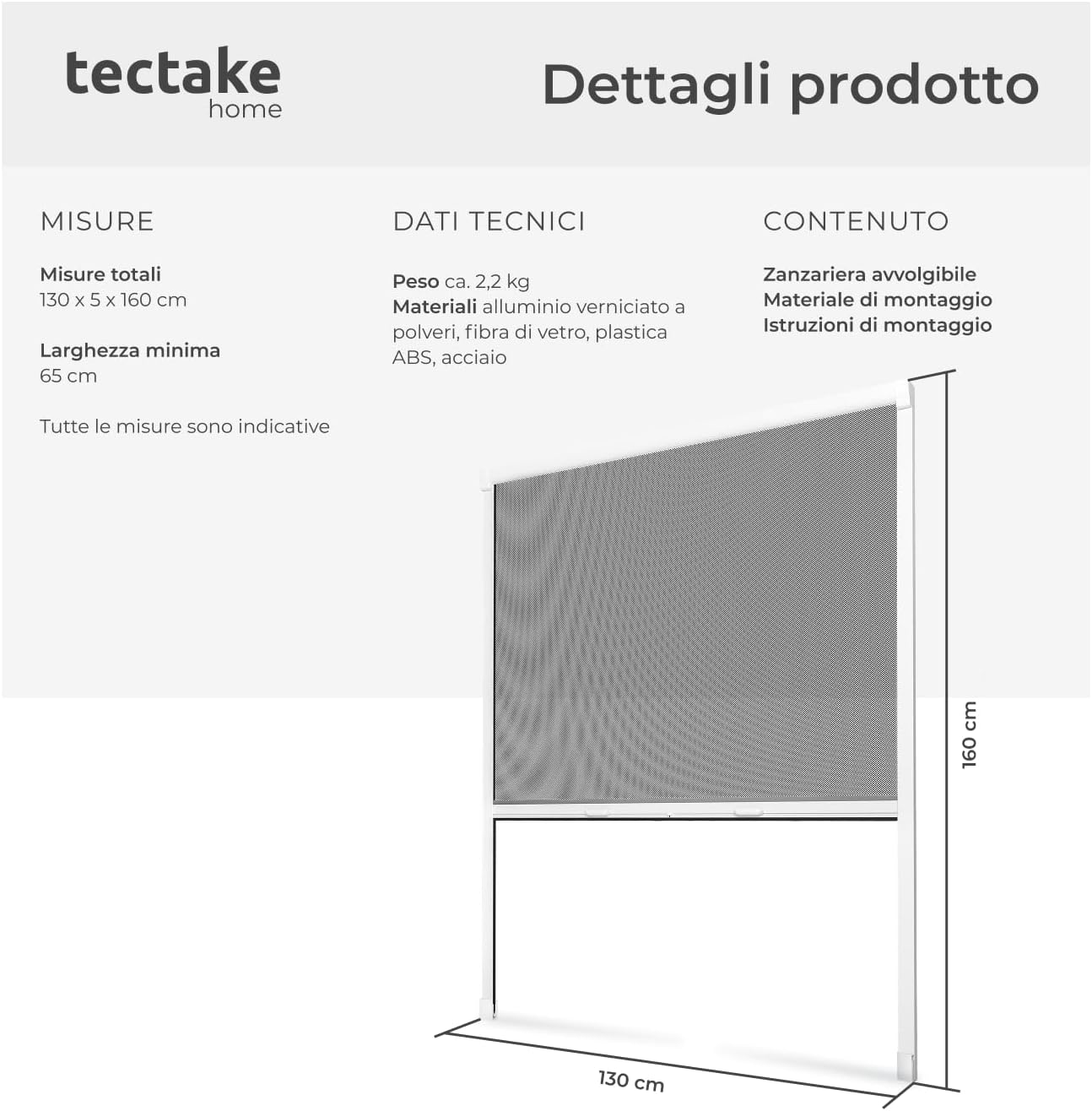
Image 3.1: Overview of product components and dimensions.
4. Setup and Assembly Instructions
The TecTake Roll-Up Insect Screen can be adjusted in width and mounted either inside or outside the window frame. Follow these steps carefully for proper installation.
4.1. Measurement and Customization
- Measure the exact width of your window opening where the screen will be installed.
- If necessary, the aluminum profiles can be cut to your desired width, down to a minimum of 65 cm. Use appropriate tools for precise cutting.

Image 4.1: The insect screen's width can be customized. Note the fine brush seals for maximum protection.
4.2. Frame Assembly
- Assemble the aluminum frame according to the detailed diagrams in the included illustrated manual. Ensure all connections are secure.
- Attach the guide profiles to the main housing. The brush seals on the guide profiles and the bottom bar ensure a tight closure against the window frame, preventing insects from entering.

Image 4.2: Details of the robust aluminum frame, durable fiberglass mesh, and effective brush seals.
4.3. Mounting the Screen
- Position the assembled screen unit on your window frame. It can be mounted on either the interior or exterior side of the window.
- Mark the drilling points for the mounting brackets.
- Drill holes and insert appropriate wall plugs if necessary.
- Securely fasten the screen unit to the window frame using the provided screws.
- Attach the handles and the pull cord to the bottom bar of the screen.

Image 4.3: The screen offers versatile mounting for convenience.
4.4. Adjusting Rewind Speed
The rewind speed of the screen can be adjusted. Refer to the specific instructions in your illustrated manual for details on how to access and modify the tension mechanism to achieve your preferred retraction speed.
5. Operating Instructions
To operate your TecTake Roll-Up Insect Screen:
- To lower the screen: Gently pull the handles or the cord downwards to extend the mesh. The screen will lock into place at your desired length.
- To retract the screen: Slightly pull the handles or cord downwards again to release the locking mechanism. The screen will smoothly roll back into its housing.

Image 5.1: The insect screen effectively keeps pests out while allowing air circulation.
6. Maintenance
Regular maintenance will prolong the life and effectiveness of your insect screen:
- Cleaning the Mesh: Use a soft brush or a damp cloth with mild soapy water to gently clean the fiberglass mesh. Avoid harsh chemicals or abrasive cleaners.
- Cleaning the Frame: Wipe the aluminum profiles with a damp cloth.
- Checking Seals: Periodically inspect the brush seals on the guide profiles and bottom bar for wear and tear. Ensure they are free from debris to maintain a tight seal.
- Lubrication: If the rolling mechanism becomes stiff, a small amount of silicone spray can be applied to the guide channels (avoiding the mesh) to ensure smooth operation.
7. Troubleshooting
- Screen does not retract smoothly: Check the guide channels for obstructions or dirt. Ensure the rewind tension is correctly adjusted (refer to section 4.4).
- Gaps appear around the screen: Verify that the brush seals are intact and clean. Ensure the frame is securely mounted and not warped.
- Screen is difficult to pull down: Check for obstructions in the guide channels. Ensure the handles and cord are properly attached and not tangled.
8. Specifications
| Feature | Detail |
|---|---|
| Model Number | 800321 (Manufacturer's No. 402061-2) |
| Brand | tectake |
| Total Dimensions (LxPxH) | 130 x 5 x 160 cm (51.2 x 2 x 63 inches) |
| Minimum Adjustable Width | 65 cm (25.6 inches) |
| Weight | 2.2 kg (4.85 lbs) |
| Frame Material | Coated Aluminum |
| Mesh Material | UV and weather-resistant Fiberglass |
| Other Materials | Plastic parts, steel |
| Frame Color | White |
| Mesh Color | Black |
| Operation Type | Manual (pull cord/handles) |
| Special Features | Brush seals, adjustable rewind speed, customizable width |
| Recommended Use | Indoor window insect protection |
9. Warranty and Support
This TecTake product comes with a standard manufacturer's warranty. For warranty claims, technical support, or replacement parts, please contact your retailer or the TecTake customer service department. Keep your proof of purchase for warranty validation.
For further assistance, please visit the official tectake website or contact their customer support channels.
