1. Introduction
Thank you for choosing the Eureka Forbes Superb Ultraviolet, Reverse Osmosis Water Purifier. This manual provides essential information for the safe and efficient operation, installation, and maintenance of your water purifier. Please read it thoroughly before using the appliance and keep it for future reference.
2. Safety Instructions
- Ensure the power supply matches the specifications (150 V - 270 V AC/50 Hz).
- Do not immerse the appliance in water or other liquids.
- Keep the appliance away from direct sunlight and heat sources.
- Only use genuine Eureka Forbes spare parts for maintenance and replacement.
- Do not attempt to repair the appliance yourself. Contact authorized service personnel.
- Keep children away from the appliance during operation.
- Ensure proper ventilation around the unit.
3. Product Overview
3.1 Key Features
- Advanced Purification: RO+UV+UF+MTDS technology for comprehensive water treatment.
- Mineral Guard Technology: Designed to retain essential natural minerals in purified water.
- Smart LED Indication: Provides advance warnings for system maintenance and cartridge replacement.
- High Capacity: 6.5 liters storage tank made of food-grade plastic.
- Wide TDS Compatibility: Suitable for water sources with TDS levels from 1 to 2000 mg/litre.
3.2 Components and Views


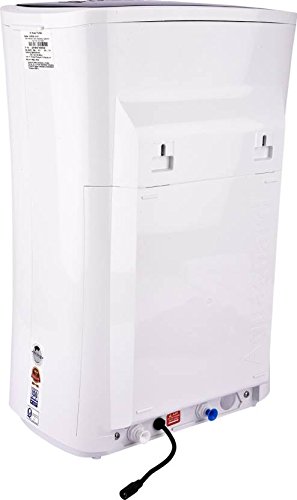
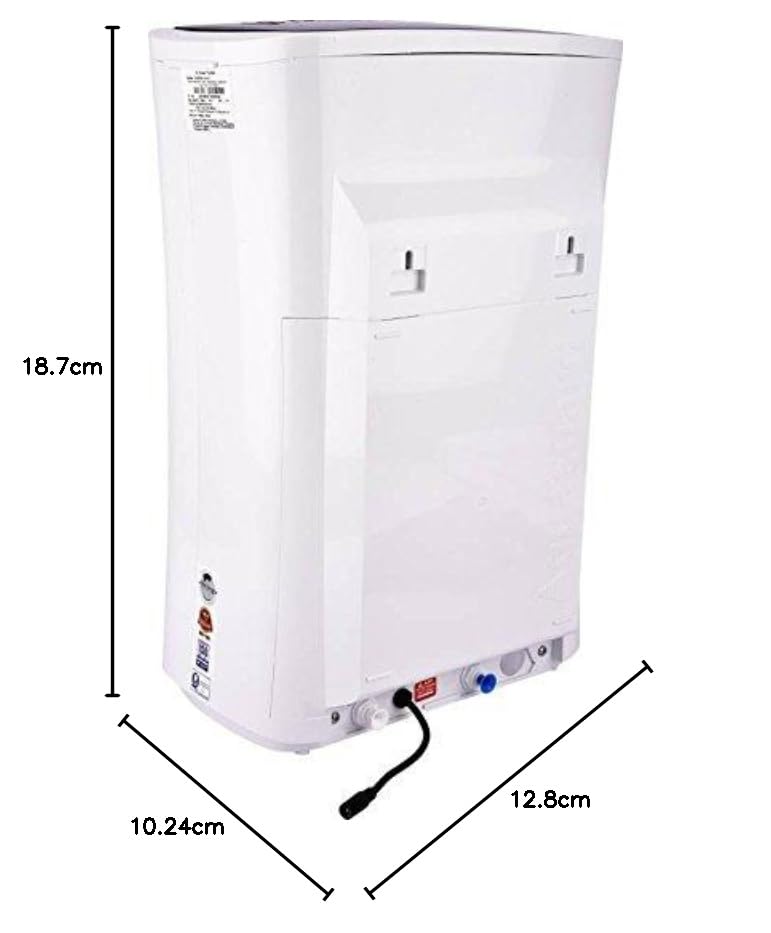
3.3 Product Video Overview
This video provides a brief overview of the Eureka Forbes Superb water purifier, showcasing its features and highlighting key aspects of the product.
4. Setup and Installation
The Eureka Forbes Superb Water Purifier requires professional installation to ensure proper functioning and adherence to warranty terms.
- Upon delivery, please contact Eureka Forbes customer support to schedule installation.
- For metro cities, the brand typically contacts you within 24 hours post-delivery. For other areas, please allow up to 48 hours.
- Customer Support Contact: 18602661177 (for installation/demo requests).
- Ensure the installation site has a stable power outlet and a suitable water connection.
- The unit can be installed as a countertop unit or wall-mounted.
5. Operation
5.1 Initial Use
- After professional installation, ensure the water supply valve is open and the purifier is plugged in.
- Allow the storage tank to fill completely. The purification process will start automatically.
- For the first use, dispense and discard the first 2-3 liters of purified water to flush out any residual manufacturing impurities.
5.2 Dispensing Water
Place a clean container under the dispensing tap and turn the tap to release purified water. The purifier will automatically refill the tank as water is consumed.
5.3 Smart LED Indication
The purifier is equipped with Smart LED indicators that provide status updates and advance warnings. Refer to the specific LED patterns in your detailed user manual for their meanings, typically indicating power, purification status, and maintenance alerts. These alerts are designed to inform you when maintenance or cartridge replacement is due.
6. Maintenance
Regular maintenance is crucial for the optimal performance and longevity of your water purifier.
- Filter Replacement: The Smart LED Indication system will alert you when filters or cartridges (Active Copper Cartridge, I-Cartridge, Chemi Block, EMLE, Reverse Osmosis Membrane, UF Cartridge, Ultra Violet Treatment) require replacement. It is recommended to replace filters as per the manufacturer's guidelines or when indicated by the system.
- Cleaning the Storage Tank: Periodically clean the internal storage tank. This should ideally be done by authorized service personnel during scheduled maintenance visits.
- External Cleaning: Wipe the exterior of the purifier with a soft, damp cloth. Do not use harsh chemicals or abrasive cleaners.
- Annual Servicing: Schedule annual maintenance with Eureka Forbes service technicians to ensure all components are functioning correctly and to replace necessary parts.
7. Troubleshooting
If you encounter any issues with your water purifier, refer to the common problems and solutions below. For persistent issues, contact customer support.
| Problem | Possible Cause | Solution |
|---|---|---|
| No water dispensing | Power off, water supply off, clogged filters. | Check power connection, open water supply valve, contact service for filter inspection. |
| Unusual water taste/odor | New filters, expired filters, tank contamination. | Flush initial water after filter change, replace filters if old, contact service for tank cleaning. |
| Low water flow rate | Clogged filters, low input water pressure. | Check input water pressure, contact service for filter replacement. |
| Leakage from unit | Loose connections, damaged components. | Immediately turn off water supply and power, contact service. |
| Smart LED showing error | Indicates maintenance or part replacement needed. | Note the LED pattern and contact customer support for diagnosis and service. |
8. Specifications
| Brand | Eureka Forbes |
| Model Name | Superb (RO + UV + UF + TDS + Mineral) |
| Capacity | 6.5 Liters |
| Purification Technology | Advanced RO+UV+UF+MTDS purification |
| Purification Modules | Active Copper Cartridge, I-Cartridge, Chemi Block, EMLE, Reverse Osmosis Membrane, UF Cartridge, Ultra Violet Treatment |
| Applicable TDS Range | 1 - 2000 mg/litre (200-2000 ppm) |
| Input Water Temperature | 10 - 40°C |
| Operating Input Voltage | 150 V - 270 V AC / 50 Hz |
| Power Consumption | 40 Watts |
| Product Dimensions (L x W x H) | 12.8L x 10.2W x 18.7H Centimeters |
| Item Weight | 6.57 Kilograms |
| Material Tank Type | Food Grade Plastic |
| Installation Type | Countertop / Wall-mount |
9. Warranty and Support
- Warranty: The Eureka Forbes Superb Water Purifier comes with a 1-year warranty from the date of purchase.
- Customer Support: For any service requests, installation, or troubleshooting assistance, please contact Eureka Forbes customer support.
- Contact Number: 18602661177
- Please retain your purchase invoice for warranty claims.


